Power BI Practical Mastery
Querying and Transformation
Inside the Power Query Engine
When you open Power Query, you're not just using a simple data import wizard. You're interacting with a powerful data transformation engine. The user interface provides a visual way to build a series of transformation steps, but behind every click, you're actually writing code.
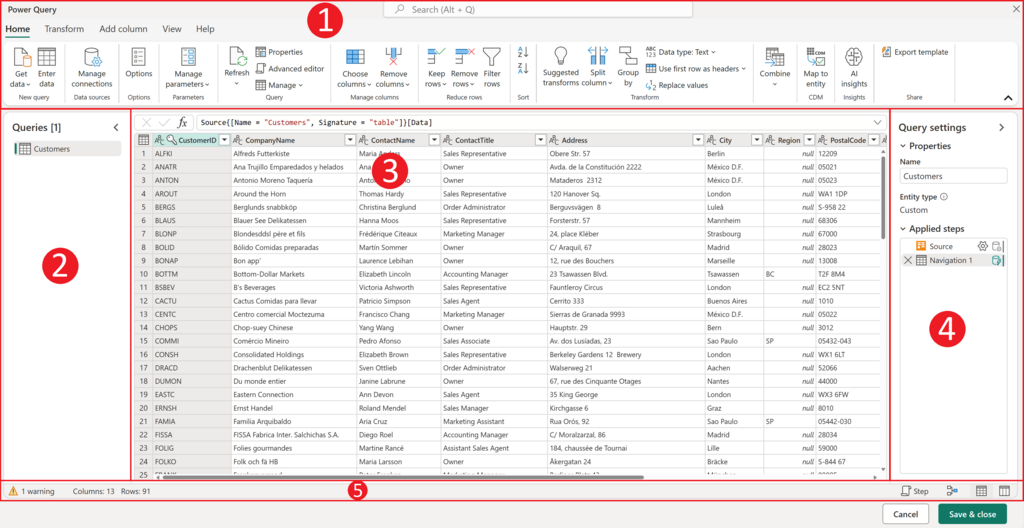
The interface is generally broken down into four key areas: the ribbon at the top with transformation commands, the Queries pane on the left listing your data connections, the central data view, and the Query Settings pane on the right. This last part is crucial; it records every transformation you apply, creating a repeatable recipe for cleaning your data. Each step is written in a language called M language.
Efficient Data Processing
Not all queries are created equal. The efficiency of your data retrieval process hinges on a concept called an optimization technique where Power Query translates your transformation steps from the M language back into the native language of the data source, like SQL. Instead of pulling a massive, raw dataset into your machine and then filtering it, query folding pushes that work back to the source server. The server does the heavy lifting, sending back only the smaller, processed dataset you actually need.
This optimization is directly tied to your choice of Data Connectivity mode. When connecting to a data source, you're often presented with two options: Import and DirectQuery. The choice has significant implications for performance, data freshness, and the availability of M functions.
| Feature | Import Mode | DirectQuery Mode |
|---|---|---|
| Data Location | Data is compressed and stored within the Power BI file. | Data remains in the source database. |
| Performance | Very fast, as queries run against the in-memory copy. | Depends on source database performance. |
| Data Freshness | Data is as current as the last scheduled refresh. | Data is queried live from the source; always current. |
| Data Volume | Limited by memory and file size constraints. | Can handle very large datasets beyond local memory. |
| M Functions | Full set of Power Query transformations is available. | Limited set; only functions that can be folded (translated to the source language) are supported. |
Advanced Data Wrangling
Modern data doesn't always come in neat packages. Power Query excels at connecting to and reshaping data from a wide variety of sources, from structured SQL databases and web APIs to messy, unformatted flat files. Once the data is in, the real work of reshaping it begins.
One common task is unpivoting. Imagine you have sales data with a separate column for each month. This 'wide' format is difficult to analyze. By unpivoting, you can transform it into a 'long' format with just two new columns: one for the attribute (e.g., 'Month') and one for the value (e.g., 'Sales'). This structure is far more flexible for building reports and visualizations.
Beyond reshaping single tables, you'll often need to combine them. Appending stacks tables with identical columns on top of each other, like adding January's sales report to February's. Merging joins two tables side-by-side based on a common column, similar to a VLOOKUP in Excel or a JOIN in SQL.
But what if your keys don't quite match? Perhaps one table lists "Corp." and another lists "Corporation." This is where comes in. It uses a similarity algorithm to find likely matches, allowing you to set a tolerance threshold. For example, you can specify that strings should be considered a match if they are 85% similar, successfully joining records that would otherwise be missed.
Finally, you can make your queries dynamic using parameters. Instead of hard-coding a file path or a filter value, you can create a parameter. This allows you or your end-users to easily change inputs—like a date range or a specific region—without ever having to open the Power Query editor. It turns a static query into a reusable, interactive tool.
Ready to test your knowledge? Let's see how well you've grasped these concepts.
What is the programming language that Power Query uses behind the scenes to record transformation steps?
What is the primary purpose of “query folding” in Power Query?
Mastering these query and transformation techniques is fundamental to building robust and efficient data models. By understanding how to work with the engine, not just the interface, you unlock the full power of your data.