PostgreSQL vs MySQL Database Performance
Introduction to Relational Databases
What Makes a Database Relational?
Think of a relational database as a highly organized digital filing cabinet. Instead of stuffing all your information into one giant folder, you use separate, structured folders for each type of information. In database terms, these folders are called tables.
A table organizes data into rows and columns, just like a spreadsheet. Each column represents a specific attribute, like a customer's name or a product's price. Each row is a single record, like one specific customer or one particular product.
| CustomerID | FirstName | LastName | |
|---|---|---|---|
| 1 | Maria | Anders | maria.a@email.com |
| 2 | Ana | Trujillo | ana.t@email.com |
| 3 | Antonio | Moreno | antonio.m@email.com |
The real power comes from the "relational" part. Tables can be linked to each other using keys. A primary key is a unique identifier for each row in a table, like a CustomerID. A foreign key is a primary key from one table that's included in another table to create a link.
For example, we could have a separate Orders table. Instead of re-typing a customer's full name and email for every order they place, we just use their CustomerID to link back to the Customers table. This keeps our data clean and efficient.
Organizing Your Data
Before you even create tables, you need a plan. This planning stage is called data modeling. It's like creating a blueprint for your database to ensure all your data has a logical place to live. A good model prevents headaches down the road.
A key part of data modeling is normalization. The main goal of normalization is to reduce data redundancy. In other words, you want to avoid storing the same piece of information in multiple places. Storing data once makes your database more efficient and reduces the risk of errors when you need to update it.
Imagine you had to update a customer's email address. If it was stored with every single order they made, you'd have to find and change it in dozens of places. With a normalized database, you only change it once in the
Customerstable.
Let's look at an example. Here's a single, unorganized table trying to track book rentals.
| RentalID | BookTitle | Author | MemberName | MemberEmail |
|---|---|---|---|---|
| 101 | The Hobbit | J.R.R. Tolkien | Ana Trujillo | ana.t@email.com |
| 102 | Dune | Frank Herbert | Maria Anders | maria.a@email.com |
| 103 | The Hobbit | J.R.R. Tolkien | Maria Anders | maria.a@email.com |
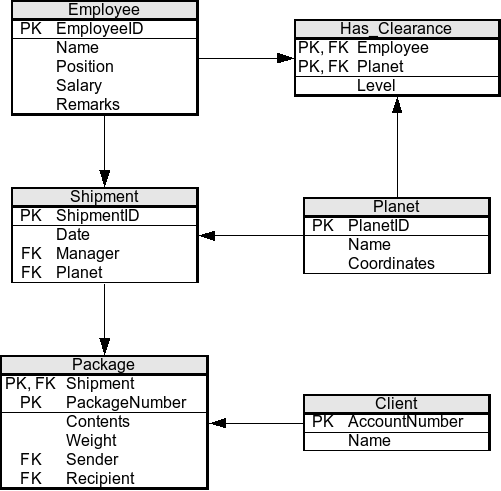
Notice the problems? The book title, author, member name, and email are all repeated. A normalized approach splits this into three separate tables: Books, Members, and Rentals. The Rentals table then just uses IDs to connect a specific member to a specific book, eliminating all the repetition.
Talking to Your Database
So you have these neatly organized tables. How do you actually use them? You talk to the database using a special language called SQL (Structured Query Language). SQL is the universal standard for interacting with relational databases.
Whether you want to add new data, retrieve information, update a record, or delete something, you'll write an SQL command to do it. SQL can be broken down into a few key actions:
Readers gain a strong foundation in relational database concepts and learn how to think through data tasks more effectively, making it easier to write queries with confidence.
- Retrieving data: The
SELECTstatement is used to fetch data from one or more tables. - Manipulating data:
INSERT,UPDATE, andDELETEstatements are used to add new rows, modify existing ones, or remove them. - Defining data: Commands like
CREATE TABLEandALTER TABLEare used to build and modify the structure of the database itself.
For example, to get a list of all your customers' first names and emails, you would write a simple query like this:
SELECT FirstName, Email
FROM Customers;
This command tells the database to go to the Customers table and return only the data from the FirstName and Email columns for every row. It's a powerful and direct way to get exactly the information you need.
What is the primary purpose of normalization in a relational database?
A CustomerID from a Customers table is included in an Orders table to link an order to the customer who placed it. In the Orders table, CustomerID is a ______.
Understanding these core concepts—tables linked by keys, organized through normalization, and managed with SQL—is the foundation for working with any relational database system.