Physical Network Topologies Explained
Introduction to Network Topologies
The Shape of a Network
Imagine you're building a new city. You wouldn't just place buildings randomly. You'd plan the layout of roads, intersections, and highways to make sure traffic flows smoothly. A computer network is similar. The arrangement of its different parts, like computers, printers, and servers, is called its network topology.
Network topology is the arrangement of various elements (links, nodes, etc.) in a computer network.
This layout is crucial. It affects the network's performance, cost, and reliability. A well-chosen topology can make a network fast and easy to manage. A poor choice can lead to bottlenecks and frequent failures.
There are two ways to look at this layout: physically and logically. Physical topology is the actual, tangible layout of the devices and cables. It's the road map of your city. Logical topology, on the other hand, describes how data travels through the network, regardless of the physical connections. It's the bus route that runs through your city, which might not use every single road.
Common Physical Layouts
While there are many ways to design a network, a few standard physical topologies have become common. Each has its own strengths and weaknesses, making them suitable for different situations.
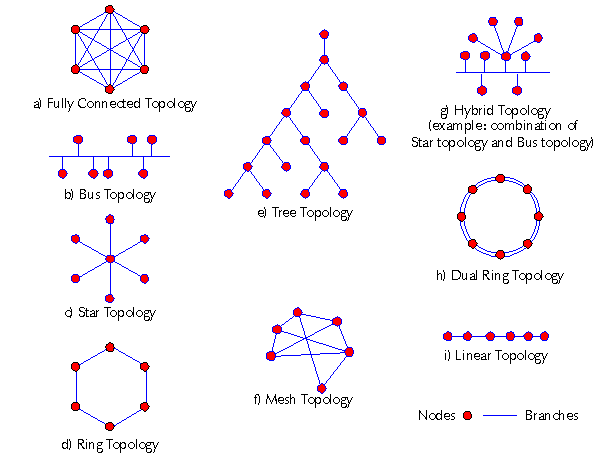
Let's explore five of the most fundamental types you'll encounter.
Bus and Star
The simplest topology is the Bus topology. All devices share a single common cable, called a bus or backbone. Think of it like a single main street with houses all connected to it. It's easy and cheap to set up, but it has a major drawback. If that main cable fails, the entire network goes down. It's also not great for heavy traffic, as all devices have to share the same line.
A more common and robust design is the Star topology. In this setup, every device connects directly to a central hub or switch. This is like a cul-de-sac where all the driveways lead to a central point. The big advantage is reliability. If one cable fails, only that one device loses its connection. The rest of the network keeps working. However, the entire network depends on that central device. If the hub fails, everything goes down.
Ring, Mesh, and Tree
In a Ring topology, devices are connected in a circular loop. Data packets travel from one device to the next in one direction until they reach their destination. It's orderly, but like the bus topology, it's vulnerable. A single break in the cable or the failure of one device can bring the whole network to a halt.
For maximum reliability, there's the Mesh topology. In a full mesh, every device is connected directly to every other device. This creates multiple paths for data, so a single failure won't disrupt the network. The internet is a large-scale example of a mesh network. The downside is cost and complexity. The number of cables required grows very quickly as you add more devices, making it impractical for most local networks.
Finally, a Tree topology combines elements of bus and star topologies. It has a root node, and other nodes are connected in a hierarchy, like the branches of a tree. This structure is useful for large networks that need to be divided into manageable sections. However, the entire network depends on its central backbone cable, and a failure there can isolate large segments of the network.
Understanding these basic shapes is the first step in designing and troubleshooting any network, from a small home office to a global enterprise.