Physical Limits of Software Performance
Cache Hierarchy Performance
Confronting the Memory Wall
CPUs have become astonishingly fast. A modern processor can execute an instruction in a fraction of a nanosecond. Main memory, or DRAM, hasn't kept pace. Accessing data from DRAM can take 50 to 100 nanoseconds—hundreds of CPU cycles spent waiting. This growing gap between processor speed and memory speed is known as the memory wall a fundamental bottleneck in computing.
Imagine a master chef who can chop vegetables in a split second, but whose ingredients are stored in a warehouse down the street. No matter how fast the chef is, the cooking process is constantly stalled by the long trip to fetch ingredients. To solve this, we place a small, well-organized pantry right next to the chef's station. This pantry is the cache.
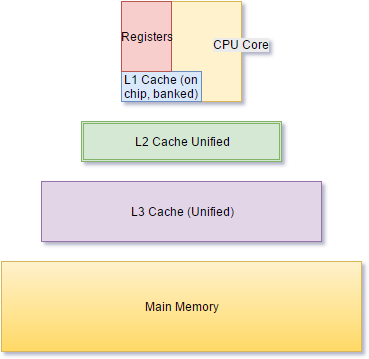
Computer architects use a similar strategy called a memory hierarchy. This consists of several levels of cache—small, extremely fast memory banks—that sit between the CPU and the main memory. These are typically labeled L1, L2, and L3, with L1 being the smallest and fastest, located directly on the processor core.
As a result L1, L2, and even L3 caches have become a major factor in preventing relatively slow RAM from holding back overall system performance by failing to feed code and data to the CPU at a high enough rate.
Cache Lines and Locality
Caches don't move data byte by byte. Instead, they operate on fixed-size blocks of data called cache lines, which are typically 64 bytes on modern systems. When the CPU requests data at a specific memory address, the hardware doesn't just fetch that single byte; it fetches the entire 64-byte line that contains it.
This design capitalizes on a principle called the which observes that programs tend to access memory in predictable patterns. There are two main types:
- Temporal Locality: If a program accesses a piece of data, it's likely to access it again soon. By keeping that data in the cache, the next access is nearly instant.
- Spatial Locality: If a program accesses a piece of data, it's likely to access data at nearby memory addresses soon. Since the entire cache line is loaded, the subsequent data is often already in the cache, waiting to be used. This is why sequentially processing an array is much faster than jumping around randomly.
The performance difference is stark. An L1 cache hit might take 1-2 nanoseconds. An L2 hit, maybe 10 nanoseconds. An L3 hit could be 30 nanoseconds. But a cache miss, where the data isn't in any cache and must be fetched from DRAM, can cost over 100 nanoseconds. These misses are called stalls, because the CPU pipeline can do nothing but wait.
Mapping and Associativity
A crucial question is: how does the system decide where to place a memory block within the cache? This is determined by the cache's mapping strategy. The simplest is direct-mapped, where each memory block can only go into one specific location in the cache. It's fast and simple, but inefficient if two frequently used memory blocks happen to map to the same cache slot.
A more flexible approach is set-associative mapping. In an N-way set-associative cache, each memory block can be placed in any of N different slots within a specific set. For example, in an 8-way set-associative cache, a block of memory is first mapped to a set, and then it can be stored in any of the 8 available lines within that set. This reduces the chance of conflicts and improves the hit rate.
This flexibility comes at the cost of complexity and power consumption. Most modern CPUs use a compromise, like an 8-way or 16-way set-associative L1 cache. This design provides a good balance, significantly reducing conflict misses compared to a direct-mapped cache without the overhead of a fully associative design.
To further combat latency, modern CPUs also include These are circuits that try to predict which memory addresses the CPU will need in the near future. If the prefetcher detects a sequential access pattern, like stepping through an array, it will proactively fetch the next few cache lines from main memory before the CPU even asks for them. When the prefetcher guesses correctly, the data is already waiting in the cache, turning a potential 100ns stall into a 1ns L1 hit.
For programmers, this means writing cache-friendly code is crucial for performance. Accessing data sequentially, organizing data structures to fit within cache lines, and maximizing data reuse are key strategies to keep the CPU fed and avoid the long trip to main memory.