PHP Fundamentals
Introduction to PHP
What is PHP?
PHP is a server-side scripting language made for web development. Let's break that down.
Imagine you're at a restaurant. You (the client) order from a menu. The waiter takes your order to the kitchen (the server). The kitchen prepares your food and gives it back to the waiter, who brings it to your table. You never see the kitchen; you just get the finished meal.
Websites work in a similar way. When you visit a static website, it's like ordering a pre-packaged sandwich. Your browser asks for a page, and the server sends back a simple HTML file. It's the same for everyone.
A dynamic website, powered by a language like PHP, is different. Your browser sends a request, and the server runs PHP code to build the page just for you. It might pull your username from a database, show you recent posts, or display the current time. The PHP code runs entirely on the server. Your browser only ever receives the final HTML, just like you only receive the finished meal.
PHP stands for "PHP: Hypertext Preprocessor." It's a recursive acronym, a little inside joke from its creators.
It’s one of the most popular languages for the web. The world's most common content management system, WordPress, is built with PHP. So are sites like Wikipedia and Slack.
Setting Up Your Workshop
To start writing PHP, you need a place to run and test your code. You can't just open a .php file in your browser like you can with an HTML file. Your browser doesn't know how to execute PHP code. That's the server's job.
This means you need a local development environment on your computer. Think of it as a workshop. This setup mimics a live web server and includes three key components:
| Component | Analogy | Role |
|---|---|---|
| Web Server | The Waiter | Software like Apache or Nginx that listens for requests from your browser and serves up files. |
| PHP | The Chef | The language interpreter that processes your code to create dynamic content. |
| Database Server | The Pantry | Software like MySQL or MariaDB that stores and retrieves data, like user accounts or blog posts. |
Installing these three parts separately can be a hassle. Luckily, there are all-in-one software packages that install everything you need with a single click. A popular choice that works on Windows, macOS, and Linux is XAMPP.
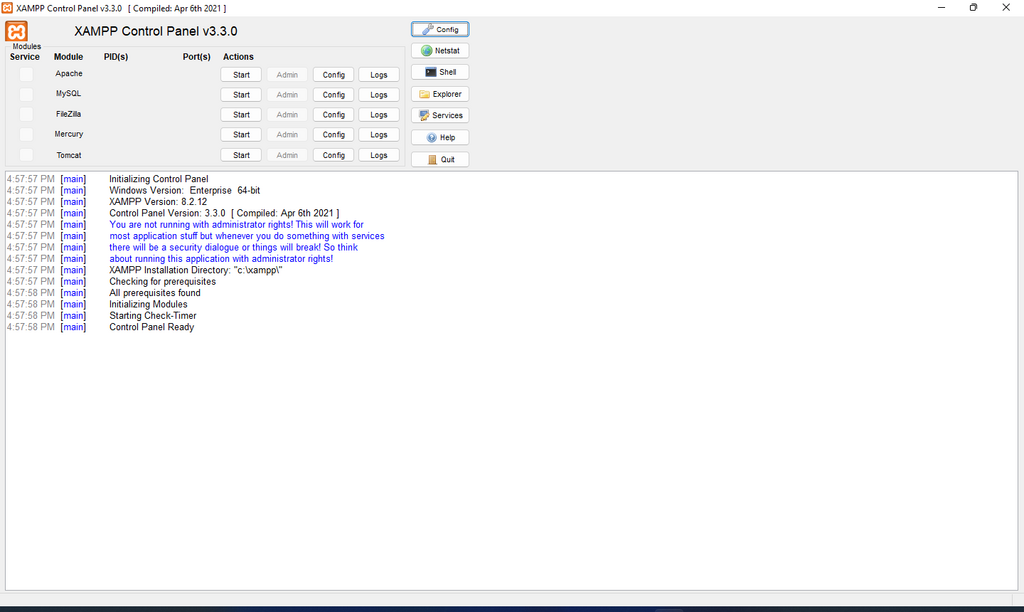
Once you install a package like XAMPP, you'll have a special folder on your computer (usually called htdocs) where you'll save your web projects. When you start the Apache and MySQL services, you can view your projects in your web browser by navigating to a local address, typically http://localhost.
Your First PHP File
Let's create a simple PHP file. Open a plain text editor, paste in the code below, and save it as hello.php inside your server's web folder (e.g., the htdocs folder for XAMPP).
Notice a few things. First, the file ends with a .php extension. This tells the server it needs to look for and execute any PHP code inside. Second, the PHP code itself is wrapped in special tags: <?php and ?>.
<!DOCTYPE html>
<html>
<head>
    <title>My First PHP Page</title>
</head>
<body>

    <h1>Hello from HTML!</h1>

    <p>
        <?php
            echo "Hello from PHP!";
        ?>
    </p>

</body>
</html>
The echo command is one of the most basic in PHP. It simply outputs text to the page. After saving the file, make sure your local server is running, then open your browser and go to http://localhost/hello.php.
You'll see both "Hello from HTML!" and "Hello from PHP!". But if you view the page source in your browser, you'll only see the final HTML output. The server processed the PHP code and replaced it with its result before sending the page to you.
The browser never sees your PHP code, only the HTML it produces. This is a fundamental concept of server-side programming.
Now that you have a basic understanding of what PHP is and how to set up your environment, you're ready to start exploring the language itself.
In the client-server model for web development, where is PHP code executed?
What is the primary purpose of using a local development environment like XAMPP?