Photography Fundamentals
Camera Basics
Choosing Your Camera
Before diving into the settings, let's talk about the tool itself. Cameras come in a few main flavors, each with its own strengths. The three most common types you'll encounter are DSLRs, mirrorless cameras, and compact cameras.
| Camera Type | Pros | Cons |
|---|---|---|
| DSLR | Excellent image quality, wide lens selection, optical viewfinder | Bulky and heavy, more complex for beginners |
| Mirrorless | Compact and lightweight, great image and video quality, electronic viewfinder | Can have shorter battery life, lens selection may be smaller |
| Compact | Extremely portable, easy to use, affordable | Limited manual controls, smaller sensor means lower image quality |
DSLRs (Digital Single-Lens Reflex) have long been the workhorse for professionals, using a mirror and prism system to show you exactly what the lens sees. Mirrorless cameras do away with the mirror, making them smaller and lighter while still offering interchangeable lenses and fantastic quality. Compact cameras, or point-and-shoots, are designed for simplicity and portability.
And of course, there's the camera in your pocket. Modern smartphones are incredibly powerful and are a perfect way to learn the fundamentals of photography.
Anatomy of a Camera
Regardless of the type, most cameras share the same core components that work together to capture an image. Understanding these parts will help you take control of your photography.
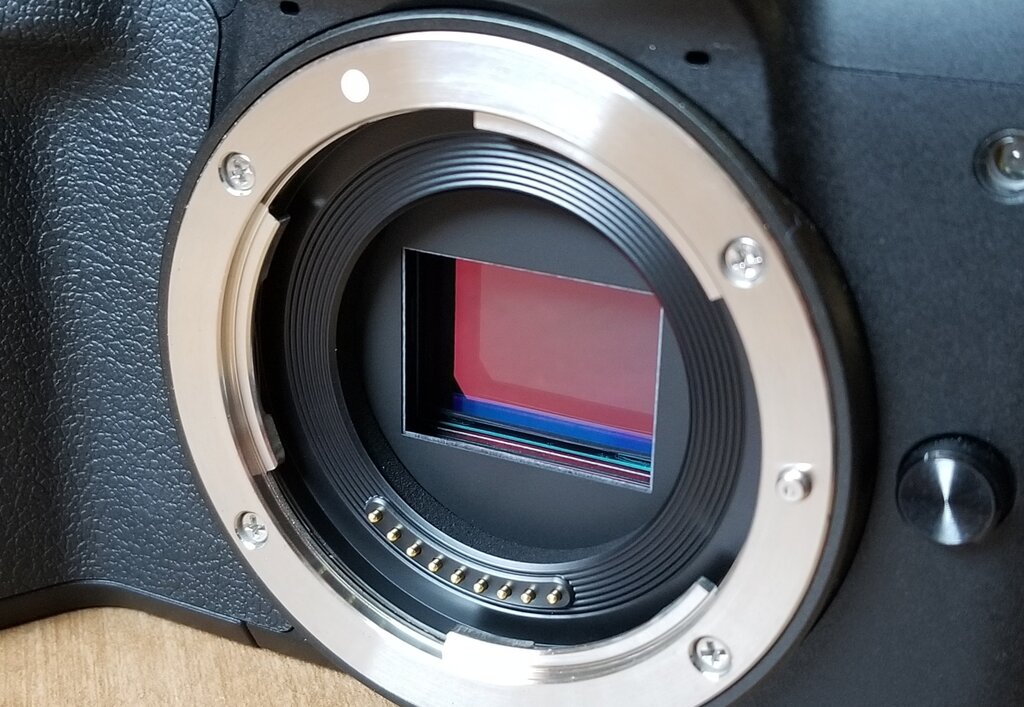
The image sensor is the digital equivalent of film. It's a small chip covered in millions of light-sensitive spots (pixels) that record the image when you press the shutter button.
The lens is the eye of the camera. It’s a series of glass elements that focus light from a scene onto the image sensor. Different lenses can create different effects, from wide-angle landscapes to zoomed-in portraits.
The viewfinder is what you look through to compose your shot. On a DSLR, it's an optical viewfinder that shows you the real scene through the lens. Mirrorless cameras use an electronic viewfinder (EVF), which is a tiny screen showing you what the sensor sees.
Finally, the controls—the buttons, dials, and menus on your camera body—are how you tell the camera what to do. They allow you to adjust all the settings that shape your final photo.
The Exposure Triangle
Taking a photo is all about capturing light. The brightness of your photo, called exposure, is controlled by three key settings: aperture, shutter speed, and ISO. They work together in a relationship known as the exposure triangle. Change one, and you have to adjust another to maintain the same exposure.
Aperture
noun
The opening in the lens through which light travels. It's measured in f-stops (e.g., f/1.8, f/4, f/11). A smaller f-number means a larger opening, letting in more light.
Shutter Speed
noun
The length of time the camera's shutter is open, exposing the sensor to light. It's measured in seconds or fractions of a second (e.g., 1/1000s, 1/60s, 2s).
ISO
noun
The measure of the image sensor's sensitivity to light. It’s measured in numbers like 100, 400, 1600.
Getting the Colors Right
Have you ever taken a photo indoors that looked too yellow, or one in the shade that looked too blue? This is because different light sources have different color temperatures. Our brains automatically adjust for this, but a camera needs to be told what 'true white' looks like in a scene. This is called white balance.
Most cameras have an Auto White Balance (AWB) setting that does a great job in most situations. But you can also set it manually using presets like 'Daylight,' 'Cloudy,' or 'Tungsten' to ensure the colors in your photos look natural and accurate.
Correct white balance ensures that the white objects in your photo actually appear white, which in turn makes all the other colors in the scene accurate.
Now you know the essential building blocks of a camera and how they work. Let's test your knowledge.
What is the primary physical difference that distinguishes a DSLR camera from a mirrorless camera?
Which component of a camera is the digital equivalent of film, responsible for capturing light and converting it into an image?
Understanding these core concepts is the first major step in moving from taking snapshots to creating photographs. With this foundation, you're ready to start exploring how to use these settings creatively.