Photo Editing Essentials
Introduction to Photo Editing
The Building Blocks of Digital Photos
Every digital photo is made of tiny squares of color called pixels. Think of them like tiles in a mosaic. Up close, you see individual squares; from a distance, they form a complete picture. How these pixels are saved creates different types of image files, each with its own purpose.
| Format | Best For | Key Feature |
|---|---|---|
| JPEG | Everyday photos, online sharing | Small file size due to lossy compression |
| PNG | Web graphics, logos, illustrations | Supports transparent backgrounds |
| RAW | Professional photography | Unprocessed data with maximum detail |
JPEGs are the most common format. They're great for sharing because they're small, but this comes at a cost. They use "lossy" compression, meaning some image data is permanently discarded to reduce the file size. PNG files use "lossless" compression, preserving all the original data, which is why they're perfect for graphics where sharp lines are important.
RAW files are the digital equivalent of a film negative. They capture all the data from the camera's sensor without any processing. This gives you the most flexibility when editing, but the files are very large and require special software to open.
Your Digital Darkroom
Photo editing software is your digital darkroom. Programs like Adobe Lightroom, Darktable, and mobile apps like Snapseed provide the tools to enhance your images. When you first open one, the interface might seem intimidating, but most are organized in a similar way.
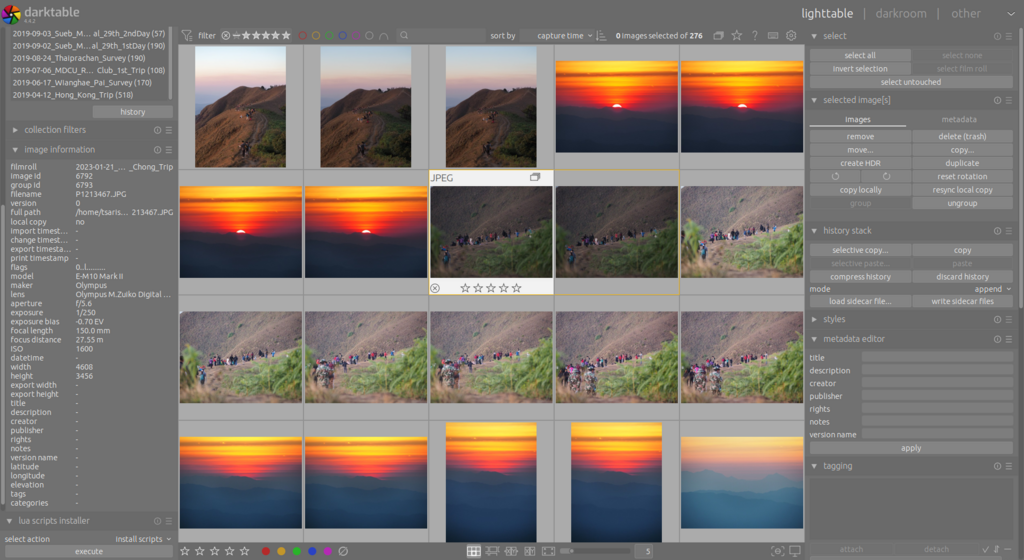
You'll typically see a library or organizer area for browsing your photos, a main window to display the image you're working on, and panels with sliders and tools for making adjustments. Don't worry about learning every single button at once. The key is to get familiar with the layout and know where to find the basic tools.
Start with basic features like cropping and brightness adjustments before moving on to more advanced edits.
Editing Without Fear
One of the most important concepts in modern photo editing is working non-destructively. Think of it like writing in pencil versus pen. With a pencil, you can always erase your marks and return to the original blank page. With a pen, your changes are permanent.
Non-destructive editing works the same way. The software saves your edits as a set of instructions, rather than directly changing the pixels of your original photo. This means you can always undo your changes, tweak them later, or start over from scratch without ever damaging the original file. Your original photo remains untouched and safe.
Destructive editing, on the other hand, overwrites the original image data. Once you save the file, those changes are permanent and the original information is lost forever.
The First Cuts
The simplest and most effective edits often involve just three basic tools: cropping, rotating, and resizing. Mastering them is the first step to improving your photos.
Crop
verb
To trim the edges of an image to improve composition, remove distracting elements, or change its aspect ratio.
Cropping is powerful. It lets you reframe your shot after you've taken it, drawing the viewer's eye exactly where you want it. Maybe a stray branch is poking into the side of your landscape photo, or you want a wide photo to fit a square social media profile. The crop tool is your answer.
Rotating is just as straightforward. Use it to straighten a tilted horizon in a landscape or fix a portrait that’s slightly askew. Most tools allow for fine adjustments by single degrees or quick 90-degree turns.
Resizing changes the overall dimensions of your image, measured in pixels. You might resize a large photo to make it smaller for an email or a website. This is different from cropping because it shrinks or stretches the entire image, rather than just trimming the edges. Be careful when making an image larger, as it can reduce the quality and make it look blurry.
Time to check what you've learned.
What are the tiny individual squares of color that compose a digital image called?
Which image file format is described as the digital equivalent of a film negative, capturing all sensor data without processing?
With these fundamentals, you have a solid base for exploring the world of photo editing. Understanding your materials and the basic tools is the key to getting started.