PGP and S/MIME Email Security
Email Security Basics
The Email Postcard
Sending an email feels private, like sealing a letter and dropping it in a mailbox. In reality, it's often more like sending a postcard. As your message travels across the internet from your server to its destination, it can pass through several points where it could be intercepted and read.
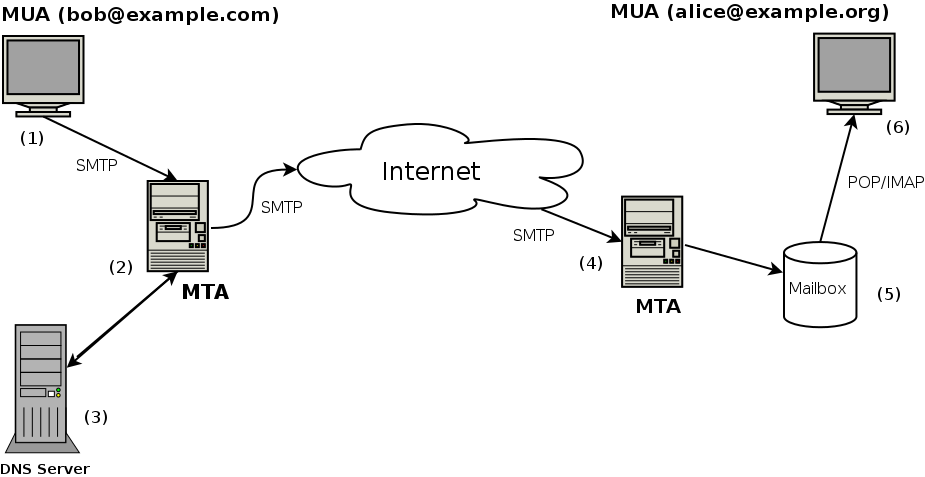
This journey makes standard email surprisingly vulnerable. Personal details, financial information, and confidential business communications are all at risk if not properly secured. Understanding the common threats is the first step toward protecting your digital correspondence.
Threats to Your Inbox
Three of the most common threats you'll face are phishing, spoofing, and eavesdropping. Each uses a different tactic to compromise your information.
Phishing
noun
A fraudulent attempt to obtain sensitive information such as usernames, passwords, and credit card details by disguising as a trustworthy entity in an electronic communication.
Phishing attacks are like a fisherman casting a baited hook. The email might look like it's from a familiar company, like your bank or a popular online service. It will often create a sense of urgency, telling you to click a link to avoid your account being closed or to claim a prize. The link, however, leads to a fake website designed to steal the credentials you enter.
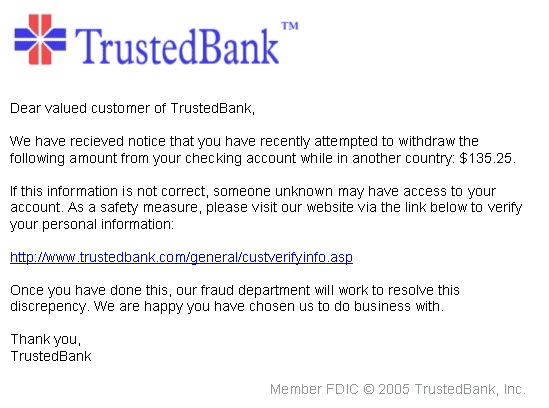
Spoofing is a technique often used in phishing. It’s the act of faking the sender's address to make the email appear to be from someone else, like your boss or a trusted colleague. The goal is to trick you into trusting the message's contents, which could be a request to transfer money or open a malicious attachment.
Eavesdropping is simpler but just as dangerous. It’s the digital equivalent of someone reading your postcard over your shoulder. When an email isn't secured, an attacker with access to the network can intercept and read its contents. This can happen on public Wi-Fi networks or if a server is compromised.
Your Digital Defenses
So how do you turn that postcard back into a sealed letter? The two main tools for this are encryption and digital signatures. They work together to ensure your emails are both private and authentic.
Encryption scrambles your message, making it unreadable to anyone without the right key. A digital signature verifies that you are the true sender and that the message hasn't been altered.
Think of encryption as a locked box. You place your message inside and lock it with a key. Only the person with the corresponding key can unlock the box and read the message. Anyone who intercepts the box along the way sees only a jumble of nonsensical data. There are two main types of encryption: symmetric, which uses one shared key for locking and unlocking, and asymmetric, which uses a pair of keys—one public, one private.
A digital signature, on the other hand, acts like a tamper-proof wax seal on an envelope. It doesn't hide the message, but it does prove who sent it and confirms the message hasn't been changed since it was sent. It's created using the sender's private key and can be verified by anyone with the sender's public key.
When used together, encryption and digital signatures provide a powerful defense. Encryption ensures confidentiality (only the intended recipient can read it), while the digital signature provides authenticity (it's really from the sender) and integrity (it hasn't been modified). This combination is the foundation of secure email protocols.
Ready to test your knowledge? This quiz will cover the email security threats and defenses we just discussed.
Sending a standard, unencrypted email is most similar to which of the following real-world actions?
An email arrives that looks like it's from your bank, warning that your account will be closed unless you click a link and verify your credentials immediately. This is a classic example of what?
Understanding these basic threats and defenses is the first step in protecting yourself. By being aware of the risks and the tools available, you can make your email communication much more secure.