PDF Invoice Automation for Non-IT Professionals
Understanding PDF Invoices
Anatomy of an Invoice
At its core, an invoice is a request for payment. It’s a document that lists the goods or services a business has provided to a client, creating a formal record of the transaction. Think of it as the financial heartbeat of a sale, confirming what was sold, to whom, and for how much.
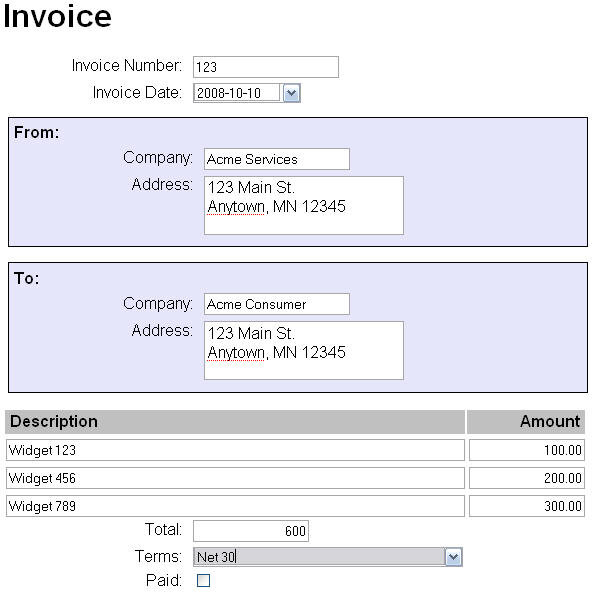
While they can look different, most invoices share a common structure. Understanding these parts is the first step to managing them effectively.
First, you'll see the seller's information: their name, address, and contact details. Right alongside it, you'll find the buyer's information. This ensures everyone knows who is involved in the transaction.
Every invoice has a unique invoice number. This is a critical identifier used for tracking and record-keeping, helping to prevent duplicate payments. The invoice date tells you when the bill was created, while the due date specifies when the payment is expected.
The main section is the breakdown of charges. This includes line items, which describe each product or service. For each item, you'll see the quantity, the price per unit, and the total for that line. After all items are listed, a subtotal is calculated. Finally, any applicable taxes or fees are added to arrive at the grand total – the final amount owed.
| Component | Purpose |
|---|---|
| Vendor/Supplier Info | Identifies who is sending the bill. |
| Customer Info | Identifies who needs to pay. |
| Invoice Number | A unique code for tracking the transaction. |
| Dates | Shows when the invoice was issued and when payment is due. |
| Line Items | Details the specific products or services sold. |
| Totals | Summarizes the costs, including subtotals, taxes, and the final amount. |
Why Accuracy Matters
Extracting data from an invoice isn't just about reading numbers; it's about capturing them perfectly. Accurate data is essential for healthy financial management. It ensures that vendors are paid the correct amount on time, preventing late fees and maintaining good business relationships.
Internally, this data feeds into financial statements, budgets, and spending analyses. If the numbers are wrong, the entire financial picture becomes distorted. A misplaced decimal or a mistyped digit can lead to overpayments, incorrect tax filings, and flawed business decisions.
Even a small error in data entry can create significant accounting problems down the line.
The Trouble with Manual Entry
For many businesses, the process of getting information from a PDF invoice into an accounting system is done by hand. An employee opens the file and manually types the details into another program. This approach is straightforward, but it's filled with challenges.
Manual data entry is slow and repetitive. It takes time that could be spent on more valuable tasks. More importantly, it’s prone to human error. People make typos, transpose numbers, or misread a blurry document. Different invoice layouts from various vendors add another layer of complexity, as the location of the invoice number or total amount can change from one document to the next.

Each invoice requires careful attention to detail, and when dealing with dozens or hundreds of them, the risk of a mistake grows.
Invoices have always been a vital accounting tool in the business world, documenting and tracking transactions between buyers and sellers.
Because these documents are so fundamental, capturing their information accurately is a non-negotiable part of running a business. The challenge lies in doing so efficiently and without error.