PCIe Deep Dive
Introduction to PCIe
The Data Superhighway
Think of a computer's motherboard as a busy city. The processor is the central business district, the graphics card is the entertainment complex, and the storage drive is the warehouse district. For this city to function, it needs an efficient road system. That's where PCIe comes in.
PCIe, which stands for Peripheral Component Interconnect Express, is the high-speed standard used to connect these vital components. It's the data superhighway that lets your graphics card render stunning visuals and your storage drive load games in a flash. Without it, data would move at a crawl, and modern computing wouldn't be possible.
peripheral
noun
A device that connects to a computer system to add functionality. Examples include graphics cards, sound cards, and network cards.
Direct Routes for Data
Older connection standards worked like a single-lane road shared by all traffic. Every component had to wait its turn, which created bottlenecks. PCIe revolutionized this with a point-to-point architecture. Each component gets its own dedicated, private connection to the central hub, like a private driveway connecting directly to the main highway.
This highway is built from individual "lanes." A lane is essentially a pair of connections, one for sending data and one for receiving it. The more lanes a connection has, the more data it can move at once. It's the difference between a small country road and a 16-lane superhighway.
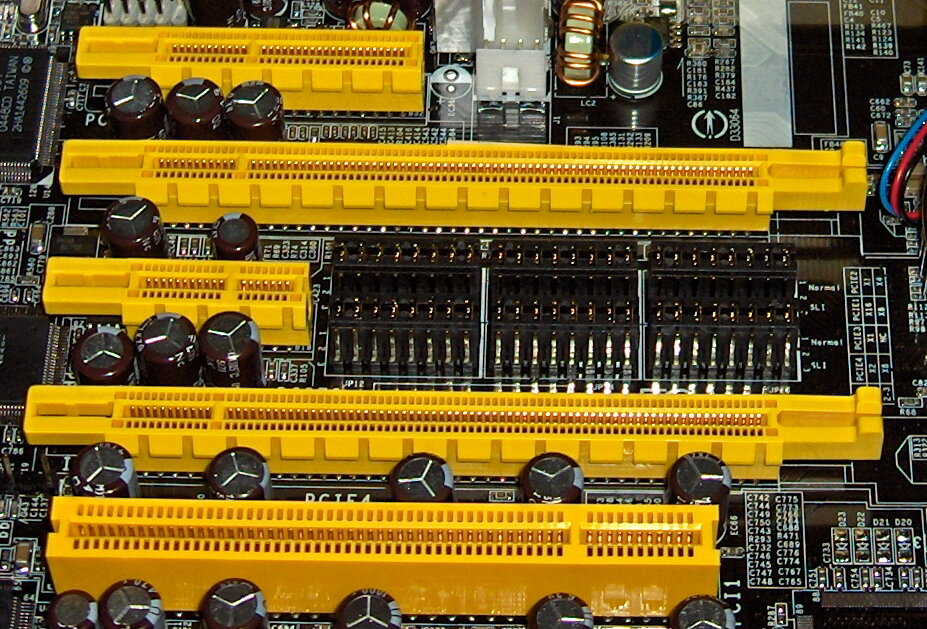
PCIe slots on a motherboard come in different physical sizes to accommodate different lane configurations: x1, x4, x8, and x16. A high-bandwidth device like a graphics card needs the full 16-lane connection, while a simpler network card might only need a single lane.
| Configuration | Typical Use Cases |
|---|---|
| PCIe x1 | Network cards, Sound cards, USB expansion cards |
| PCIe x4 | High-speed storage drives (NVMe SSDs), 10 Gigabit Ethernet cards |
| PCIe x8 | High-end network cards, RAID controllers |
| PCIe x16 | Graphics cards, other high-performance accelerators |
Getting Faster with Every Generation
The PCIe standard isn't static. It has evolved through several generations, with each new version roughly doubling the data transfer rate per lane of the one before it. A device using a PCIe 4.0 connection can move data twice as fast as the same device using a PCIe 3.0 connection.
The great thing about this evolution is backward compatibility. You can plug a newer PCIe 4.0 graphics card into an older PCIe 3.0 slot (or vice-versa), and it will still work. It will just run at the speed of the slower component.
| PCIe Generation | Introduction Year | Data Rate per Lane |
|---|---|---|
| 1.0 | 2003 | 250 MB/s |
| 2.0 | 2007 | 500 MB/s |
| 3.0 | 2010 | ~1 GB/s |
| 4.0 | 2017 | ~2 GB/s |
| 5.0 | 2019 | ~4 GB/s |
| 6.0 | 2022 | ~8 GB/s |
This consistent doubling of bandwidth makes PCIe a scalable and future-proof standard for the ever-increasing demands of modern computing.
From powering the most demanding graphics cards for gaming and AI to enabling lightning-fast storage with NVMe SSDs, PCIe is the unsung hero working behind the scenes. It's the essential link that allows all the powerful components in your computer to communicate effectively and deliver the performance you expect.
Ready to check your understanding?
What is the primary function of PCIe in a computer?
How does PCIe's 'point-to-point' architecture differ from older standards?
As you can see, PCIe is a fundamental technology. Its scalable, point-to-point design ensures that as individual components get faster, the connections between them can keep pace.