Password Manager Mastery
Password Management Basics
Your First Line of Defense
Think of a password as the key to a part of your digital life. You have keys for your email, your bank, your social media, and dozens of other online accounts. Just as you wouldn't use a flimsy, easily copied key for your house, you shouldn't use a weak password for your online accounts.
A strong password is long, complex, and unpredictable. It mixes uppercase and lowercase letters, numbers, and symbols. The longer and more random it is, the harder it is for someone to guess or for a computer to crack.
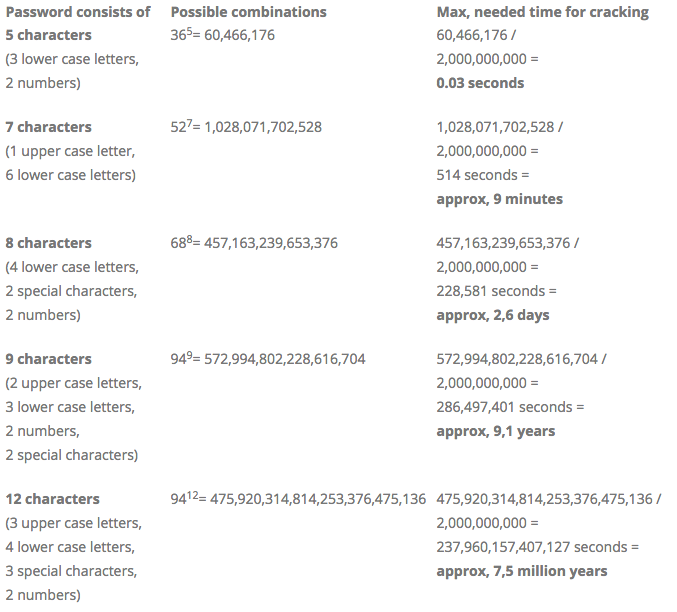
As you can see, a short, simple password can be broken in less than a second. A longer, more complex one could take millions of years. This is your first and most important line of defense against unauthorized access.
The Problem with Memory
So, the solution is to use a long, unique, and random password for every account. But who can remember dozens of passwords like j2!zP&9*bK$4? Almost no one.
This is where most people run into trouble. We create simple, memorable passwords like Password123 or use personal information like a pet's name. Worse, we often reuse the same password across multiple websites. This is incredibly risky. If a single one of those sites has a data breach, criminals can take your leaked email and password and try them on other popular sites. It's like having one key that unlocks your house, your car, and your office.
Using the same password everywhere is a common habit, but it puts all of your accounts at risk if just one is compromised.
A Smarter Way to Manage Passwords
Instead of trying to memorize countless complex passwords, you can use a tool designed for the job: a password manager. It acts like a secure digital vault for all your login credentials.
Password managers keep powerful passwords for all your accounts stored in a “vault” that you can access with a single master password.
You only need to remember one strong master password to unlock the vault. Inside, the password manager stores all your different account passwords. Most importantly, it can also generate new, incredibly strong passwords for you whenever you sign up for a new service. You never even have to see or type the complex password; the manager handles it for you.
Password managers typically work across your devices, like your computer and phone, often through a browser extension or a dedicated app. When you visit a login page, the manager can automatically fill in your username and password.
This solves the two biggest password problems at once. You no longer have to remember dozens of passwords, and you can easily use a unique, super-strong password for every single account, dramatically improving your online security.
Ready to check your understanding?
What are the three essential characteristics of a strong password?
What is the biggest risk of reusing the same password for multiple websites?
Using a password manager is one of the simplest and most effective steps you can take to protect your digital life.