Password Manager Mastery
Understanding Password Security
Your First Line of Defense
Think of a password as the key to a part of your digital life. Your email, your bank account, your social media—each one is locked behind a door, and your password is the only key. If that key is flimsy, like "123456," anyone can break in. A strong password, however, is like a complex, unpickable lock.
Weak passwords are a huge risk. They open the door to unauthorized access, identity theft, and financial loss. If a hacker gets into your email, they can often reset the passwords for all your other accounts, causing a domino effect. The goal is to make your digital keys as strong as possible.

What Makes a Password Strong?
Creating a strong password isn't about coming up with something clever you can remember. It's about creating something a computer can't guess. A strong password has three key ingredients.
There are three keys to a good, strong password: length, randomness, and uniqueness.
1. Length: The longer, the better. Every character you add makes a password exponentially harder to crack. A short, simple password can be guessed by a computer in seconds. A long one could take centuries.
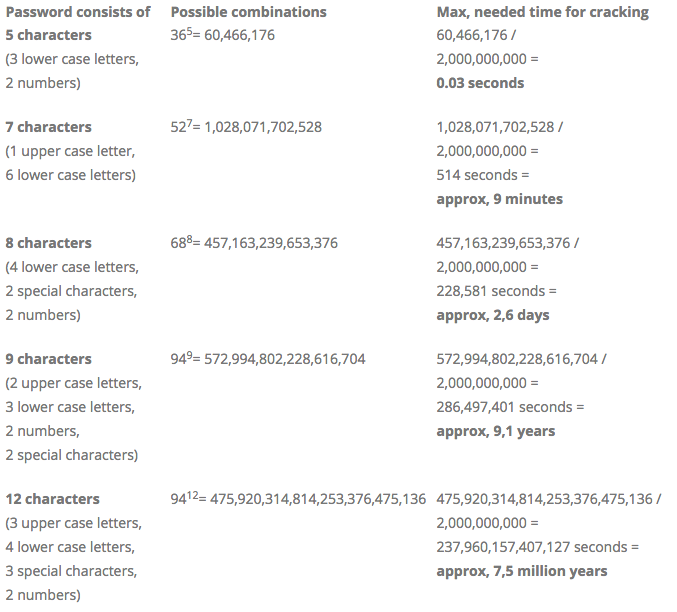
2. Randomness: A good password is a random mix of uppercase letters, lowercase letters, numbers, and symbols. Avoid common words, phrases, or personal information like your birthday or pet's name. "L1saBday1992!" is much weaker than "j9!dF#kE&pQz" because it contains predictable patterns.
3. Uniqueness: You need a different, strong password for every single account. Why? Because data breaches happen all the time. If you reuse passwords, a breach at one company means criminals can try your login information at every other popular website, a technique called "credential stuffing."
The Password Problem
At this point, you might be thinking, "How am I supposed to remember dozens of long, random, unique passwords?" The simple answer is: you're not. Nobody can.
Trying to memorize them leads to bad habits, like writing them on sticky notes or using simple, reusable patterns. This is where a password manager comes in.
A password manager is a secure app designed to store and manage all your passwords in one place. It acts like a digital vault.
Instead of remembering hundreds of passwords, you only need to remember one: the master password to unlock your vault. The password manager does the heavy lifting for you. It can generate long, random passwords for new accounts and automatically fill them in when you log into websites. It's the modern solution to the password problem, making it easy to follow security best practices without the headache.
Ready to test what you've learned about the basics of password security?
What is the primary reason for using a unique password for every online account?
Which of the following is the most effective way to create and manage strong passwords for dozens of different websites?
By understanding these core concepts, you've taken the first and most important step toward securing your online life.