Pandas for Python Data Analysis
Introduction to Pandas
What Is Pandas?
Think of a spreadsheet, like one you'd find in Microsoft Excel or Google Sheets. It has rows and columns, and it's great for organizing data. Pandas is like a super-powered version of that spreadsheet, but it lives inside your Python code. It’s a library designed specifically for data analysis and manipulation.
Pandas gives you two main tools to work with: the Series and the DataFrame.
- A Series is like a single column in a spreadsheet. It’s a one-dimensional array that can hold any type of data.
- A DataFrame is the whole spreadsheet. It’s a two-dimensional table made up of rows and columns, where each column is a Series.
Pandas is a cornerstone of the data science ecosystem in Python. It's built on top of another library called NumPy, which provides powerful tools for numerical operations. Pandas plays nicely with other data science libraries too, like Matplotlib for plotting and scikit-learn for machine learning.
pandas provides rich data structures and functions designed to make working with structured data fast, easy, and expressive.
Why Not Just Use a Spreadsheet?
Spreadsheets are fantastic for many tasks, but they have limits. When you start working with larger, more complex datasets, or need to perform the same cleaning steps over and over, you'll run into trouble. This is where Pandas shines.
| Feature | Spreadsheet (e.g., Excel) | Pandas |
|---|---|---|
| Data Size | Limited by memory, can be slow with large files | Handles very large datasets efficiently |
| Automation | Requires manual steps or complex macros | Easily scriptable to automate repetitive tasks |
| Reproducibility | Hard to track changes and repeat steps exactly | Code acts as a perfect record of your analysis |
| Advanced Analysis | Limited statistical and modeling tools | Integrates with the entire Python data science stack |
In short, Pandas gives you more power, flexibility, and control over your data. It allows you to create a clear, repeatable process for your analysis, which is critical in any data-driven project.
Getting Started
First, you need to install Pandas. If you have Python and its package manager, pip, set up, you can install it from your terminal or command prompt with a single command.
pip install pandas
Once installed, you can use Pandas in any Python script by importing it. The community standard is to import it with the alias pd. This saves you from typing pandas every time you want to use one of its functions.
# Import the pandas library
import pandas as pd
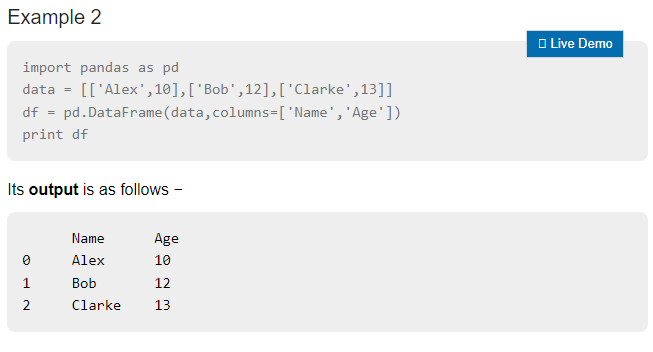
With that one line, you're ready to start working. You can create a DataFrame from scratch or, more commonly, load data from a file like a CSV. Here’s a quick look at how you might create a simple DataFrame.
Now you have the foundational knowledge of what Pandas is and why it’s so important for data analysis in Python. You're ready to start exploring its capabilities.
What is the primary purpose of the Pandas library in Python?
In Pandas, a single column of data is represented by which data structure?