Pandas Essentials
Introduction to Pandas
What is Pandas?
Working with data can sometimes feel like trying to organize a messy closet. You might have information scattered everywhere, in different formats, with missing pieces. Pandas is a library for the Python programming language designed to make this process easier. It's a powerful tool for cleaning, transforming, and analyzing structured data.
Pandas is a popular Python library for data manipulation and analysis.
Think of it as the ultimate spreadsheet for Python. It allows you to load data from various file formats (like CSVs or Excel files), handle missing values, and reshape your data into a clean, usable format. It's an essential part of the data science toolkit in Python, providing the foundation for more complex analysis and visualization.
Getting Started
Before you can use Pandas, you need to install it. If you have Python and its package manager, pip, set up, you can install Pandas by running the following command in your terminal or command prompt:
pip install pandas
Once installed, you need to import it into your Python script. The standard convention is to import it with the alias pd. This shorthand makes your code cleaner and easier to read.
import pandas as pd
With that one line, you're ready to start working with the core components of the library.
The Building Blocks
Pandas revolves around two primary data structures: the Series and the DataFrame.
A Series is a one-dimensional array-like object that can hold any data type. Think of it as a single column in a spreadsheet. Each value in a Series is associated with a label, called an index.
# Creating a simple Series
ages = pd.Series([22, 35, 58, 19])
print(ages)
The second, and more common, structure is the DataFrame.
DataFrame
noun
A two-dimensional, size-mutable, and potentially heterogeneous tabular data structure with labeled axes (rows and columns).
A DataFrame is like a full spreadsheet or a SQL table. It has both row and column indices, and it's the primary object you'll work with in Pandas. You can think of a DataFrame as a collection of Series objects that share the same index.
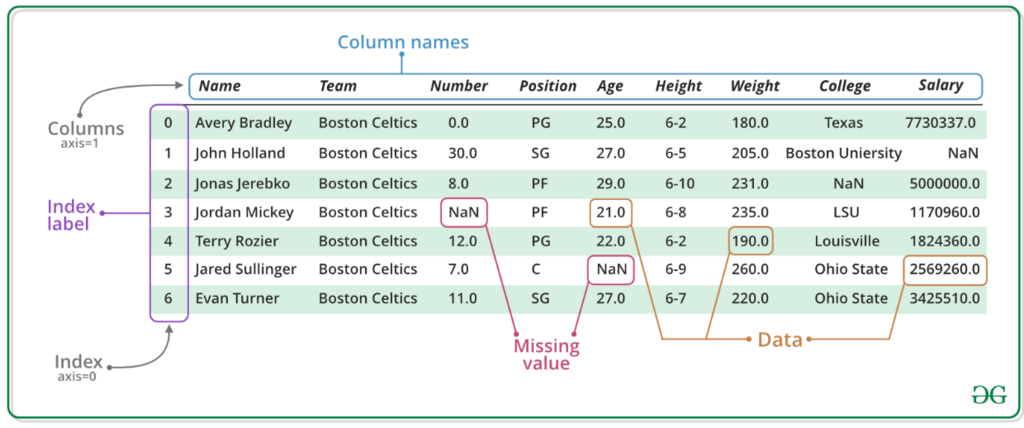
Here’s how you can create a simple DataFrame from scratch:
# Creating a DataFrame from a dictionary
data = {
    'Name': ['Alice', 'Bob', 'Charlie'],
    'Age': [25, 30, 35],
    'City': ['New York', 'Los Angeles', 'Chicago']
}

df = pd.DataFrame(data)
print(df)
Working with Other Libraries
Pandas isn't an island. It's designed to work seamlessly with other major data science libraries.
-
NumPy: Pandas is built on top of NumPy, a library for numerical computing. In fact, the data inside a Pandas Series or DataFrame is stored in NumPy arrays. This integration means you get the high performance of NumPy's numerical operations combined with Pandas's flexible data handling.
-
Matplotlib: While Pandas has its own basic plotting capabilities, it integrates tightly with Matplotlib, a powerful data visualization library. This allows you to easily create charts and graphs directly from your DataFrames to better understand your data.
This powerful ecosystem is what makes Python such a popular choice for data analysis.
What is the primary purpose of the Pandas library in Python?
What is the standard, conventional way to import the Pandas library in a Python script?