Oracle Database 19c Expert Mastery
Oracle Database Architecture
Inside the Oracle Database
An Oracle database has two main parts that work together: the database instance and the database itself. Think of the database as the collection of files on disk where your data lives, like a library's building full of books. The instance is the set of active processes and memory that access and manage those files. It's the librarian and the library's internal systems, making everything work.
The instance is the active, in-memory part. The database is the passive, on-disk part. You can't have one without the other.
When you start up an Oracle database, you are starting the instance. The instance then finds the database files and opens them, making the data available to users. Let's break down what makes up the instance.
The Database Instance
Every running Oracle database is managed by an instance. The instance is made up of memory structures and background processes. These two components are the engine of the database, handling everything from query execution to data recovery.
Memory Structures Oracle uses two main areas of memory: the System Global Area (SGA) and the Program Global Area (PGA).
System Global Area (SGA): This is a large, shared memory region used by all database processes. Think of it as the central nervous system of the database. It contains several key components:
- Database Buffer Cache: This is where copies of data blocks from the actual datafiles are held. When you query data, Oracle first looks here. Finding data in memory is thousands of times faster than reading it from disk.
- Shared Pool: This area caches executable SQL and PL/SQL code, allowing it to be reused without being re-parsed. It also holds the data dictionary cache, which stores information about database objects (like table and column definitions).
- Redo Log Buffer: This is a small, circular buffer that stores a record of all changes made to the database. This information is crucial for recovery in case of a failure.
Program Global Area (PGA): Unlike the shared SGA, each server process gets its own private memory area called the PGA. This memory is used for tasks specific to that process, such as sorting data for an ORDER BY clause or holding information for a hash join.
Process Architecture
An Oracle database uses several types of processes to do its work. They fall into three categories: user processes, server processes, and background processes.
A user process is the application or tool you use to connect to the database, like SQL*Plus or a Java application. When this process needs something from the database, it doesn't interact with it directly. Instead, it talks to a server process.
The server process takes the request from the user (like a SQL query), executes it, and sends the results back. Each server process has its own PGA, as we just learned.
The real workhorses, however, are the background processes. These are special processes that are always running as part of the instance, performing maintenance and I/O tasks. Here are some of the most important ones:
- Database Writer (DBWn): This process is responsible for writing modified data blocks from the Database Buffer Cache back to the datafiles on disk.
- Log Writer (LGWR): This process writes the transaction records from the Redo Log Buffer to the online redo log files on disk. This is a critical step in ensuring that no committed data is ever lost.
- System Monitor (SMON): This process performs recovery if the instance fails. It also cleans up temporary segments that are no longer in use.
- Process Monitor (PMON): This process cleans up after failed user processes, releasing locks and other resources they were using.
- Checkpoint (CKPT): This process signals the DBWn to write blocks to disk and updates the headers of the control files and datafiles to record the most recent checkpoint.
Storage Structures
The database itself, where the data is permanently stored, is a collection of files. Oracle manages this storage using both logical and physical structures. The physical structure is how the operating system sees the files, while the logical structure is how Oracle organizes the space within those files.
Physical Storage The database is physically composed of three main file types:
- Datafiles: These are the files that actually store all the user and application data, as well as the data dictionary. A database has one or more datafiles.
- Control Files: These small binary files contain critical metadata about the database itself. They know the database name, the names and locations of the datafiles and redo log files, and the current state of the database. They are essential for opening and running the database.
- Redo Log Files: These files store a record of all changes made to the data. If a failure occurs (like a power outage), Oracle can use the redo log files to recover any committed transactions that hadn't yet been written to the datafiles.
Logical Storage Oracle uses a logical hierarchy to manage the space inside datafiles:
- Tablespaces: A database is divided into one or more logical storage units called tablespaces. A tablespace is made up of one or more physical datafiles. This allows you to group related data together. For example, you might have one tablespace for application data and another for indexes.
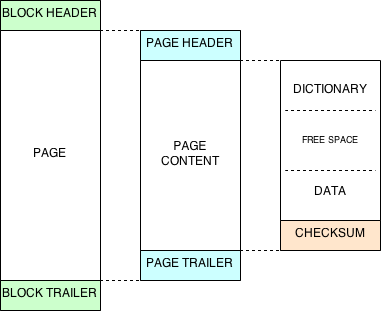
- Segments, Extents, and Blocks: Within a tablespace, data is stored in segments. A segment is the space allocated for a specific object, like a table or an index. A segment is made up of one or more extents, which are contiguous collections of Oracle data blocks. The data block is the smallest unit of I/O, the fundamental unit of database storage.
Oracle Net Services Finally, how do clients communicate with the database instance, especially if they are on different machines? This is handled by Oracle Net Services. It's the networking component that enables a connection between a client application and an Oracle database server. The most important part of this is the Listener, a process running on the database server. Its job is to listen for incoming connection requests from clients and hand them off to a server process.
Now, let's test your knowledge of these core architectural components.
What is the primary difference between the Oracle database instance and the database itself?
Which memory area is unique and private to each server process, used for tasks like sorting data?
Understanding this architecture is the first step to mastering Oracle database administration. Knowing how the memory, processes, and storage structures interact is key to managing, troubleshooting, and optimizing the database.