Optimize Home Wi-Fi for Remote Work
Wi-Fi Basics
How Wi-Fi Works
Wi-Fi is a way to get internet access without plugging in any cables. It uses radio waves to send and receive data between your devices, like a laptop or phone, and a central hub called a router.
Think of it like a radio station. A station broadcasts music over the air, and your car radio picks it up. A Wi-Fi router does something similar, but with internet data. The key difference is that it’s a two-way street. Your device doesn't just receive information; it sends it back, allowing you to upload photos, send emails, and participate in video calls.
The router itself is connected to the internet with a physical wire. It takes that wired connection and converts it into a wireless signal that it broadcasts in your home or office. Your devices have tiny, built-in antennas that pick up this signal and connect to the network.
Your Home Network Gear
Two key pieces of hardware work together to bring the internet to your devices: the modem and the router. Sometimes they are combined into a single box, but they perform two distinct jobs.
The modem is your gateway to the internet. It connects to the line from your Internet Service Provider (ISP)—whether it's a cable, fiber optic, or phone line—and translates the signal into a usable internet connection for one device.

But you probably have more than one device you want to connect. That’s where the router comes in. The router plugs into the modem and creates your own private network. It takes the single internet connection from the modem and shares it with all the different devices in your home, either through Wi-Fi or with additional ethernet cables.
A modem brings the internet into your home. A router creates a network within your home and shares the connection wirelessly.
The Two Wi-Fi Lanes
Modern Wi-Fi routers broadcast signals on invisible “lanes” or frequency bands. The two most common are 2.4 GHz and 5 GHz. Your phone or laptop will often see two networks from your router, one for each band.
They both get you online, but they have different strengths.
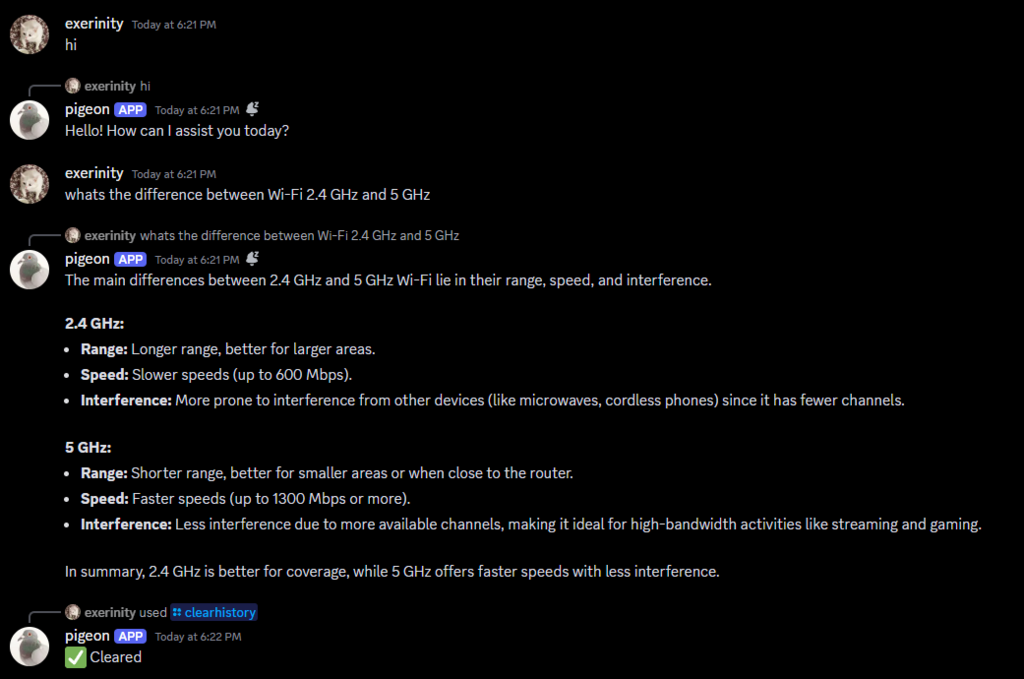
Think of the 2.4 GHz band as a road with a slow speed limit that goes a long way and can navigate around obstacles. It has a longer range and is better at getting through solid objects like walls and floors. However, it’s slower and more crowded. Many common household devices, like microwaves, cordless phones, and Bluetooth speakers, also use this frequency, which can cause interference and slow things down further.
The 5 GHz band is like a multi-lane, high-speed highway. It offers much faster speeds and is less crowded, meaning less interference. The trade-off is its shorter range. The signal doesn't travel as far and is more easily blocked by walls and other obstructions.
| Band | Speed | Range & Penetration | Interference |
|---|---|---|---|
| 2.4 GHz | Slower | Longer range, better through walls | High (from microwaves, etc.) |
| 5 GHz | Faster | Shorter range, weaker through walls | Low (less crowded) |
So, which one should you use? If you’re close to your router and streaming a movie or gaming, 5 GHz is your best bet for a fast, stable connection. If you're further away, or if walls separate you from the router, the 2.4 GHz band will likely provide a more reliable, albeit slower, signal.
What is the primary role of a modem?
You are trying to stream a high-definition movie on your laptop, which is in the same room as your Wi-Fi router. For the best performance, which frequency band should you connect to?
That's the basic breakdown of how Wi-Fi gets to your screen. Understanding these core pieces helps you know what's happening when your internet works—and gives you a starting point for figuring out why it might not be.