Operating System Types Explained
Introduction to Operating Systems
The Computer's Conductor
A computer's hardware—its processor, memory, and drives—is like an orchestra full of talented musicians. On their own, they can make noise, but they can't create a symphony. They need a conductor to coordinate their efforts, tell them when to play, and make sure they work together harmoniously. That conductor is the operating system (OS).
The OS is the fundamental software that manages all the hardware and software resources on a computer. It's the bridge that connects you and your applications to the physical components of the machine.
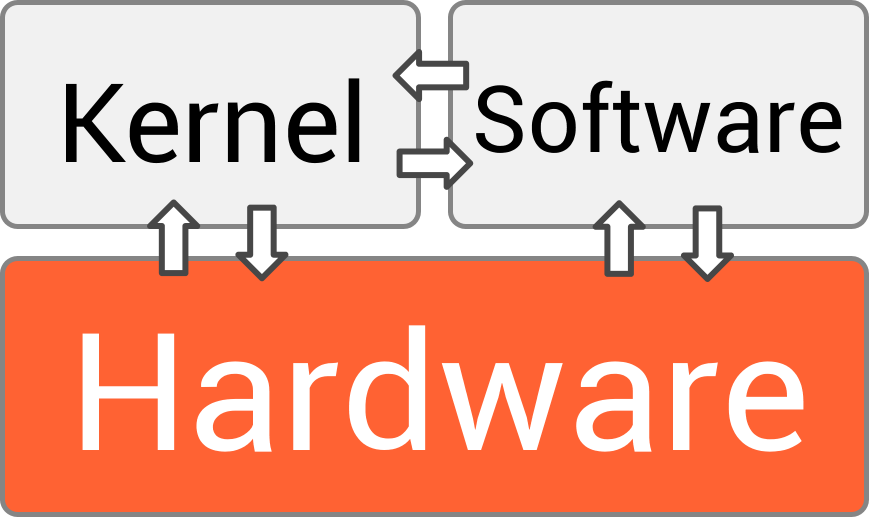
Without an OS, every application developer would have to write code to directly control the screen, keyboard, and storage devices. It would be incredibly inefficient. The OS provides a stable, consistent platform for applications to run on, handling the complex, low-level details so that developers—and users—don't have to.
Core Responsibilities
The operating system juggles several critical jobs at once. We can group its main duties into four key areas: managing processes, memory, files, and devices.
Process
noun
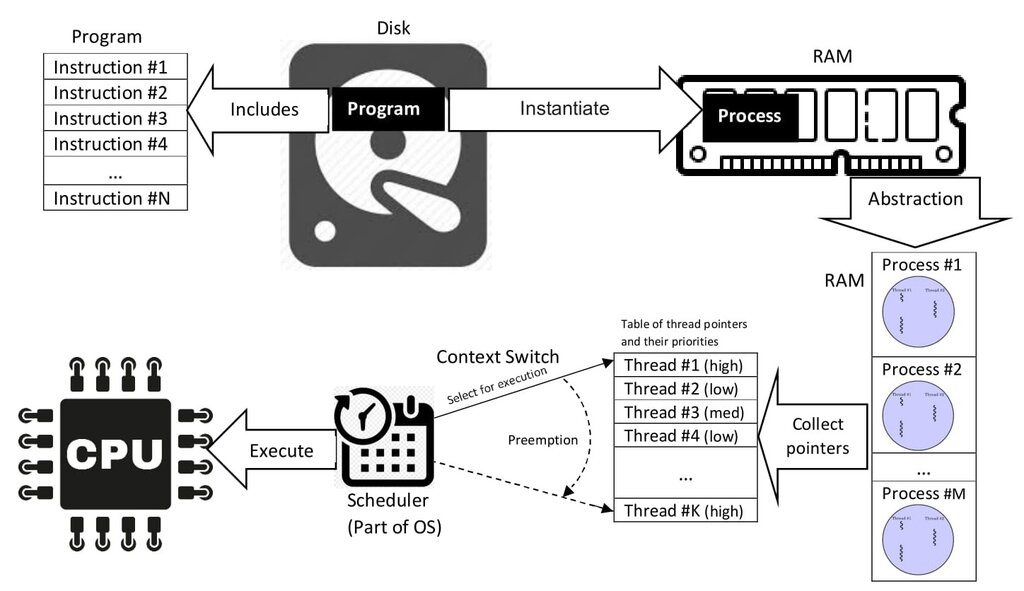
A program that is currently running or executing. When you open an application, the OS creates one or more processes for it.
Process Management: Think of the OS as a skilled traffic cop at a busy intersection. At any moment, you might have a web browser, a music player, and a word processor all running. Each of these is a process competing for the attention of the Central Processing Unit (CPU). The OS rapidly switches the CPU's focus between these processes, creating the illusion that they're all running simultaneously. This is called multitasking.
Memory Management: Your computer's Random Access Memory (RAM) is its short-term workspace. When you open a program, the OS finds an empty spot in RAM and allocates it to that program. Its job is to keep track of every bit of memory, ensuring that one process doesn't accidentally write over another's data. It's like a librarian carefully assigning shelves to different books and making sure they don't get mixed up.
File System Management: The OS is your digital file clerk. It organizes data into a hierarchy of files and folders, which we call a file system. It keeps track of where every file is located on your hard drive or solid-state drive (SSD), who has permission to access it, and how much space is available. When you save a document, you don't need to know the physical address on the disk; you just give it a name, and the OS handles the rest.
Device Management: Your computer connects to many devices: keyboards, mice, printers, monitors, and network cards. The OS communicates with these devices through special software called drivers. It manages the flow of information to and from each device, ensuring they work correctly with your applications.
Inside the OS
An operating system isn't a single, monolithic piece of code. It has a layered architecture, with two main parts that are essential to understand: the kernel and the user interface.
Kernel
noun
The core component of an operating system. It has complete control over everything in the system and acts as the primary interface between hardware and software.
The kernel is the heart of the OS. It's the first program loaded when the computer starts up, and it manages the four core functions we just discussed. It controls the CPU, memory, and devices at the lowest level. Everything else relies on the kernel to function.
The user interface (UI) is the part of the OS you interact with. It can be a Graphical User Interface (GUI), with windows, icons, and pointers, or a Command-Line Interface (CLI), where you type text commands. The UI is the layer that translates your clicks and keystrokes into instructions the kernel can understand.
The OS's primary responsibilities include managing hardware resources (such as the CPU, memory, and storage), facilitating application execution, and providing services to users.
So how does an application like a web browser ask the OS to do something, like open a network connection? It uses a system call. A system call is a request from an application to the kernel for a service. It's the official, secure way for software to access hardware resources. The application can't just talk to the network card directly; it has to politely ask the kernel, and the kernel will handle the request on its behalf. This protects the system from errant or malicious programs.
Based on the orchestra analogy, what is the primary role of an operating system?
When you open a program, the OS allocates a portion of RAM for it to use and ensures it doesn't interfere with other programs. This task is known as:
Understanding these fundamental roles and components is the first step to seeing how computers truly work. The OS is the unsung hero, quietly managing countless complex operations every second to provide a smooth and stable experience.