Operating System Types Explained
Operating System Basics
The Computer's Manager
Think of an operating system, or OS, as the general manager of a busy company. The company is your computer, with different departments like the processor (the thinkers), memory (the short-term planners), and storage (the long-term archives). The manager doesn't do the specialized work but makes sure all departments work together smoothly, communicate properly, and have the resources they need to get their jobs done. Without the manager, it would be chaos.
Operating System
noun
The fundamental software that manages all the hardware and software resources of a computer, acting as an intermediary between the computer user and the computer hardware.
Essentially, the OS is the first program that loads when you turn on your computer, and it stays in charge until you turn it off. Every other program, from your web browser to your photo editor, relies on the operating system to function. It translates your clicks and keystrokes into actions the hardware can understand.
At its core, an operating system (OS) is the software that manages computer hardware and software resources, and provides common services for computer programs.
This management role is crucial. It allows software developers to create applications without needing to know the specific details of every piece of hardware. They just need to know how to ask the OS for what they need.
Core Responsibilities
An operating system juggles three main jobs: managing resources, providing a user interface, and supporting applications. Let's look at each one.
Resource Management: This is the OS's biggest job. It allocates resources like CPU time, memory space, and access to devices like printers and hard drives. If multiple programs are running, the OS decides which one gets to use the CPU and for how long. It ensures that your music player doesn't stop just because you opened a new browser tab. It's a constant balancing act to keep everything running efficiently.
User Interface (UI): The UI is how you interact with the computer. Early computers required users to type in complex text commands. Today, most operating systems use a Graphical User Interface (GUI), with windows, icons, menus, and a pointer. The OS is responsible for drawing these elements on the screen and responding when you click or tap them.

Application Support: The OS provides a platform for other software to run. It offers common services that applications need, such as reading and writing files, sending data over a network, or displaying text on the screen. This saves programmers from having to reinvent the wheel for every new app. They can simply use the services provided by the OS, making development faster and more consistent.
A Brief History
The first computers didn't have operating systems. Programmers had to interact directly with the hardware, a slow and error-prone process. In the 1950s, the first rudimentary OSs appeared, designed to automate simple tasks like loading the next program in a queue. This was known as batch processing, where jobs were run one after another without user interaction.
By the 1960s, time-sharing systems emerged. These operating systems were advanced enough to let multiple users interact with a single powerful computer simultaneously. Each user felt like they had the machine all to themselves, as the OS rapidly switched between tasks.
The personal computer revolution in the late 1970s and 1980s brought computers into homes and offices. This led to the development of operating systems like MS-DOS, with a focus on single-user interaction, and later, the graphical interfaces of Apple's Macintosh and Microsoft Windows. These made computers accessible to a much wider audience.
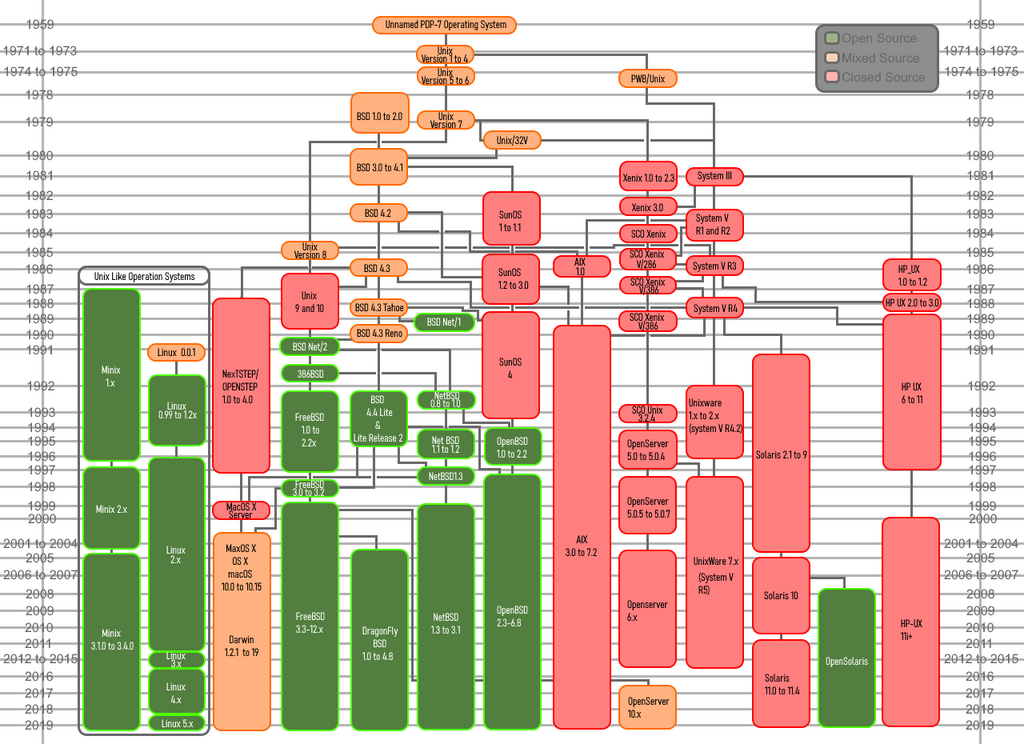
Today, operating systems are everywhere. They're not just on our desktops and laptops, but in our phones (iOS, Android), cars, smart TVs, and even refrigerators. They are the invisible yet indispensable software that powers our digital world. Every time you send a text, stream a movie, or ask a smart speaker for the weather, you are interacting with a sophisticated operating system.
Time to check your understanding of these fundamental concepts.
Using the analogy of a computer as a company, what is the best description of an operating system's role?
You are listening to music, browsing the web, and have a word processor open simultaneously. Which core function of the OS is primarily responsible for ensuring all these applications run smoothly without interfering with each other?
The operating system is a foundational piece of software. By managing the complex interactions between hardware and software, it makes modern computing possible, powerful, and user-friendly.