Operating System Types Explained
Introduction to Operating Systems
The Computer's Conductor
Think of an operating system as the conductor of an orchestra. The hardware components—the processor, memory, and storage—are the musicians. The software applications are the sheet music. Without a conductor, the musicians wouldn't know when to play, how loudly, or in what order. It would be chaos. The operating system (OS) brings order to this complexity, directing all the different parts of your computer to work together harmoniously.
At its core, the OS is a special type of software that acts as the main intermediary between you (and your applications) and the computer's physical hardware. When you click an icon to open a program, you're not talking directly to the processor. You're giving a command to the operating system, which then translates your request into instructions the hardware can understand.
Operating System
noun
Software that manages all of the hardware and software on a computer, providing common services for computer programs and a platform for them to run on.
This management role is crucial. It ensures that different programs can run at the same time without interfering with each other, and it handles all the nitty-gritty details of saving files, connecting to the internet, and displaying images on your screen. The OS provides a stable, consistent environment so that application developers don't have to write code for every single possible hardware configuration.
The Core Functions
An operating system juggles several key responsibilities. These functions are fundamental to how any modern computer works, from a smartphone to a supercomputer.
Process Management: A 'process' is any program that is running. When you have your web browser, a music player, and a text editor all open, the OS is in charge of managing these processes. It decides which process gets to use the CPU and for how long, a task known as scheduling. This is what allows your computer to multitask, making it seem like everything is happening at once.
Memory Management: Your computer's memory (RAM) is a finite resource. The OS is responsible for allocating portions of memory to different processes as they start up and reclaiming that memory when they close. It ensures that one program doesn't accidentally access or overwrite the memory being used by another, which would cause crashes and instability.
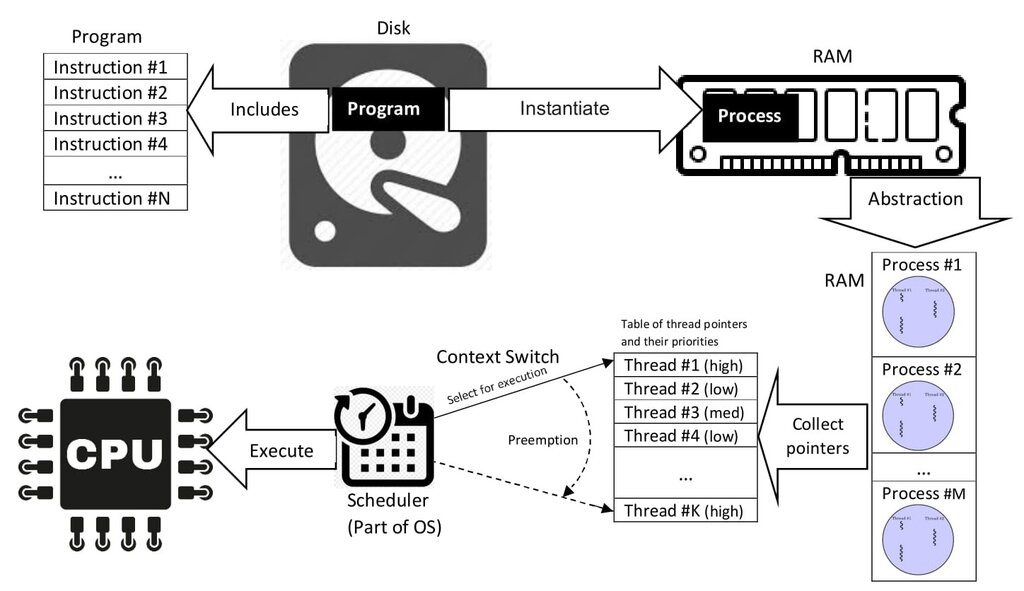
File Systems: Every time you save a document, download a picture, or install an application, the operating system's file system is at work. It organizes data into a hierarchy of files and folders on your storage drive (like a hard drive or SSD). The file system keeps track of where everything is located, who has permission to access it, and how much space is available.
User Interface (UI): This is the part of the OS you actually interact with. Early computers used command-line interfaces (CLIs), where users had to type text commands. Today, most operating systems use a graphical user interface (GUI), which includes icons, windows, and menus that you can manipulate with a mouse or a touchscreen. The UI makes the computer accessible and easy to use.
The Unseen Foundation
Beyond these main functions, the OS also manages device drivers—small pieces of software that allow the OS to communicate with hardware like printers, graphics cards, and webcams. It handles networking, security, and provides a set of common services and libraries that applications can use, so developers don't have to reinvent the wheel for basic tasks like opening a 'Save As...' dialog box.
Without an operating system, a computer would just be a collection of silent, inactive electronic parts. It's the essential software that breathes life into the hardware, creating the platform upon which all other software is built.
Ready to check your understanding of these core concepts? This quiz will test you on the purpose and main functions of an operating system.
Using the analogy of a computer as an orchestra, what role does the operating system play?
What is the primary function of an operating system?
Understanding these fundamentals provides the foundation for exploring the different types of operating systems and how they are designed to handle specific tasks and devices.