Operating System Types Explained
Operating System Basics
The Computer's Conductor
Think of an operating system, or OS, as the conductor of an orchestra. The hardware components—the processor, memory, and storage drives—are the musicians. The software applications you use are the sheet music. The conductor doesn't play an instrument but ensures all the musicians work together to create beautiful music. Similarly, the OS doesn't perform a specific task like a word processor or a web browser, but it manages all the computer's resources so those applications can run smoothly.
An Operating System (OS) is the essential software layer that bridges the gap between a computer's hardware and its users.
Without an OS, your computer would be a useless box of electronics. You wouldn't be able to click an icon to open a program or save a file to your hard drive. The OS provides the fundamental interface that lets you interact with your device and allows software to access the hardware it needs to function.
This layered structure is key. It means an application developer doesn't need to know the specific details of every possible hard drive. They just tell the OS to "save this file," and the OS handles the rest. This abstraction makes creating software much simpler and allows the same application to run on different hardware configurations.
From Punch Cards to Touchscreens
The earliest computers didn't have operating systems. Programmers had to manually load their programs using punch cards or toggle switches, a tedious and slow process. Each program had to include code to control the basic hardware itself.
Over time, as computers became more powerful, batch processing systems were developed to run multiple jobs sequentially without human intervention. This was a step forward, but users still couldn't interact with their programs directly.
The major breakthrough came with the development of multitasking operating systems, which could juggle multiple programs at once. This paved the way for the interactive computing we know today. The final piece of the puzzle for most users was the graphical user interface, or GUI, which replaced complex text commands with intuitive icons, windows, and menus.

The Four Core Functions
Modern operating systems are incredibly complex, but their responsibilities can be broken down into four main areas.
1. Process Management A program sitting on your hard drive is just a file. When you run it, the OS creates a process—an active instance of that program loaded into memory. Your computer is likely running dozens of processes right now. The OS's job is to manage these processes, scheduling when each one gets to use the Central Processing Unit (CPU). It switches between them thousands of times per second, creating the illusion that they are all running simultaneously.
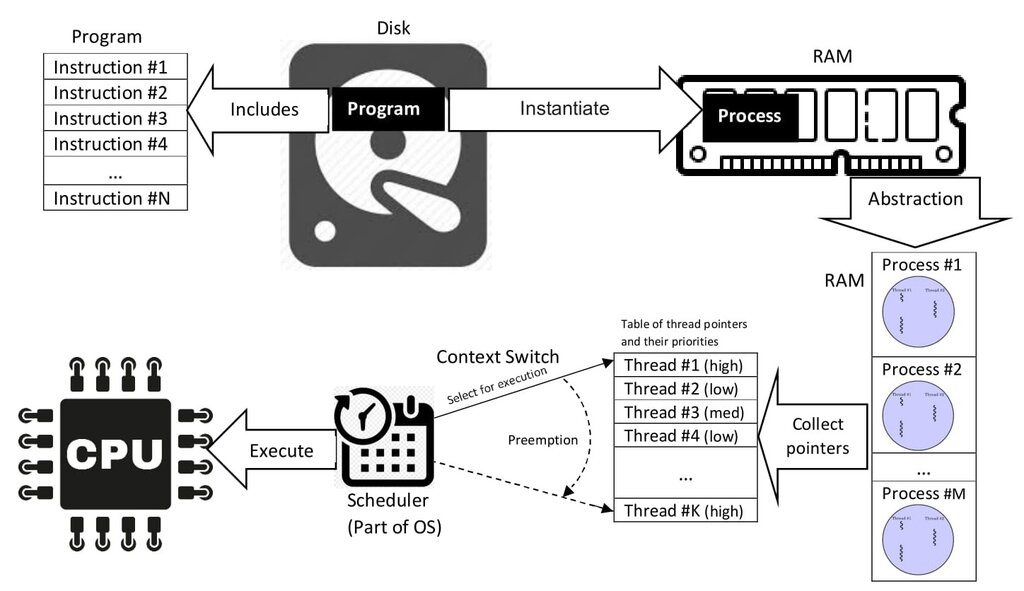
2. Memory Management Every process needs a place in the computer's memory (RAM) to store its instructions and data. The OS is the ultimate gatekeeper of memory. It allocates a portion of RAM to each process and ensures that no process can interfere with another's memory space. When a program closes, the OS reclaims that memory so it can be used by other processes. This careful management prevents crashes and keeps the system running efficiently.
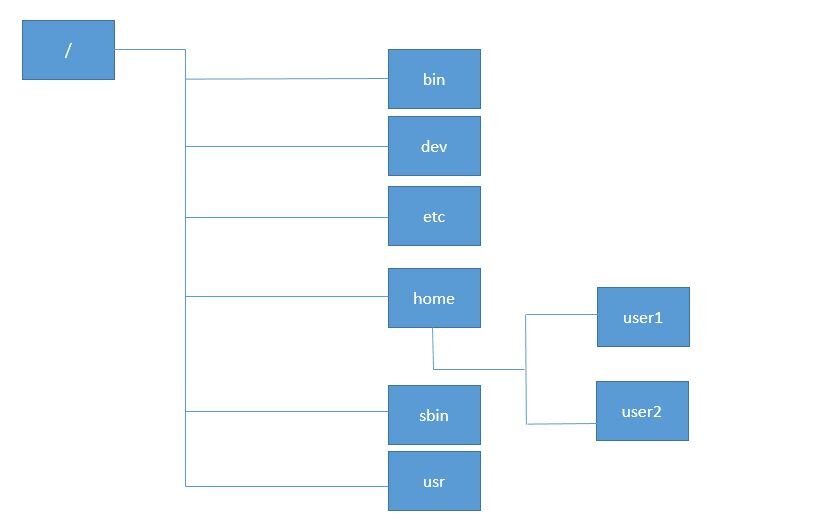
3. File Systems Your data—documents, photos, applications—is stored in files on a hard drive or solid-state drive. The OS is responsible for organizing these files so they can be easily stored and retrieved. It does this through a file system, which is essentially a set of rules for how files are named, organized into directories (folders), and tracked. When you save a document, the OS finds an empty spot on the disk, writes the data, and records its location in the file system's index.
4. Security and Protection Finally, the OS acts as a security guard. It controls who can access the system and what they are allowed to do. This involves user authentication, like requiring a password to log in. It also involves protection, which is about ensuring that programs and users can only access the resources they have permission for. This prevents a buggy web browser from, for example, deleting your important documents or one user from viewing another's private files.
Let's review these key concepts.
Time to check your understanding.
Based on the orchestra analogy, what is the primary role of an operating system?
What is the main advantage of the 'abstraction' layer that an OS provides for application developers?
These core functions are the foundation of any operating system, providing the stable and reliable environment you need to get work done.