Operating System Fundamentals
Introduction to Operating Systems
The Computer's Conductor
A computer without an operating system (OS) is like an orchestra without a conductor. You have all the pieces, the powerful brass, the soaring strings, and the thunderous percussion, but they can't work together. The OS is the software that directs all the hardware and other software, ensuring every part plays its role at the right time.
An Operating System (OS) is a system software that manages computer hardware, software resources, and provides common services for computer programs.
Think of it as the master program that runs when you turn on your device. It's the bridge between you and the complex electronics inside. Whether you're writing an email, playing a game, or browsing the web, the OS is working silently in the background, managing memory, processing your commands, and displaying information on the screen.
What an OS Actually Does
At its core, an operating system juggles several critical responsibilities. Its main job is to manage the computer's resources. These resources include the central processing unit (CPU), memory (RAM), storage drives, and connected devices like printers and webcams. The OS acts like a traffic cop, deciding which application gets to use the CPU and for how long, allocating memory, and handling requests to read or write data.
It also provides a platform for other software to run. Applications don't need to know the specific details of your computer's hardware. Instead, they make requests to the OS, which then translates those requests into instructions the hardware can understand. This abstraction makes it much easier for developers to create software that works on a wide variety of machines.
Finally, the OS provides a user interface (UI), which is how you interact with the machine. This can be a visual system with icons and windows or a simple text-based command line. Without it, you would have no way to tell the computer what to do.
The Core Components
An operating system is not one single program but a collection of components working together. While the specifics can be complex, they generally fall into a few key categories.
kernel
noun
The central component of an operating system that manages operations of the computer and hardware. It acts as the main bridge between the hardware and software.
The kernel is the heart of the OS. It controls everything and has the highest level of privilege. Surrounding the kernel are other essential parts.
- Device Drivers: These are small programs that act as translators. Each piece of hardware, like a mouse or graphics card, has a specific driver that tells the kernel how to communicate with it.
- File Systems: This component organizes how data is stored and retrieved. When you save a file, the file system determines where on the storage drive it goes and keeps a record of its location so you can find it later. It's like a library's card catalog for your data.
- User Interfaces (UI): This is the part of the OS you actually see and interact with. Early computers used a Command-Line Interface (CLI), where users typed text commands. Most modern devices use a Graphical User Interface (GUI), which uses icons, windows, and menus.
| Feature | Command-Line Interface (CLI) | Graphical User Interface (GUI) |
|---|---|---|
| Interaction | Text-based commands | Visual elements (icons, windows) |
| Precision | High; direct control | Lower; more abstract |
| Resource Use | Very low | Higher (requires more memory/CPU) |
| Ease of Use | Steeper learning curve | Intuitive and easy to learn |
| Example | Windows Command Prompt, Bash | Windows, macOS, Android |
Systems for Different Jobs
Operating systems have evolved significantly over time to meet different needs. The earliest computers used very simple systems that could only handle one job at a time.
Batch Systems were the first. Users would prepare their jobs, often on punch cards, and submit them to the computer operator. The OS would then run these jobs in a batch, one after another, without any user interaction. It was efficient for the machine, but slow for the user, who had to wait hours for results.
As computers became more powerful, the CPU often sat idle, waiting for slow mechanical parts to finish a task. To solve this, multiprogramming was introduced. The OS would keep several jobs in memory at once. When one job had to wait for something, like reading from a tape drive, the OS would switch the CPU to another job. This kept the CPU busy and increased overall throughput.
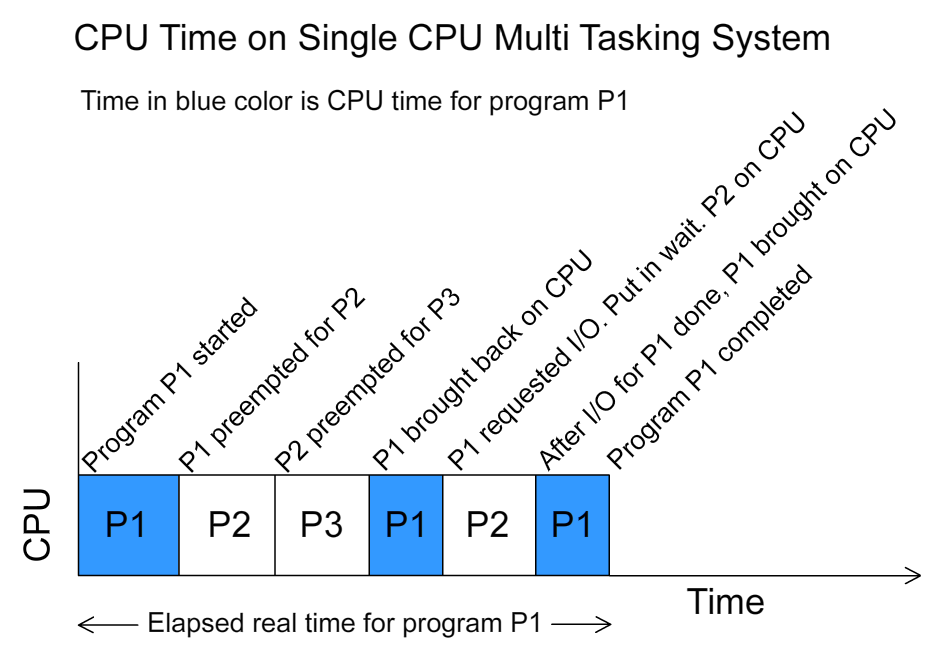
The next logical step was multitasking (or time-sharing) systems, which is what we use today. This is a form of multiprogramming where the OS switches between jobs so frequently—many times per second—that it gives the illusion that all programs are running simultaneously. This allows for interactive computing, where you can browse the web while listening to music and a file downloads in the background.
What is the primary role of an operating system?
What is the core component of the operating system that has the highest level of privilege and controls all other parts?
Understanding these basic concepts provides a foundation for how modern computers function, managing complex tasks with seamless efficiency.