Operating System Fundamentals
Introduction to Operating Systems
The Computer's Conductor
Think of an orchestra. You have dozens of musicians, each playing a different instrument. Without a conductor, you'd have chaos. The conductor tells everyone when to play, how loudly, and keeps the whole performance in sync. An operating system (OS) is the conductor for your computer.
An Operating System (OS) is the essential software that acts as an intermediary between computer hardware and the user.
It’s the first program that loads when you turn on your device, and it manages all the hardware and software. It translates your clicks and keystrokes into actions the hardware can understand. Without an OS, a computer is just a collection of silent, uncoordinated parts. It provides the foundation upon which all your applications, from web browsers to video games, can run.

A Brief History
The very first computers didn't have operating systems. Programmers had to manually load their programs using punch cards or toggle switches, a slow and painstaking process. Only one program could run at a time.
To make things more efficient, developers created systems for batch processing. An operator would group similar jobs together and run them in a batch. This was better, but the computer's processor often sat idle, waiting for a slow task to finish.
The next big leap was multiprogramming. This allowed the OS to keep several jobs in memory at once. When one job had to wait for something, like reading from a tape, the OS could switch to another job. This kept the processor busy and dramatically improved efficiency.
From there, time-sharing systems evolved, allowing many users to interact with a single computer simultaneously. The OS would rapidly switch between each user's tasks, giving everyone the illusion that they had the computer all to themselves. This innovation paved the way for the personal computers and interactive interfaces we use today.
The Core Jobs of an OS
An OS is a master multitasker, constantly juggling several critical responsibilities to keep everything running smoothly. These core functions are the pillars of any modern operating system.
Process
noun
A program in execution. When you launch an application, the OS creates one or more processes to carry out the work.
Process Management: Imagine a busy chef in a kitchen with multiple dishes cooking at once. The chef has to decide which dish needs attention at any given moment—stirring the sauce, checking the oven, chopping vegetables. The OS does the same for processes. It schedules which process gets to use the central processing unit (CPU) and for how long, ensuring that all programs get a fair share of computing power and your system feels responsive.
Memory Management: The OS is also like a meticulous librarian. A computer’s main memory (RAM) is like a set of shelves. When a program needs to run, the OS finds an empty spot on the shelves and allocates it to that program. It keeps track of which program is using which part of memory and ensures that one program doesn't accidentally write over another's space. When you close the application, the OS frees up that shelf space for another program to use.
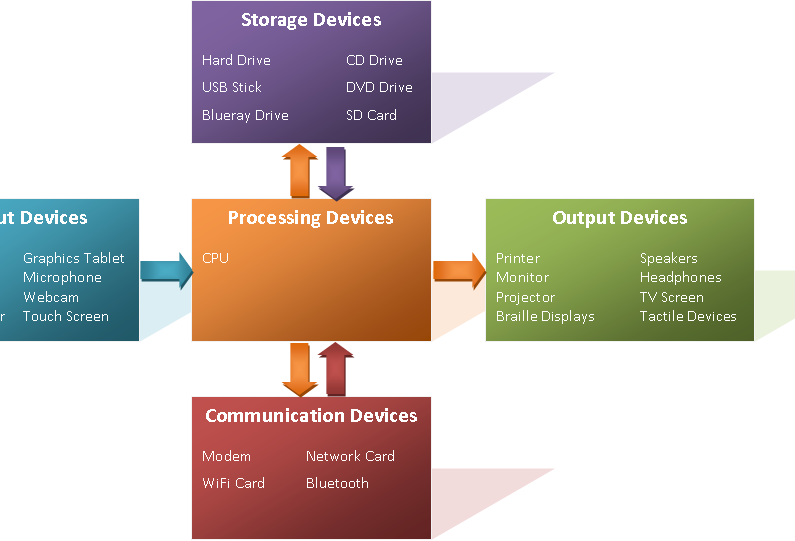
Device Management: Your computer connects to many devices: a keyboard, a mouse, a monitor, a printer, a Wi-Fi card. The OS manages the communication between your software and all this hardware. It uses special programs called device drivers as translators, so an application like a word processor doesn't need to know the specific details of every printer model in the world. It just tells the OS, "print this," and the OS handles the rest.
File Systems: Without a file system, a storage drive would be a chaotic jumble of data with no structure. The OS organizes this data into a hierarchical structure of files and folders that we can easily navigate. It keeps track of where each file is located on the disk, who has permission to access it, and how much space is available. This organization is what allows you to save a document, find it later, and be confident it will still be there.
Security: Finally, the OS acts as a gatekeeper. It controls who can access the computer and what they're allowed to do. This is handled through user accounts, passwords, and permissions that prevent one user from accessing another's files. The OS also provides a layer of protection against malicious software by controlling how programs can access system resources.
Ready to test your knowledge on these core concepts?
Which early OS development allowed a single computer to be used by many people simultaneously, giving each user the illusion of having the machine to themselves?
The OS function responsible for organizing data into a hierarchical structure of files and folders is known as ________.
These five functions are the invisible workhorses of computing. By managing processes, memory, devices, files, and security, the operating system creates a stable and usable environment for us to get our work done.