Operating System Fundamentals
Introduction to Operating Systems
The Computer's Conductor
Think of an operating system (OS) as the conductor of an orchestra. The hardware components—the processor, memory, and storage drives—are the musicians. The software applications you use are the sheet music. The OS doesn't play an instrument itself, but it directs all the musicians, telling them when to play, how loudly, and ensuring they all work together to create a beautiful performance. Without the conductor, you'd just have a chaotic mess of sounds.
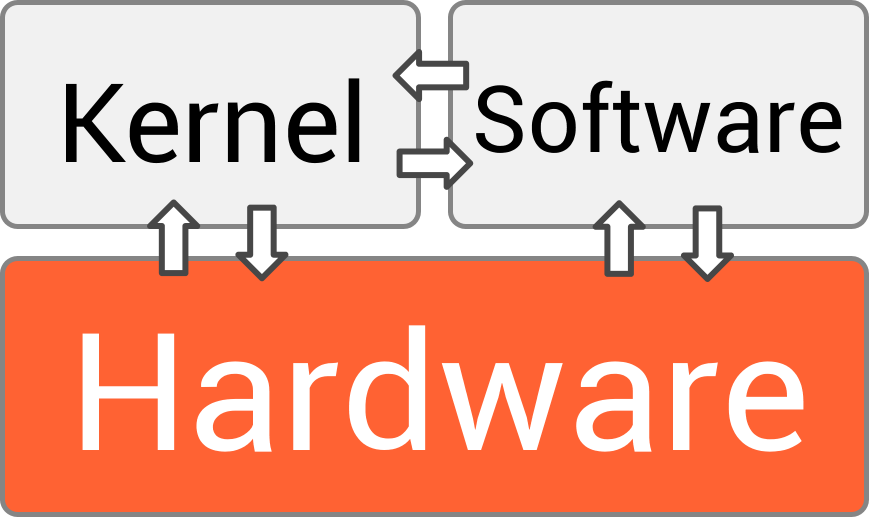
An operating system is the software that manages all the hardware and software on a computer. It acts as the intermediary between you, your applications, and the physical components of your machine.
When you turn on your computer, the OS is the first major piece of software to load. It provides a stable, consistent environment for other programs to run. Whether you're writing an email, browsing the web, or playing a game, the OS is working silently in the background, handling all the complex interactions with the hardware for you.
The Three Core Jobs
While an OS does many things, its responsibilities can be broken down into a few core management tasks. Let's look at three of the most important ones.
- Process Management: Deciding which programs get to run and when.
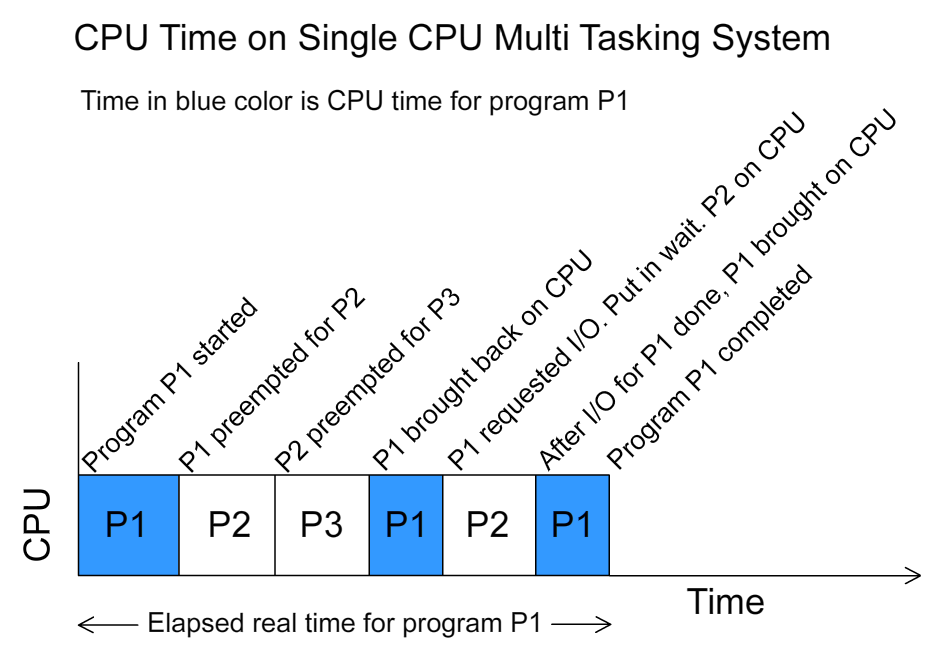
When you run a program, it becomes a process. If you have multiple applications open—a web browser, a music player, and a text editor—you have multiple processes all wanting to use the computer's processor (CPU) at the same time. The OS acts as a traffic cop, scheduling which process gets to use the CPU for a tiny fraction of a second before switching to the next one. This switching happens so fast that it creates the illusion that everything is running simultaneously.
- Memory Management: Allocating the computer's workspace.
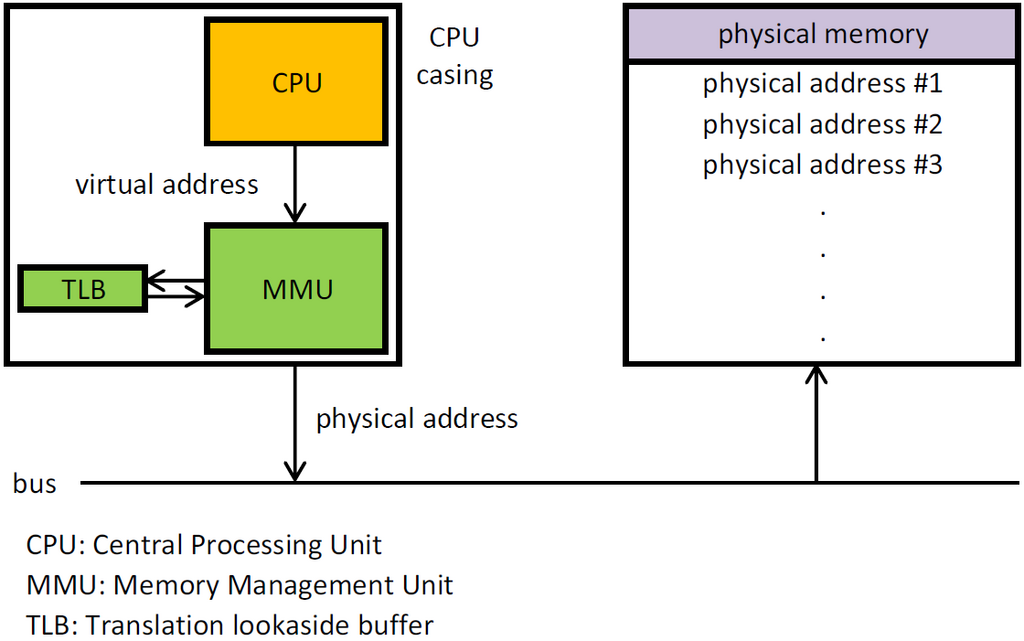
Think of your computer's RAM (Random Access Memory) as a large desk. When a process needs to work, the OS gives it some space on the desk. It also makes sure that one process doesn't write over another's space, which would be like one person scribbling over someone else's important notes.
When a process is finished, the OS cleans up its space on the desk, making it available for the next process. This careful management of memory is crucial for keeping the system stable and preventing programs from interfering with each other.
- File System Management: Organizing and retrieving data.
Your data—documents, photos, applications—is stored on drives in the form of files. Without a file system, a storage drive would be like a library with all its books thrown into one giant, unorganized pile. It would be nearly impossible to find anything.
The OS creates a structure, typically a hierarchy of folders and files, so you can store, find, and retrieve your data easily. It keeps track of where everything is located on the drive, manages file permissions (who can read or write a file), and handles the basic operations of creating, deleting, and renaming files.
A Tour of OS Types
Not all operating systems are designed for the same job. They are tailored for different tasks and environments. Here are a few major types.
| Type | Key Characteristic | Example Use Case |
|---|---|---|
| Batch | Executes jobs in groups without direct user interaction. | Processing payroll or bank statements overnight. |
| Time-Sharing | Allows multiple users to interact with the system simultaneously by sharing CPU time. | Mainframe computers accessed by many users via terminals. |
| Distributed | Manages a group of independent computers and makes them appear to be a single computer. | Large-scale web services or scientific computing grids. |
| Real-Time | Must process data and events within a strict, guaranteed time frame. | Controlling industrial robots, car engines, or medical devices. |
Most modern operating systems, like Windows, macOS, and Linux, are a hybrid of these types. They are primarily time-sharing systems that allow multiple users and processes to run at once, but they also incorporate features from other models to provide a rich and responsive experience.
Using the analogy of an orchestra, what is the primary role of an operating system?
When you have multiple applications open, how does the OS create the illusion that they are all running simultaneously?
From managing the programs you run to organizing your files, the operating system is the unsung hero that makes modern computing possible.