Operating System Fundamentals
Introduction to Operating Systems
What is an Operating System?
Think of an operating system (OS) as the general manager of your computer. It’s the essential piece of software that brings the machine to life. Without it, your laptop or phone would just be a collection of circuits, wires, and silicon. You can't directly tell the processor what to do or pull a file from the hard drive yourself. Instead, you interact with applications, and the OS handles the complex details in the background.
The operating system is the intermediary. It sits between you (and your applications) and the physical hardware, translating your requests into actions the computer can understand.

When you save a document, your word processor doesn't know the specifics of your hard drive. It just tells the OS, "Hey, save this file." The OS then finds space on the drive, writes the data, and keeps track of where it put it. When you open a web browser and a music player at the same time, the OS is what manages the computer's memory and processing power, ensuring both applications can run smoothly without interfering with each other.
kernel
noun
The core component of an operating system that manages the system's resources. It acts as the main bridge between the computer's hardware and its software.
The Evolution of Operating Systems
In the early days of computing, there were no operating systems. Programmers interacted directly with the massive, room-sized machines using punch cards. Setting up a single job was a slow, manual process. To improve efficiency, the first rudimentary operating systems were born.
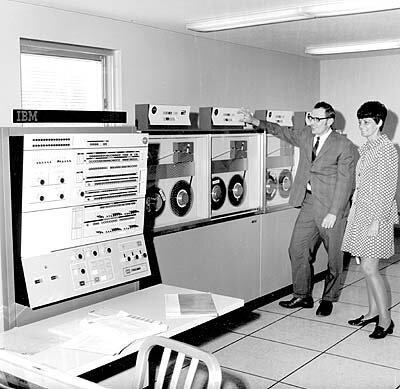
These were Batch Systems. The idea was simple: group similar jobs together and run them in a batch. An operator would collect all the programs that needed a certain compiler, for instance, and run them one after another. This was better than the manual approach, but users had to drop off their programs and come back hours later for the results. There was no direct interaction.
Think of a batch system like a laundromat that only runs full loads: first all the whites, then all the colors. It’s efficient for the machine, but you have to wait.
The next major leap was Time-Sharing Systems. These systems allowed multiple users to connect to a single powerful computer and interact with it simultaneously. The OS was smart enough to rapidly switch between user tasks, giving each a tiny slice of the processor's time. The switching happened so fast that it created the illusion that each person had the computer's full attention. This is the fundamental principle behind the modern operating systems we use today, like Windows, macOS, and Linux.
Finally, there are Real-Time Operating Systems (RTOS). In these systems, correctness depends not just on the result, but on the timing. They are designed for tasks where a delay could be catastrophic. An RTOS powers the anti-lock braking system in your car, the flight controls of an airplane, or a robotic arm on an assembly line. The system must guarantee a response within a strict deadline, every single time.
The OS as Resource Manager
At its core, an OS is a master of resource allocation. It manages four main types of resources:
| Resource | How the OS Manages It |
|---|---|
| Processor (CPU) | Decides which program gets to use the CPU and for how long. This is called scheduling. |
| Memory (RAM) | Allocates memory space to running programs and ensures they don't interfere with each other. |
| Input/Output Devices | Manages communication with devices like your keyboard, mouse, printer, and network card. |
| Files & Data | Organizes data into files and folders, controls access, and keeps track of where everything is stored. |
This constant juggling act is what makes modern computing possible. The OS provides a stable, consistent environment where software can run, abstracting away the messy, complicated details of the underlying hardware. It allows application developers to focus on creating great features, trusting the OS to handle the fundamentals.
What is the primary role of an operating system?
In the early days of computing, which type of operating system required users to submit their jobs and come back hours later for the results, with no direct interaction?