Operating System Essentials
Introduction to Operating Systems
The Computer's Conductor
Think of a computer's hardware—the processor, memory, and storage—as a talented but chaotic orchestra. Each part can do amazing things, but without a conductor, all you'd get is noise. The operating system (OS) is that conductor. It's the core software that directs all the hardware and software, making sure they work together to perform useful tasks.
An OS is the intermediary between you (and your applications) and the physical computer hardware. It translates your clicks and commands into actions the hardware can understand.

Without an OS, you'd have to write specific instructions for every single task, telling the processor exactly how to fetch data from the hard drive and display it on the screen. The OS handles all this complexity behind the scenes, providing a stable platform for applications like web browsers and games to run on. Every desktop, laptop, smartphone, and server has one.
A Manager of Many Tasks
The OS has four main responsibilities. It's a multi-talented manager that juggles everything needed to make a computer function smoothly.
Process
noun
A program that is currently running or executing on a computer.
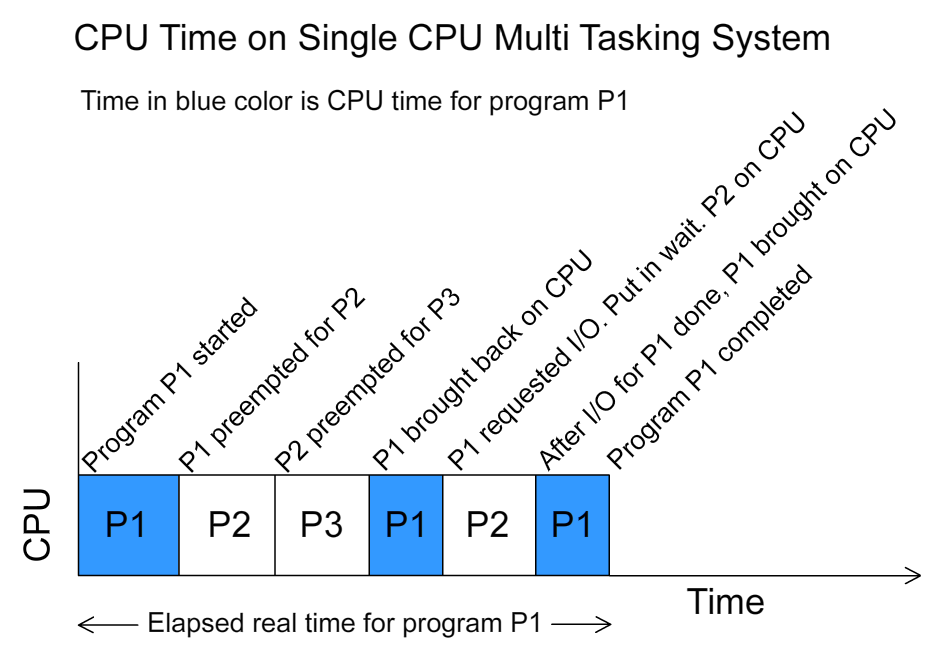
Process Management: A modern computer does many things at once. You might have a browser, a music player, and a word processor all open simultaneously. Each of these running applications is a process. The OS's job is to manage these processes, deciding which one gets to use the Central Processing Unit (CPU) at any given moment. It rapidly switches between them, creating the illusion that they're all running at the same time. This is called multitasking.
Memory Management: Random Access Memory (RAM) is the computer's short-term workspace. When you run a program, the OS allocates a chunk of this memory for it. The OS must ensure that each process stays within its assigned memory space and doesn't interfere with others. When you close the program, the OS reclaims that memory, making it available for the next task. It's like a librarian assigning shelves to different books and clearing them off when the books are returned.
File Management: The OS is responsible for organizing and keeping track of all your data. It creates the hierarchical structure of files and folders that we're all familiar with. It knows exactly where on the hard drive or solid-state drive (SSD) each file is stored. When you save a document or download a picture, the OS handles the process of writing that data to the storage device.
Device Management: Your computer connects to many devices: a keyboard, mouse, monitor, printer, Wi-Fi card, and more. The OS communicates with all of them through special software called drivers. It manages the flow of information between these devices and your applications, so you don't need to worry about the technical details of how a printer works to print a document.
Different Systems for Different Needs
Not all operating systems are built the same way. They are designed for different purposes and environments. Here are a few common types:
| Type | Description | Example |
|---|---|---|
| Single-user | Allows one user to do one thing at a time. | MS-DOS |
| Multi-user | Allows multiple users to run programs at the same time on a single computer. | Linux, Unix, Windows Server |
| Real-time | Designed to respond to inputs instantly. Used in systems where timing is critical. | Systems in cars, airplanes, or medical devices |
| Distributed | Manages a group of independent computers and makes them appear to be a single computer. | Cloud computing platforms like AWS or Google Cloud |
A personal computer, like a Windows PC or a Mac, runs a multi-user OS at its core, even if you're the only one who uses it. This architecture allows it to run background services and your applications simultaneously and securely.
Real-time systems are crucial in settings where a delay could be catastrophic. Think of the software controlling a car's airbags—it must deploy them in a fraction of a second. A distributed OS pools the resources of many machines, providing the immense power behind the internet services we use every day.
The provided text compares an operating system to an orchestra conductor. What is the primary role of the OS in this analogy?
An OS creates the illusion of running multiple applications at the same time by rapidly switching the CPU's attention between them. What is this capability called?
These fundamental concepts are the building blocks of all modern computing. Understanding the role of the OS helps demystify what's happening inside the machine.