Operating System Essentials
Introduction to Operating Systems
The Computer's Conductor
Think of an orchestra. You have dozens of musicians, each with a different instrument, all needing to play in harmony. Without a conductor, it would be chaos. A computer's operating system (OS) is that conductor. It's the core software that manages all the hardware and software resources, ensuring everything works together smoothly.
Operating System
noun
System software that manages computer hardware and software resources and provides common services for computer programs.
The OS acts as an intermediary. Your applications, like a web browser or a game, don't need to know the specific details of your computer's processor or hard drive. They just make requests to the OS, and the OS handles the complex task of communicating with the hardware to get the job done. This creates a stable, consistent environment for software to run.

The Four Core Jobs
An operating system is constantly juggling several critical tasks. We can group its main responsibilities into four key functions.
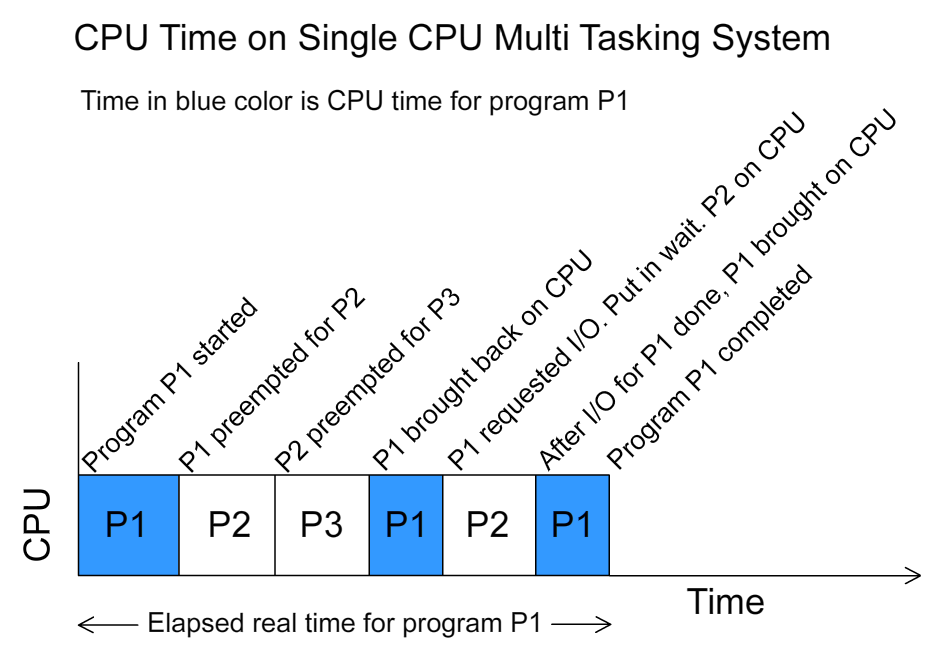
Process Management: A running program is called a process. When you have multiple applications open—a browser, a music player, and a text editor—the OS is in charge of managing all these processes. It decides which process gets to use the CPU and for how long, ensuring that each one gets a fair share of processing time. It handles starting, stopping, and pausing them as needed.
Memory Management: Your computer's RAM is like its short-term memory. The OS acts as a meticulous librarian for this memory. When a process needs to store some data, the OS finds an empty spot in RAM and allocates it. When the process is finished, the OS reclaims that memory so it can be used by something else. Crucially, it also ensures that one process can't access or interfere with the memory being used by another, which prevents crashes and keeps the system stable.
File System Management: Without an OS, a hard drive would just be a vast, unorganized collection of data. The OS creates a file system, organizing data into the familiar structure of files and folders. It keeps track of where everything is stored, controls who can access what, and manages the creation, deletion, and movement of files.
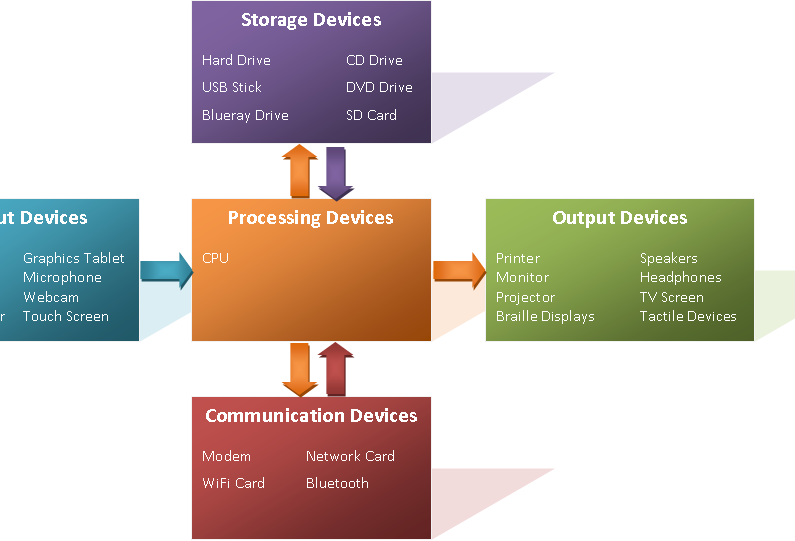
Device Management: Your computer has many connected devices: a keyboard, mouse, monitor, printer, network card, and more. The OS manages the communication between your computer and all of these peripherals. It uses special pieces of software called drivers to translate the general commands from your applications into specific instructions that each device can understand.
Different Systems for Different Needs
Not all operating systems work the same way. Their design often depends on the type of work they are intended to do. Here are a few major types.
Batch Systems: These were some of the earliest operating systems. Users would prepare their jobs on punch cards or tape and submit them to the computer operator. The OS would then run these jobs in a large group, or "batch," one after the other, without any direct interaction from the user. This was efficient for repetitive, non-interactive tasks like payroll processing.
Time-Sharing Systems: This is the model used by most modern operating systems like Windows and macOS. The OS allows multiple users or processes to share the computer's resources simultaneously. It does this by dividing the CPU's time into tiny slices and rapidly switching between tasks. The switching happens so fast—thousands of times per second—that it creates the illusion that all the programs are running at the same time, allowing for a responsive, interactive experience.
Distributed Systems: A distributed OS manages a collection of separate, networked computers, but makes them appear to the user as a single, unified system. For example, a search engine uses a distributed system to spread the task of indexing the web across thousands of servers. This approach increases computing power and reliability; if one computer in the network fails, the system can continue to operate using the others.
What is the primary role of an operating system?
In the context of an OS, what is the main purpose of memory management?
That's a quick look at the fundamental role of an operating system. It's the invisible yet essential software that makes modern computing possible.