Online Safety Essentials
Understanding Online Threats
What Are You Up Against?
The internet is an amazing tool, but it's also a place where you need to be careful. Understanding the most common threats is the first step toward protecting yourself. Think of it like learning the rules of the road before you start driving. Once you can spot the dangers, you're much better at avoiding them.
Most online threats fall into a few main categories: malicious software that sneaks onto your device, deceptive messages that trick you into giving up information, and the theft of your personal data. Let's break down what these are and how they work.
Malware The Digital Pest
Malware, short for "malicious software," is any program or file that is intentionally harmful to a computer, network, or server. It's designed to disrupt operations, gather sensitive information, or gain unauthorized access to computer systems. Think of it as a digital pest that can cause all sorts of problems once it gets inside.
There are several common types of malware, each with its own nasty specialty.
| Type | How it Works |
|---|---|
| Virus | Attaches to a clean file and spreads when you open it, like a flu virus spreading from person to person. |
| Worm | Spreads across computer networks on its own, without needing to attach to a program. It looks for weaknesses to exploit. |
| Trojan | Disguises itself as legitimate software. You might download what you think is a useful app, but it has a hidden, malicious purpose. |
| Ransomware | Locks up your files and encrypts them, making them inaccessible. The attacker then demands a ransom payment to unlock them. |
| Spyware | Hides on your device and secretly collects information, such as your passwords, browsing habits, and credit card numbers. |
Phishing The Art of the Fake
Phishing is a type of scam where attackers try to trick you into giving them sensitive information, like passwords or financial details. They do this by pretending to be someone or something you trust, like your bank, a social media site, or even a government agency.
These attacks usually arrive as an email, text message, or a direct message on social media. The message will often try to create a sense of urgency, telling you that your account has been compromised or that you need to act immediately to claim a prize. The goal is to get you to click a link or download an attachment without thinking.
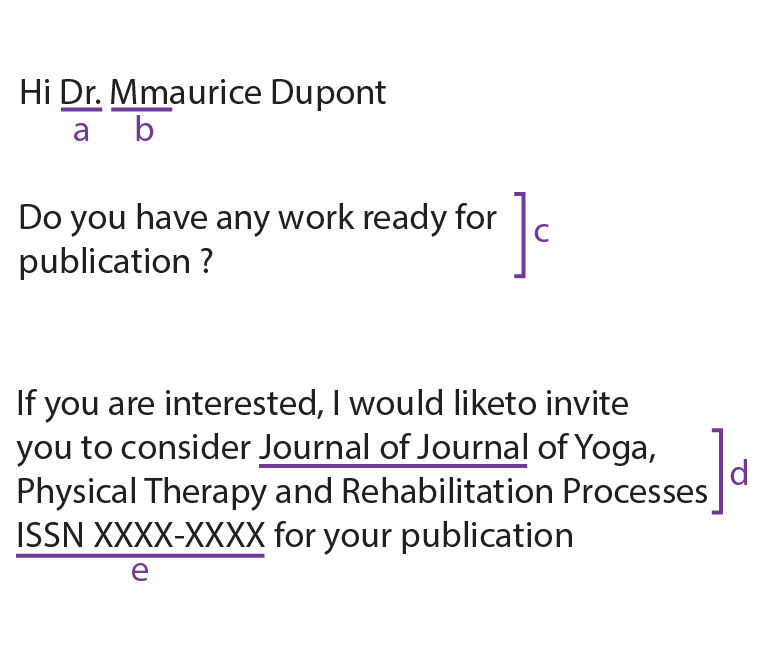
How to spot a phishing attempt:
- Check the sender's email address. It might look real at a glance, but often has a slight misspelling or a strange domain.
- Look for generic greetings. Legitimate companies usually address you by name, not "Dear Customer."
- Don't trust urgent threats. Scammers want you to panic and act quickly. Pause and think before you click.
- Hover over links. Before you click, hover your mouse over the link to see the actual web address it will take you to. If it looks suspicious, don't click.
Identity Theft and Data Breaches
Malware and phishing are often just the first steps. The attacker's ultimate goal is frequently to steal your personal information and commit identity theft. This happens when someone uses your data—like your name, Social Security number, or credit card number—without your permission to commit fraud or other crimes.
Your information can also be exposed in a data breach. This is when sensitive data from a company or organization is stolen by hackers. Breaches can expose the personal information of millions of people at once. You might have done everything right to protect yourself, but your data can still be compromised if a service you use gets hacked.
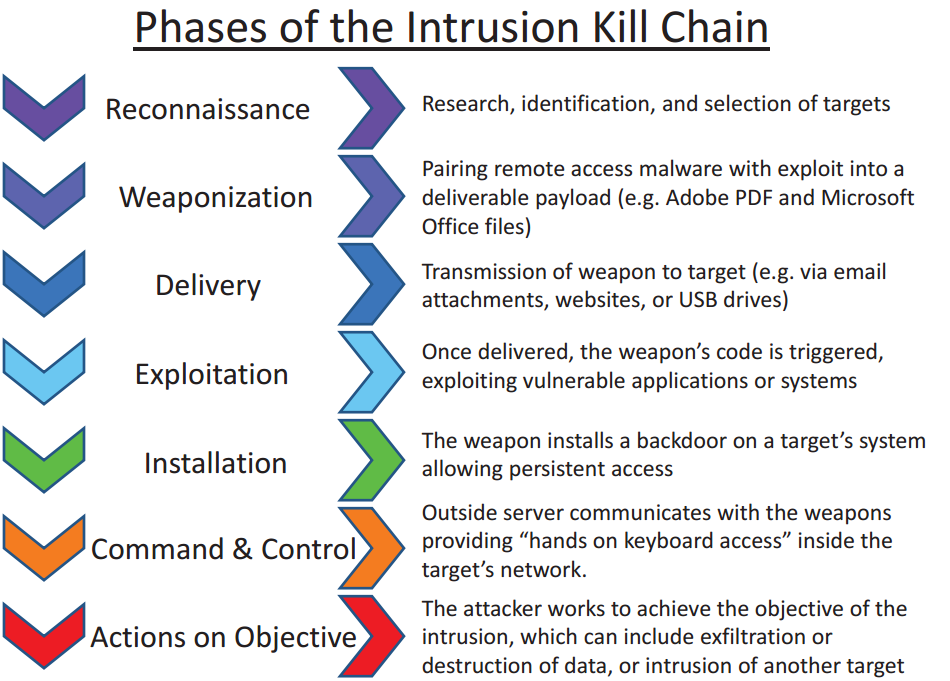
The consequences of identity theft and data breaches can be serious. Victims might face financial loss from fraudulent charges, damage to their credit score, and a long, stressful process to clear their name and restore their identity. It underscores why recognizing these initial threats is so important.
Now that you can identify some of the most common online threats, let's test your knowledge.
What is the primary purpose of software known as "malware"?
You receive an urgent text message that claims you've won a prize and must click a link to enter your personal details immediately to claim it. This is a classic example of what kind of threat?
Knowing these terms and tactics is the foundation of good online safety. By staying aware and skeptical, you can navigate the digital world more confidently.