OCR Prescription Data with Java ML
Introduction to OCR
Teaching Computers to Read
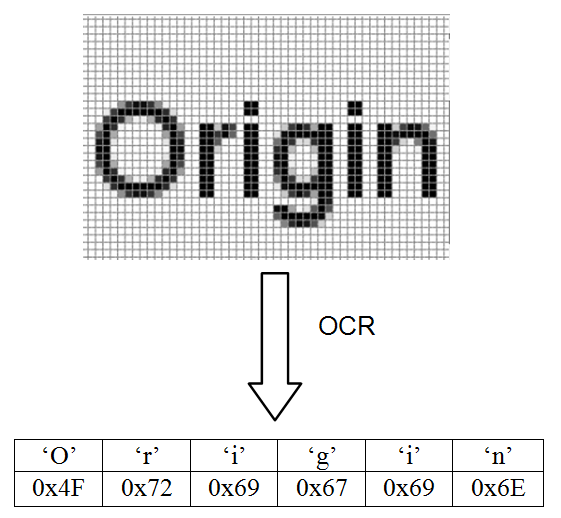
A computer sees a picture of a stop sign differently than we do. We see a red octagon with the word "STOP." A computer just sees a grid of pixels—a collection of red, white, and gray dots. It doesn't inherently understand the letters or the word they form. That's where Optical Character Recognition, or OCR, comes in.
Optical Character Recognition
noun
The process of converting images of typed, handwritten, or printed text into machine-readable text data.
Think of it as a bridge. It connects the visual world of text, which humans read, to the digital world of text, which computers can process. Without OCR, a scanned document is just an image file, like a photograph. You can't search for a word in it, copy a sentence, or have a screen reader announce the text. OCR analyzes the image, identifies the shapes of letters and numbers, and translates them into actual text characters (like ASCII or Unicode).
From Post Offices to Pocket Scanners
The idea of teaching machines to read isn't new. The earliest concepts emerged in the early 20th century. However, the first practical OCR machines appeared in the 1950s. They were massive, expensive devices created for very specific tasks, like sorting mail by reading postal codes or helping banks process checks.
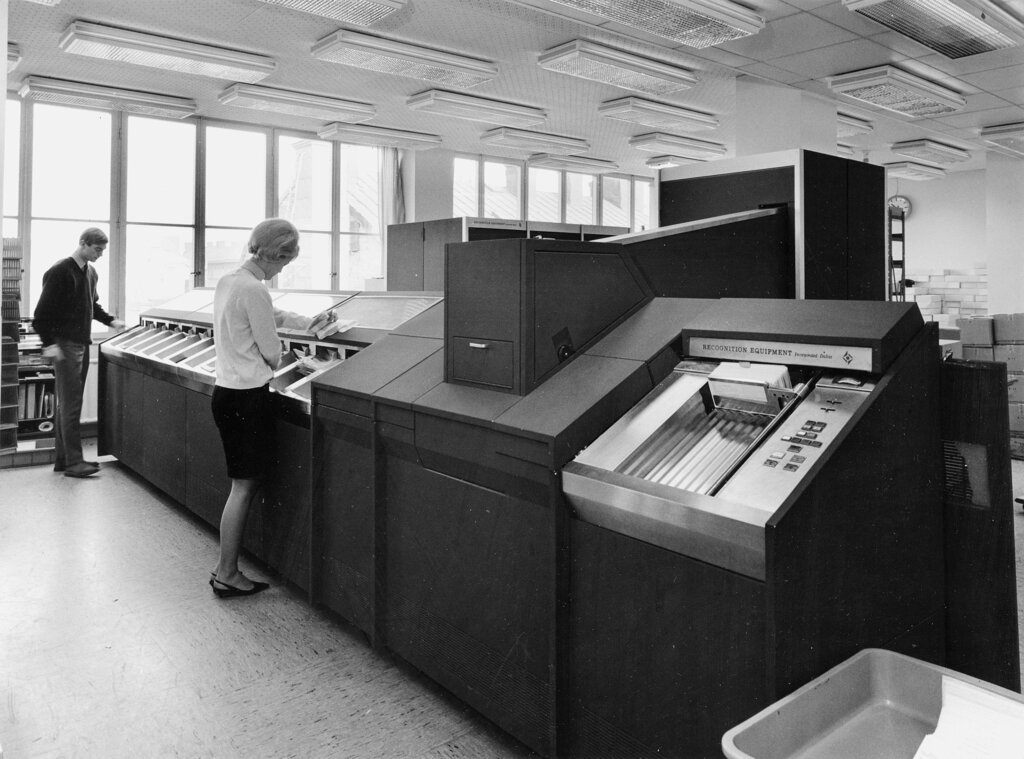
These early systems were limited. They could often only recognize a single, specific font, printed perfectly on a clean background. Over the decades, advances in computing power, software algorithms, and artificial intelligence have dramatically improved OCR. Technology that once filled a room now fits in your pocket, accessible through a smartphone app that can read messy handwriting on a crumpled napkin.
Optical Character Recognition (OCR) technology transforms these hidden archives into discoverable resources by converting image-based text into searchable content while preserving the original document appearance.
OCR in the Wild
Once you know what OCR is, you start seeing it everywhere. It's a key technology behind many modern conveniences:
- Digitizing Knowledge: Libraries and companies like Google use OCR to scan millions of books, making them searchable and accessible online.
- Automating Paperwork: Businesses scan invoices, receipts, and forms to automatically extract data, saving countless hours of manual data entry.
- Assistive Technology: Screen reader applications use OCR to read printed text aloud from a phone's camera, helping visually impaired individuals navigate the world.
- Travel and Translation: Apps can read street signs or menus in a foreign language and translate them for you on the spot.
- Law Enforcement: Automated systems read license plates to identify vehicles for toll collection or police alerts.
At its core, OCR makes information more useful by unlocking text trapped in images.
Not a Perfect Science
Despite its power, OCR isn't flawless. The accuracy of the conversion depends heavily on the quality of the source image. Several factors can trip up an OCR system:
Common challenges include blurry or low-resolution images, strange fonts, complex layouts with columns and tables, and text on degraded or damaged documents. Even the best systems can struggle with cursive handwriting or text that's distorted by perspective. Because of this, developers often have to clean up or "preprocess" images before sending them to an OCR engine to get the best results.
If you anticipate issues ahead of time related to the fact that OCR (Optical Character Recognition) is an imperfect technology, it will help you set more realistic translation project timelines.
Understanding these fundamentals is the first step. By recognizing both the incredible capabilities and the inherent limitations of OCR, you can begin to use it effectively to solve real-world problems.
What is the primary function of Optical Character Recognition (OCR)?
Which of these factors is most likely to cause an OCR system to make errors?