OAuth 2.0 Authorization Framework
Introduction to OAuth 2.0
What is OAuth 2.0?
Have you ever signed up for a new app and seen an option like “Continue with Google” or “Log in with Facebook”? When you click that button, you’re likely using OAuth 2.0. In simple terms, OAuth 2.0 is a standard that allows one application to access your data from another application on your behalf, without you having to give the first app your password.
Think of it like a hotel key card. When you check in, the front desk doesn’t give you a master key to the entire hotel. They give you a key card that grants you access only to your room and maybe the gym, and only for the duration of your stay. OAuth 2.0 works similarly, providing temporary, limited-access tokens instead of master passwords.
This process is called delegated authorization. You (the user) are delegating permission to a third-party app to access specific information or perform certain actions from a service where you have an account. The key here is limited access. The app only gets the permissions it asks for and that you approve. It never sees your actual password for the other service.
The Problem OAuth Solved
Before standards like OAuth existed, the internet had a big problem. If you wanted a photo printing service to access your pictures on a photo-sharing site, you often had to give the printing service your username and password for the photo site. This was a terrible security practice. It gave the third-party app full access to your account, and if that app's security was breached, your credentials would be stolen.
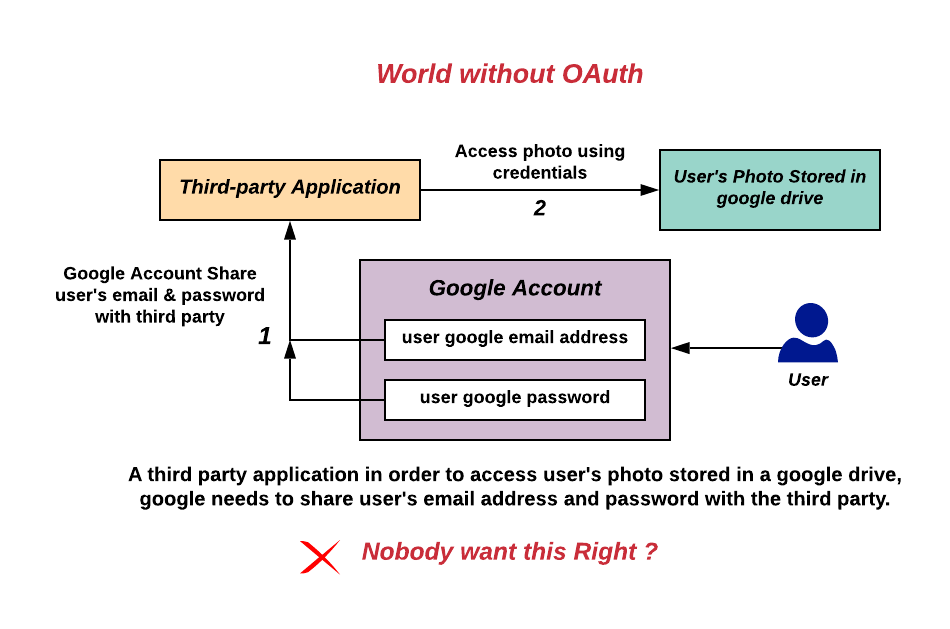
OAuth 1.0 was created in 2007 to solve this. It was a good start but was notoriously complex to implement. In 2012, OAuth 2.0 was released as a complete rewrite. It simplified the process, made it more flexible, and was designed with mobile apps in mind, which were becoming increasingly common. Today, OAuth 2.0 is the industry standard for API authorization.
Authorization, Not Authentication
It’s crucial to understand a key distinction. OAuth 2.0 is a protocol for authorization, not authentication. These two terms sound similar but mean very different things.
authorization
noun
The process of verifying what a user is allowed to do. It determines the specific permissions or access rights an individual has to a resource.
Authentication is about verifying who you are. When you type your username and password into a login screen, you're authenticating.
Authorization is about what you're allowed to do. Once you're logged in, authorization determines whether you can view a page, edit a file, or delete a comment.
OAuth 2.0 handles the authorization part—it gives an app permission to do things for you. While it's often used in login flows, it doesn't actually authenticate the user itself. That job falls to other protocols, like OpenID Connect, which is built on top of OAuth 2.0 to add an authentication layer.
| Protocol | Primary Purpose | Key Use Case |
|---|---|---|
| OAuth 2.0 | Authorization | Granting a third-party app limited access to your data in another service. |
| OpenID Connect (OIDC) | Authentication | Using your Google account to sign in to a new website (social login). |
| SAML | Authentication & Authorization | Signing in to multiple corporate applications with a single set of credentials (enterprise single sign-on). |
OAuth in the Wild
Once you know what to look for, you'll see OAuth 2.0 everywhere. It's the technology that powers many of the convenient integrations we use daily.
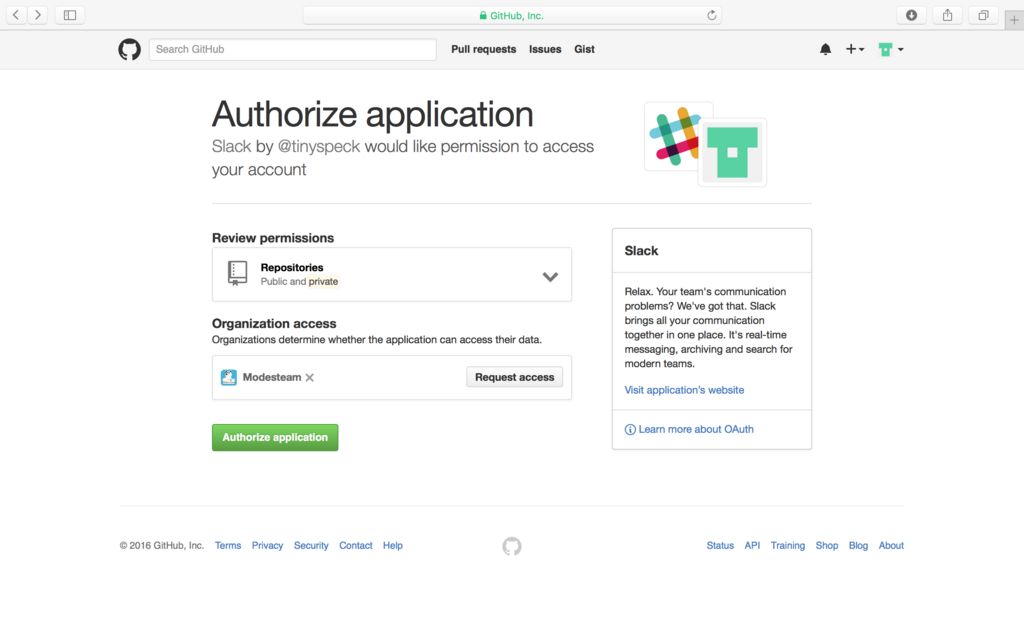
Common use cases include:
- Social Logins: As we've discussed, using your social media or email account to sign in to other services is a primary use case.
- Connecting Services: When you allow your calendar app to access your contacts, your music app to post to your social feed, or your smart home device to connect to your email, you're using OAuth.
- Third-Party API Access: Developers use OAuth to securely access APIs. For example, a travel app might use the Google Maps API to show directions, and OAuth ensures it has the proper permissions to do so without accessing a user's entire Google account.
In each case, you, the user, are presented with a consent screen that clearly lists what permissions the application is requesting. You remain in control, and your password is never shared.