Network Testing Commands
Network Basics
The Rules of the Road
For data to travel from your computer to a website and back, it needs a clear set of rules. Think of it like a postal service. There are rules for how to write an address, how mail gets sorted, and how it’s physically delivered. In computer networking, these rules are organized into conceptual frameworks called models. The two most important are the OSI model and the TCP/IP model.
The OSI (Open Systems Interconnection) model is a 7-layer framework that standardizes the functions of a telecommunication or computing system. It's a great tool for learning and for troubleshooting because it breaks down the complex process of network communication into smaller, more manageable pieces.
While the OSI model is great for theory, the TCP/IP model is what the internet actually uses. It's a more practical, four-layer model that collapses some of the OSI layers.
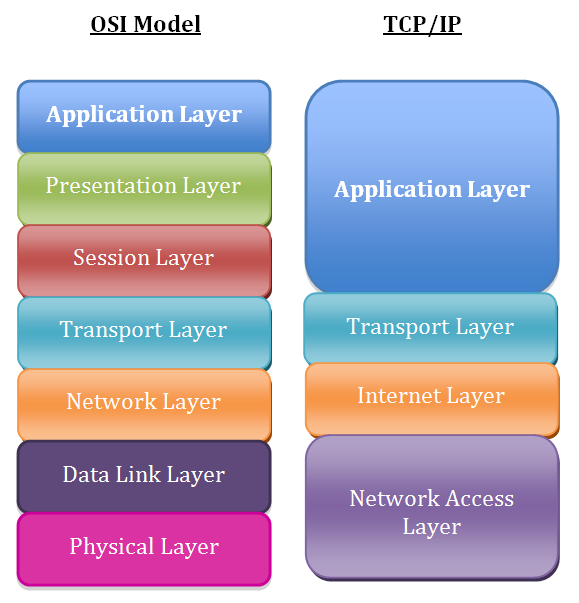
Here’s how they map out:
- Application Layer: Combines the OSI Application, Presentation, and Session layers. This is where protocols you've heard of, like HTTP (for web browsing) and SMTP (for email), operate.
- Transport Layer: This corresponds directly to the OSI Transport layer. It handles end-to-end communication, ensuring data arrives reliably using protocols like TCP.
- Internet Layer: This maps to the OSI Network layer. Its job is to move packets across networks. The Internet Protocol (IP) lives here.
- Network Access Layer: This combines the OSI Data Link and Physical layers. It deals with the physical hardware that makes the connection possible, like cables and network cards.
When things go wrong, network engineers often ask, "What layer is the problem on?" This helps them narrow down the possibilities. If it's a physical cable issue, it's Layer 1. If a website is down but the internet works, it might be a Layer 7 problem.
Your Digital Address
Every device connected to a network needs a unique identifier, just like every house on a street needs a unique address. In networking, this is called an IP address.
IP Address
noun
A unique string of numbers separated by periods that identifies each computer using the Internet Protocol to communicate over a network.
The most common format you'll see is IPv4, which looks like this: 192.168.1.101. It consists of four numbers, each ranging from 0 to 255. An IP address has two parts: a network portion and a host portion.
- Network Portion: Identifies the specific network the device is on. It's like the street name.
- Host Portion: Identifies the specific device on that network. It's like the house number.
How do computers know which part is which? That's where the subnet mask comes in.
A subnet mask is another set of four numbers, like 255.255.255.0. It acts like a stencil. When a computer looks at an IP address through the subnet mask, the 255s tell it, "This part is the network address." The 0s say, "This part is the host address."
| Address Type | Example | Role |
|---|---|---|
| IP Address | 192.168.1.101 | Identifies the device |
| Subnet Mask | 255.255.255.0 | Identifies the network part of the IP |
| Network ID | 192.168.1.0 | Identifies the entire network (the street) |
| Host ID | 101 | Identifies the specific device (the house) |
This system of separating networks from hosts is called subnetting. It allows network administrators to divide a large network into smaller, more manageable sub-networks. This improves organization, security, and performance.
Directing Traffic
Now that we have addresses, we need devices to manage the flow of data. Two of the most fundamental pieces of networking hardware are switches and routers. They operate at different layers of the OSI model and have distinct jobs.

A switch is a device that connects other devices together on the same local network. Think of it as the mail sorting office for a single, large apartment building. It knows which apartment (device) is in which room (port) and directs mail (data) only to the intended recipient. It operates at the Data Link Layer (Layer 2) and uses physical MAC addresses, which are unique hardware identifiers burned into every network card.
A router, on the other hand, connects different networks together. If the switch manages mail inside one building, the router is what connects that building's mailroom to the city's entire postal system. It directs traffic between your local network and the wider internet. Routers operate at the Network Layer (Layer 3) and use IP addresses to figure out the best path for data to travel across the internet.
In a typical home setup, the box your internet provider gives you is often a combination device: a modem, a router, a switch, and a wireless access point all in one.
By understanding these core pieces—the models (OSI/TCP/IP), the addressing system (IP/subnets), and the traffic directors (switches/routers)—you have the foundation needed to understand how networks function and how to start diagnosing problems when they don't.