Network Operating System Administration Basics
Introduction to Network Operating Systems
The Network's Conductor
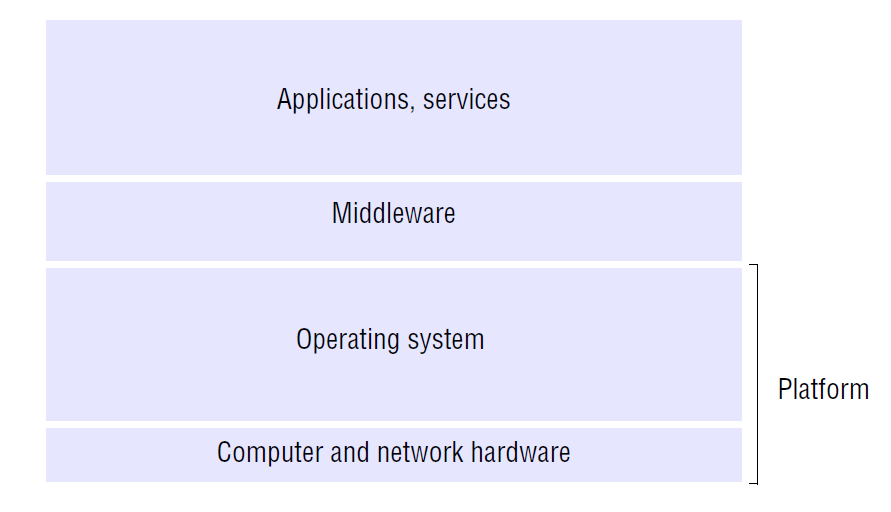
A standard operating system, like Windows 10 or macOS, is great at managing one computer. It juggles your applications, files, and hardware. But what happens when you have dozens or even thousands of computers that need to work together? That's when a specialized OS is needed to direct the show.
Network Operating System
noun
A specialized operating system for a network device (like a router, switch, or firewall) or for a server that provides services to other computers on a network.
Think of a Network Operating System, or NOS, as the conductor of an orchestra. While each musician (a computer) can play its own part, the conductor (the NOS) ensures they all play together harmoniously. It coordinates communication, shares resources, and keeps everything secure so the entire network can perform complex tasks.
Core Responsibilities
A NOS has three primary jobs that make a network function smoothly. It's a gatekeeper, a librarian, and a security guard all rolled into one.
User Management: The NOS is in charge of who can access the network. It maintains a list of users and their credentials. When you log into a work or school computer, the NOS is what verifies your username and password. It also handles permissions, determining what each user is allowed to see and do. For example, it can ensure that only the accounting department can access financial spreadsheets.
A junior designer can be granted access to project folders but restricted from accessing sensitive company-wide financial reports.
Resource Allocation: One of the main benefits of a network is sharing resources. A NOS makes this possible. It allows many users to share a single printer, access files stored on a central server, or use a shared internet connection. The NOS manages the requests for these resources, preventing conflicts and ensuring everyone gets fair access.
Security Enforcement: The NOS acts as the first line of defense for the network. It enforces security policies, such as requiring strong passwords or blocking access from unauthorized devices. Many network operating systems include firewall capabilities to monitor traffic coming in and out of the network, protecting it from external threats. It logs events, which helps administrators track down problems or identify security breaches.
Common Systems
Network operating systems come in many flavors, but most fall into a few major categories. You've likely heard of their desktop counterparts.
| Category | Examples | Common Use |
|---|---|---|
| Windows Server | Windows Server 2019, 2022 | Corporate environments, often used for file sharing, user management (Active Directory), and web services. |
| Linux-Based | Ubuntu Server, Red Hat Enterprise Linux (RHEL), Debian | Web servers, databases, and cloud computing. Known for stability, security, and being open-source. |
| Proprietary | Cisco IOS, Juniper JUNOS | Specialized hardware like routers and switches. Optimized for routing traffic and managing network infrastructure. |
Windows Server is popular in many businesses due to its integration with other Microsoft products and its graphical user interface. Linux systems are the backbone of the internet, powering a vast majority of web servers because of their flexibility and robust performance.
Proprietary systems are different. You won't install Cisco's Internetwork Operating System (IOS) on a standard server. It's the software that runs on Cisco's own hardware, like the routers that direct traffic across the internet. Administrators interact with these systems primarily through a command-line interface.
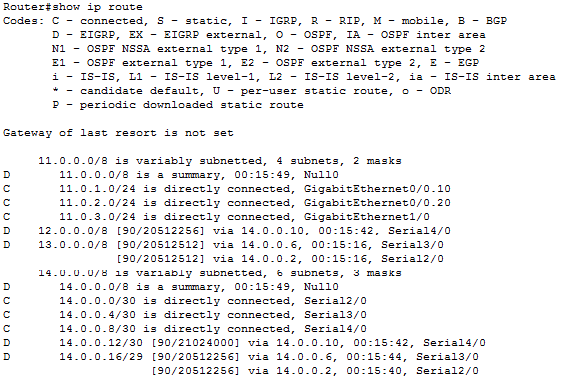
While each type of NOS has a different look and feel, they all share the same fundamental goal: to make a collection of individual computers function as a single, powerful network.