Modern Website Architecture and Launch
Modern Site Architecture
The Client and the Server
A modern website isn't a single entity. It's a conversation between two distinct parts: the client and the server. The client is what you see and interact with in your browser—the buttons, text, and images. This is often called the frontend. The server is the powerful, remote computer that stores the data and runs the core logic. This is the backend.
This separation is fundamental. The client's job is to present information and capture your actions. The backend's job is to process those actions, manage data, and perform the heavy lifting. They communicate through a well-defined set of rules, much like a waiter taking an order to the kitchen.
When you click 'Buy Now' on an e-commerce site, your browser (the client) doesn't handle the payment. It packages up a request—containing information about the product you want—and sends it to the server. The server receives this request, runs the necessary business logic (checks inventory, processes payment), and sends back a response, like a confirmation message. This is the request-response lifecycle in action.
Dividing the Labor
Distinguishing between frontend and backend tasks is crucial for building scalable applications. Each side has a clear responsibility.
The frontend is responsible for state management. State is essentially the temporary memory of the user interface. It’s what keeps track of which dropdown menu is open, what you've typed into a form, or the items currently in your shopping cart. It's all about the immediate user experience, making the interface feel responsive and alive.
The backend handles business logic. These are the core rules and processes that make the application work. Think of things like verifying a password, calculating shipping costs, or ensuring a user has permission to view a certain page. The backend enforces these rules and interacts directly with the database to read or write information.
Frontend manages UI state. Backend executes business logic.
This clear separation allows teams to work independently. Frontend developers can focus on creating a great user experience, while backend developers can build a secure and efficient system, without getting in each other's way.
Connecting the Pieces
As applications grow, a single backend server often isn't enough. A modern system might have separate services for handling user accounts, product catalogs, and order processing. This is where an API Gateway comes in.
An API Gateway acts as a single entry point for all client requests. Instead of the client needing to know the address of every individual service, it sends all requests to the gateway. The gateway then intelligently routes each request to the correct backend service. This simplifies the frontend code and adds a layer of security.
Middleware is another key component. It's software that sits between the gateway and the business logic. Middleware can handle tasks that are common to many requests, such as checking if a user is logged in (authentication), logging request details, or compressing data to make the application faster. It filters and processes requests before they ever reach the core application logic.
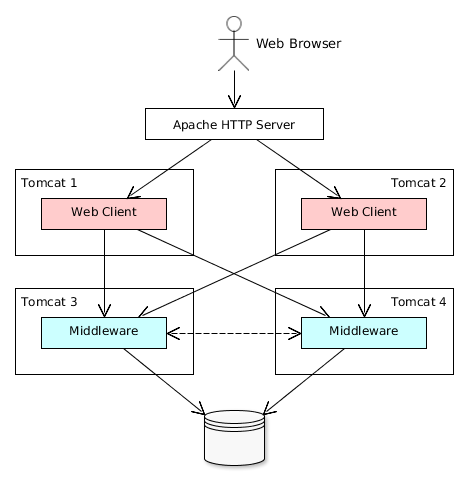
This layered approach makes the system more organized, secure, and easier to manage. Each layer has a specific job, from routing requests to authenticating users to executing business logic.
Architectural Patterns
How you structure your application code has a massive impact on how easy it is to maintain and scale. For years, the dominant pattern was the monolithic architecture. In a monolith, the entire application—frontend, backend, and all its features—is built as a single, unified unit. This is simple to start with, but can become cumbersome as the application grows. A small change in one part of the code can require re-deploying the entire application.
To solve this, many large-scale applications are moving towards micro frontends. This approach breaks the frontend down into smaller, independent pieces. For example, on an e-commerce site, the product search, the shopping cart, and the user profile page could each be a separate micro frontend, developed and deployed by different teams. These pieces are then seamlessly assembled in the browser to create a cohesive user experience.
This architecture allows teams to work autonomously and release updates faster without disrupting other parts of the site. It’s a way of bringing the scalability and independence of backend microservices to the frontend.
The Data Layer
At the very back of the architecture are the application and database servers. The application server is where your backend code—the business logic—actually runs. It processes incoming requests, performs computations, and coordinates with other parts of the system.
Ultimately, most applications need to store data persistently. That's the job of the database server. Different types of databases are optimized for different tasks:
- PostgreSQL is a relational database. It's great for structured data where relationships are important, like users, orders, and products.
- MongoDB is a NoSQL, document-based database. It offers more flexibility and is often used for unstructured data like blog posts or user-generated content.
- Redis is an in-memory data store. Because it holds data in RAM, it's incredibly fast. It's not typically used as a primary database but is perfect for caching frequently accessed data to speed up response times.
A scalable backend architecture design is crucial for any modern web application, allowing it to handle a growing number of users and traffic without compromising performance.
Choosing the right mix of these technologies allows you to build a data layer that is both powerful and efficient, ready to handle the demands of a modern web application.
In the context of a modern website, what is the primary role of the client?
Which of the following tasks is an example of backend business logic?
Understanding these architectural layers is the first step toward building professional, high-traffic web applications. It's a shift from thinking about a website as a single thing to seeing it as a system of communicating parts.