Modern Web Development Architecture and Practice
Semantic Layout Logic
Beyond the Box
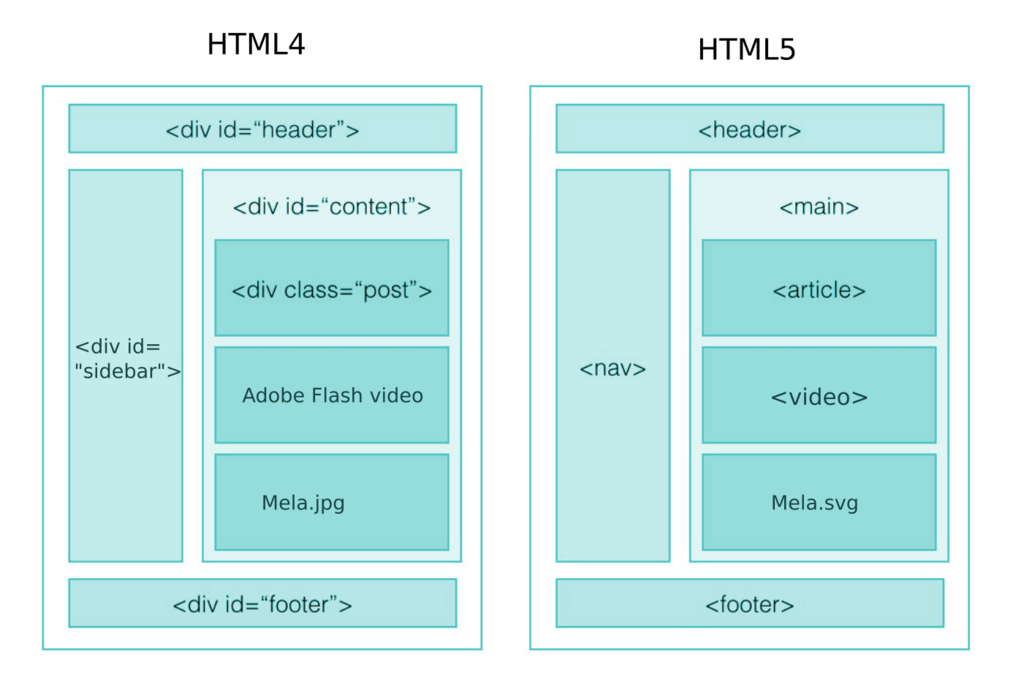
If you've looked at the source code of older websites, you've likely seen a condition known as "div soup." It's a structure where almost every element is a generic <div> container, often with convoluted class names trying to describe its purpose, like <div class="main-content-article-wrapper">.
This approach works, visually. With enough CSS, you can make a pile of <div>s look like anything. But it tells browsers, search engines, and assistive technologies almost nothing about the document's structure or the meaning of its content. It’s like building a house where every room is just called "room." You can find your way around if you live there, but a newcomer has no idea which is the kitchen and which is the bedroom without opening every door.
HTML5 semantic elements solve this problem by providing a vocabulary to describe the different parts of a webpage. They function like architectural blueprints, outlining the purpose of each section.
Using semantic HTML elements helps to create a well-structured and meaningful web page, as opposed to non-semantic HTML elements like
and , which serve as content holders without providing any indication about the type of content they contain or its role on the page.
Let's move beyond the generic <div> and build a more intelligent structure. Think of your webpage not as a visual design, but as a logical document. Every piece of content has a role.
The Core Layout Elements
Modern HTML provides a toolkit for outlining your document. The most important elements for page structure are:
<header>: Not just for the top of the page. It represents introductory content for its nearest ancestor section. You can have a<header>for the whole page, but also one inside an<article>.<footer>: The closing section for its nearest ancestor. It often contains copyright info, related links, or author information.<main>: This is for the primary, unique content of the document. Each page should have one and only one<main>element, and it shouldn't be nested inside other layout elements like<article>or<aside>.<nav>: Specifically for major navigation blocks. Think primary site navigation, a table of contents, or previous/next links. Don't use it for every single group of links on a page.<article>: A self-contained piece of content that could, in theory, be distributed on its own and still make sense. A blog post, a forum comment, or a news story are all great examples of an<article>.<section>: A thematic grouping of content. It’s more generic than<article>. A<section>usually has its own heading. A homepage might have sections for "About Us," "New Products," and "Contact Info."<aside>: For content that is tangentially related to the content around it. This is often used for sidebars, pull quotes, or groups of ads.
A key question to ask is: can this content be syndicated as a standalone unit? If yes, use
<article>. If it's a thematic grouping of related content, use<section>.
Here's how they might fit together in a simple blog post.
<body>
<header> <!-- Site-wide header -->
<h1>My Awesome Blog</h1>
<nav> <!-- Main navigation -->
<ul>
<li><a href="/">Home</a></li>
<li><a href="/about">About</a></li>
</ul>
</nav>
</header>
<main>
<article>
<header> <!-- Header for the article -->
<h2>My First Post</h2>
<p>By Author Name</p>
</header>
<p>This is the main content of my post...</p>
<section> <!-- A related group of content -->
<h3>Related Reading</h3>
<p>Some links to other cool stuff.</p>
</section>
<footer> <!-- Footer for the article -->
<p>Posted in: Tech</p>
</footer>
</article>
<aside> <!-- Tangential content -->
<h3>About the Author</h3>
<p>A short bio about me.</p>
</aside>
</main>
<footer> <!-- Site-wide footer -->
<p>© 2024 My Awesome Blog</p>
</footer>
</body>
Notice how the elements nest logically. The <main> element wraps the core content. The <article> is a complete unit within <main>. The document outline is clear just from reading the tags, even without any CSS. This logical source order is crucial for accessibility. A navigates the page based on this structure, not the visual layout you create with CSS. It will announce "main content," "navigation," and "article," allowing users to quickly jump to the parts they care about.
Adding Deeper Meaning
Semantic HTML lays the foundation, but you can add even more detail for machines to understand.
Implicitly, semantic elements come with built-in accessibility features. For example, <nav> has an implicit of navigation. This means you don't need to add role="navigation" yourself; the browser and assistive technologies already understand the element's purpose. Using the correct native HTML element is almost always better than forcing a role onto a generic <div>.
Sometimes, though, you need to add meaning that HTML doesn't have a tag for. This is where data attributes and microformats come in.
Data attributes (data-*) are another tool. They let you store extra information on standard HTML elements without breaking rules. This is useful for JavaScript to hook into, without overloading the class or id attributes.
For instance, <div class="product" data-product-id="12345"> gives your scripts a clean way to identify the product, separate from any styling information in the class.
By combining a strong semantic outline with these additional layers of meaning, you create a document that is robust, accessible, and easily understood by both people and machines. You're no longer just building a webpage; you're creating a structured, meaningful piece of data.
Time to check your understanding of these structural concepts.
What is the primary problem with "div soup," where websites are built almost entirely with <div> elements?
Which HTML element is designed to hold the primary, unique content of a document, and should only be used once per page?
Building with semantic elements from the start makes your code easier to maintain and more accessible to all users. It's a foundational skill for modern web development.