Modern Computer Systems and Architecture
System Interconnects and Architecture
The Computer's Blueprint
A computer isn't just a box of parts; it's a system designed around a specific philosophy of how those parts should communicate. For most modern computers, that philosophy is the Von Neumann architecture This design principle states that both program instructions and the data those instructions use should be stored in the same memory space. Think of it like a cookbook where the recipes (instructions) and the ingredients (data) are all written on the same set of pages. The CPU fetches both from this common pool.
This isn't the only way to design a computer. The alternative is the Harvard architecture, where instructions and data have separate storage and separate pathways to the CPU. This is like having a recipe book and a pantry; you can grab an ingredient from the pantry while reading the next step in the recipe. This separation can be faster in certain situations, which is why it's common in specialized systems like digital signal processors and microcontrollers. However, the flexibility of the Von Neumann model has made it the standard for general-purpose computing.
The System Bus
The CPU, memory, and other components don't communicate through thin air. They're connected by a set of electrical pathways called the system bus. This bus is the computer's central nervous system, carrying all the information needed to get things done. It's not a single entity, but rather a collection of three distinct buses working in concert.
- Address Bus: Specifies the location of data. When the CPU needs to read or write data, it first puts a memory address on this bus. It's a one-way street from the CPU to memory.
- Data Bus: Carries the actual data. This is a two-way street, allowing data to flow from memory to the CPU (a read operation) or from the CPU to memory (a write operation).
- Control Bus: Manages the flow of traffic. It carries timing signals and commands from the CPU to other components, indicating whether to read or write data and ensuring everything happens in the right order.
Imagine you're sending a letter. The address you write on the envelope is the Address Bus. The letter inside is the Data Bus. The instructions for the postal service (e.g., 'First Class', 'Signature Required') are the Control Bus.
The CPU's Rhythm
At its core, a CPU does one thing over and over: it processes instructions. This process, known as the instruction cycle, is a continuous loop with three main steps.
| Step | Action | Description |
|---|---|---|
| Fetch | Get Instruction | The CPU asks memory for the next instruction. It places the instruction's address on the address bus, and memory sends the instruction back on the data bus. |
| Decode | Understand Instruction | The instruction, now inside the CPU, is interpreted by the control unit. It figures out what operation needs to be performed. |
| Execute | Perform Action | The Arithmetic Logic Unit (ALU) or another part of the CPU performs the operation. This might involve calculations, moving data, or making a decision. |
The speed at which the CPU moves through this cycle is determined by its clock speed, measured in gigahertz (GHz). A 3 GHz processor, for example, can perform 3 billion cycles per second. While clock speed is a key performance metric, it doesn't tell the whole story. The number of instructions completed per cycle is just as important.
The Memory Bottleneck
There's a fundamental problem in modern computers: the CPU is incredibly fast, but main memory (RAM) is relatively slow. If the CPU had to wait for RAM every time it needed data, the system would grind to a halt. This speed difference is often called the memory bottleneck.
The solution is a cache hierarchy This is a system of smaller, faster memory banks that sit between the CPU and RAM. The idea is to keep frequently used data and instructions as close to the CPU as possible to reduce memory latency, the time it takes to retrieve data.
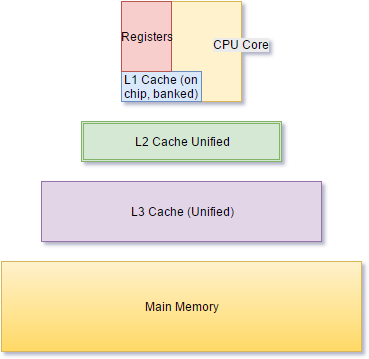
This hierarchy typically has three levels:
- L1 Cache: The smallest and fastest cache, built directly into the CPU core. It holds the data the CPU is most likely to need next.
- L2 Cache: Larger and slightly slower than L1. It serves as a backup for the L1 cache.
- L3 Cache: The largest and slowest of the caches, often shared by all cores on a modern multi-core processor. It's the last stop before the system has to go all the way to RAM.
Bypassing the CPU
Even with caching, some tasks are too data-intensive for the CPU to manage efficiently. Imagine the CPU having to manually move every single byte of a large file from a hard drive into RAM. It would be a huge waste of processing power.
This is where Direct Memory Access (DMA) comes in. DMA is a feature that allows certain hardware components to access main memory directly, without involving the CPU. A special component called a DMA controller takes over the task of transferring data between peripherals (like a network card or SSD) and RAM.
By offloading these bulk data transfers, DMA frees up the CPU to continue executing program instructions instead of acting as a glorified data courier. This results in a significant boost to overall system performance, especially for tasks involving large amounts of data, like disk I/O or network traffic.
What is the defining characteristic of the Von Neumann architecture?
The primary purpose of a cache hierarchy is to increase the total amount of RAM a computer can use.
This orchestration of components, from the system bus to the cache hierarchy and DMA, forms the core of a computer's architecture. Understanding these interconnects reveals how a machine is more than the sum of its parts; it's a carefully balanced system designed for performance.