Mobile Control Protocol Explained
Introduction to Network Protocols
Rules of the Digital Road
Imagine sending a package to a friend. You write their address on the box, put the right postage on it, and drop it at the post office. The postal service then takes over, sorting it, flying it across the country, and handing it to a local carrier for final delivery. Every step of this process follows a specific set of rules. If you skip a rule, like forgetting the address, the package won't arrive.
Network protocols are the rules for sending digital packages, or data packets, across the internet. They ensure that when your computer sends an email or requests a webpage, the data gets to the right place, intact and understandable.
Protocols are standardized rules that let different devices, made by different companies, speak the same language.
To manage this complex process, engineers created conceptual models that break down the communication process into distinct stages, or layers. The two most important models are the OSI model and the TCP/IP model.
The OSI Model
The Open Systems Interconnection (OSI) model is a seven-layer framework that standardizes the functions of a telecommunication or computing system. Think of it as a detailed, universal blueprint for building a network. While not strictly implemented in the modern internet, it's an essential tool for understanding how networks operate and for troubleshooting problems.
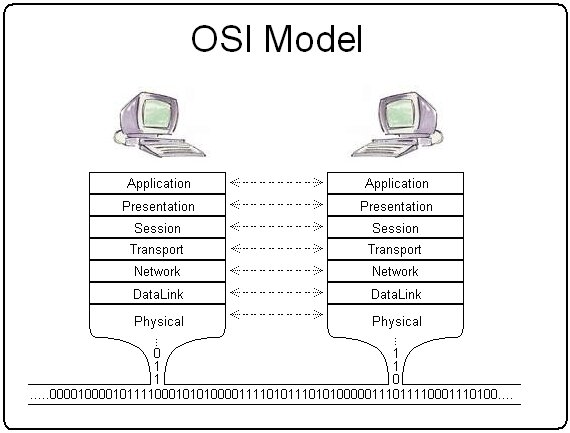
Each layer has a specific job and only interacts with the layers directly above and below it. Data moving down the stack gets wrapped in new information at each layer, a process called encapsulation. Let's walk through the layers from top to bottom.
| Layer | Name | Function |
|---|---|---|
| 7 | Application | Provides network services directly to user applications like web browsers and email clients. |
| 6 | Presentation | Translates, encrypts, and compresses data so the Application layer can understand it. |
| 5 | Session | Manages the connection and dialogue between two computers, starting, stopping, and restarting it. |
| 4 | Transport | Ensures data is transferred reliably and completely. Breaks data into segments. |
| 3 | Network | Routes data packets across different networks using logical addresses (like IP addresses). |
| 2 | Data Link | Manages data transfer between two devices on the same network, using physical addresses (MAC addresses). |
| 1 | Physical | The hardware layer. Transmits raw bits of data over physical media like cables or radio waves. |
The TCP/IP Model
If the OSI model is the detailed blueprint, the TCP/IP model is the version that was actually built to create the internet. It's more practical and combines several of the OSI layers into four broader categories. TCP/IP stands for Transmission Control Protocol/Internet Protocol, which are the two most important protocols in the suite.
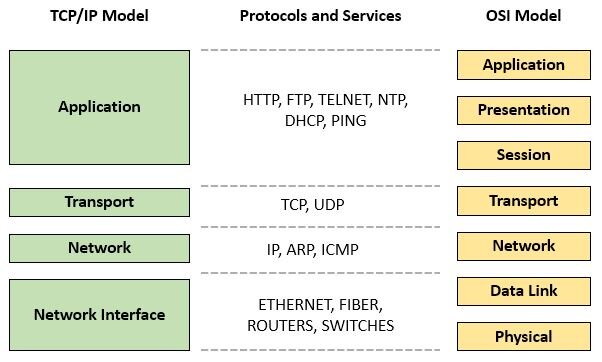
Here's how the TCP/IP layers generally map to the OSI model:
- Application Layer: This layer combines the functions of the OSI Application, Presentation, and Session layers. It’s where protocols like HTTP (for web browsing) and SMTP (for email) live.
- Transport Layer: This corresponds directly to the OSI Transport layer. It handles reliable data delivery using protocols like TCP.
- Internet Layer: This is equivalent to the OSI Network layer. It's responsible for moving packets from their source to their destination across networks, a process known as routing. The key protocol here is the Internet Protocol (IP).
- Link Layer: This layer combines the OSI Data Link and Physical layers. It deals with the physical hardware and media that make up the network, like Ethernet cables and Wi-Fi.
Meet the Protocols
The TCP/IP Application layer is home to many protocols you use daily, even if you don't realize it. They are the rules that specific applications follow to communicate over the network.
HTTP (Hypertext Transfer Protocol) This is the foundation of the World Wide Web. When you type a web address into your browser, it sends an HTTP request to a web server, which then sends back the website's files using HTTP.
FTP (File Transfer Protocol) As the name suggests, FTP is used for transferring files between a client and a server on a computer network. While less common for casual users today, it's still used for uploading files to web servers or for bulk file transfers.
SMTP (Simple Mail Transfer Protocol) SMTP is the standard protocol for sending email. When you hit "send" on an email, your email client uses SMTP to push the message to an email server, which then uses SMTP to forward it toward its final destination.
Now that you understand the basic rules and frameworks for network communication, let's test your knowledge.