Microprocessor Side Information Buffer
Introduction to Microprocessor Buffers
The CPU’s Traffic Cops
A microprocessor, or CPU, is the brain of a computer, performing calculations at incredible speeds. But it doesn't work alone. It constantly communicates with other components like memory (RAM) and input/output devices (like your keyboard or a hard drive). A major challenge is that these components operate at very different speeds. The CPU is a speed demon, while memory and other devices are often much slower.
Imagine a chef who can chop vegetables in seconds, but the kitchen assistant who brings them is slow. The chef would spend a lot of time waiting, and the whole cooking process would grind to a halt. The CPU faces a similar problem.
To solve this, computers use buffers. A buffer is a small, temporary storage area that holds data being transferred between two components. It acts as a staging area, or a waiting room, to smooth out the differences in speed and timing. Instead of the fast component having to wait for the slow one, it can drop off or pick up data from the buffer and get back to its main job.
One-Way and Two-Way Streets
Buffers are like traffic lanes for data, and just like roads, they can be designed for one-way or two-way traffic. The direction of data flow determines the type of buffer.
An input buffer handles data coming into a component. For the CPU, it's like an inbox. Data from a device like a keyboard arrives and waits in the input buffer until the CPU is ready to process it. This ensures incoming data isn't lost if the CPU is busy.
An output buffer works in the opposite direction, managing data going out of a component. Think of it as the CPU's outbox. The CPU can quickly place the results of a calculation into the output buffer and move on to the next task, while a slower device, like a printer, retrieves the data at its own pace.
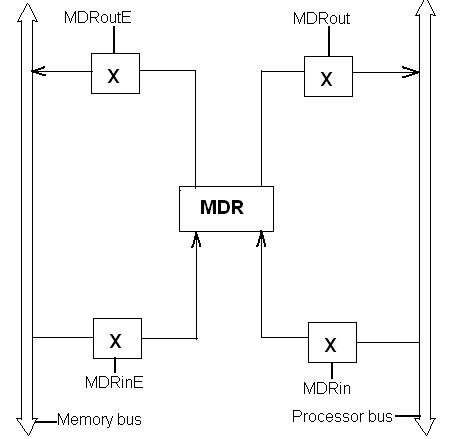
Finally, a bidirectional buffer is a two-way street. It can handle both input and output, allowing data to flow in either direction. This is common for components like RAM, which both sends data to and receives data from the CPU. Using one bidirectional buffer is more efficient than having separate input and output buffers.
| Buffer Type | Data Flow | Analogy |
|---|---|---|
| Input | Into the CPU | An inbox |
| Output | Out of the CPU | An outbox |
| Bidirectional | In and Out | A two-way street |
Keeping Everything Moving
The main impact of buffers on system performance is efficiency. By preventing the super-fast CPU from constantly waiting on slower components, buffers allow the system to perform multiple tasks more smoothly. The CPU can process one chunk of data while another is being fetched from memory and a third is being sent to a display.
This process of decoupling components lets them work more independently and in parallel. Without buffers, your computer would feel sluggish, as its powerful processor would be perpetually throttled by the speed of its slowest parts. Buffers are the unsung heroes that keep the digital traffic flowing smoothly, making your entire computing experience faster and more responsive.
What is the primary problem that buffers are designed to solve in a computer system?
A component like RAM, which both sends data to the CPU for processing and receives data from the CPU for storage, would most efficiently use which type of buffer?