Mastering Zoho Projects
Introduction to Zoho Projects
What is Zoho Projects?
Think of Zoho Projects as a digital command center for your team's work. It’s a project management tool designed to help you plan your work, keep track of progress, and collaborate with your team, all in one place. Instead of juggling spreadsheets, emails, and chat apps, you can manage everything from a single, organized platform.
Zoho Projects is an all-in-one project management software solution designed to help businesses and teams manage their projects effectively.
The main goal is to bring clarity and structure to your projects. Whether you're launching a new product, organizing an event, or managing a marketing campaign, Zoho Projects helps ensure everyone knows what they need to do and when they need to do it.
Core Features and Benefits
Zoho Projects is packed with features that simplify how you manage work. It helps you lay out a clear plan, break down large goals into smaller tasks, and communicate with your team seamlessly. This keeps projects from getting derailed and helps everyone stay focused on what matters.
| Feature | Benefit |
|---|---|
| Project Planning | Creates a clear roadmap for your team to follow. |
| Task Management | Breaks down big goals into manageable steps. |
| Team Collaboration | Keeps everyone connected and informed in one place. |
| Progress Tracking | Gives a real-time view of where things stand. |
By centralizing everything, you gain a clear view of your entire project. You can spot potential roadblocks early, keep stakeholders updated without extra effort, and make sure work is distributed evenly across the team.
With the Zoho project management system, you will see real-time insights, automated reports, and structured workflows – so overdue tasks will not haunt your dreams anymore.
Finding Your Way Around
When you first log in to Zoho Projects, you'll land on the main dashboard. This is your high-level overview, showing you key metrics and recent activity across all your projects. On the side, you’ll find a navigation panel that lets you quickly jump between different projects, view your tasks, or access reports.
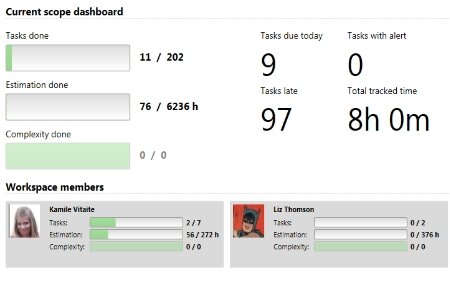
The interface is designed to be intuitive. Most of your time will be spent within specific projects, where you can see task lists, calendars, and discussion forums related to that particular initiative. Think of the dashboard as your home base and each project page as a dedicated workshop for that specific job.
Creating Your First Project
Setting up a new project is straightforward. The platform guides you through the essential details needed to get started. You'll give your project a name, set a timeline, and invite your team members.
Here are the basic steps:
- Find and click the New Project button, usually in the top corner.
- Fill in the project name, and optionally, a brief description.
- Set the start and end dates to establish a timeline.
- Add team members by selecting them from a list or inviting them via email.
- Click Create to launch your project workspace.
Once your project is created, you have a clean slate ready for you to start adding tasks and milestones. Don't worry about getting everything perfect from the start; you can always edit project details later on.
What is the primary goal of using Zoho Projects?
When you first log in to Zoho Projects, the __________ provides a high-level overview of key metrics and recent activity across all your projects.
Now you have a basic understanding of what Zoho Projects is, what it's for, and how to get started with your first project.