Mastering XML Troubleshooting for Technical Support
Validation and Well-Formedness
Well-Formed vs. Valid
When troubleshooting XML, the first step is to figure out if you're dealing with a 'well-formed' error or a 'valid' error. They sound similar, but they're fundamentally different problems.
A well-formed XML document follows all the basic syntax rules. Think of it like grammar. Every opening tag has a matching closing tag, elements are nested correctly, and attributes are quoted. The parser, which is the software reading the XML, only cares about these structural rules. If a rule is broken, the parser stops and throws an error.
On the other hand, a valid XML document is one that is both well-formed and conforms to a specific set of rules defined in a schema, like an XSD (XML Schema Definition) or DTD (Document Type Definition). The schema acts as a blueprint, defining which elements are allowed, what order they must appear in, and what kind of data they can hold. An XML document can be perfectly well-formed but still be invalid if it doesn't follow its schema's blueprint.
| Category | Analogy | What it Checks | Question it Answers |
|---|---|---|---|
| Well-Formed | Sentence Grammar | Correct syntax, tag matching, proper nesting. | "Are the rules of XML followed?" |
| Valid | Document Template | Follows a specific schema (XSD/DTD). | "Does it fit the required business structure?" |
As a support professional, you'll find that most day-to-day issues, especially in SOAP payloads, are simple well-formedness errors. A parser won't even try to check for validity if the basic syntax is broken.
Common Structure Errors
XML parsers are strict. Unlike a web browser that might try to render broken HTML, an XML parser will fail on the first error it finds. Here are the most common culprits you'll see in support tickets.
Mismatched or Missing Tags Every opening tag must have a corresponding closing tag, spelled and cased identically.
<!-- Incorrect: Closing tag has wrong case -->
<name>Alice</Name>

<!-- Incorrect: Missing closing tag -->
<user><name>Bob</name>
Incorrect Nesting Tags must be closed in the reverse order they were opened. Think of them as nested boxes; you have to close the inner box before you can close the outer one.
<!-- Incorrect Nesting -->
<customer><b><i>Acme Inc.</b></i>

<!-- Correct Nesting -->
<customer><b><i>Acme Inc.</i></b></customer>
Unquoted or Improperly Quoted Attributes
All attribute values must be enclosed in either single (') or double (") quotes.
<!-- Incorrect: id value is not quoted -->
<product id=123>

<!-- Correct -->
<product id="123">
<product id='123'>
These simple syntax mistakes account for a huge percentage of integration failures. The good news is that they are easy to spot with the right tools.
Tools for Troubleshooting
You don't need to find these errors by hand. Several tools can instantly pinpoint the exact line and character causing a parser to fail.
For quick checks, browser-based online validators are excellent. You can paste an XML payload from a support ticket directly into a tool like XML Linter or the W3C Validator. They provide clear, actionable error messages, which you can then relay to the customer.
For more regular work, a good text editor with built-in validation is essential. Notepad++ is a popular choice, and its XML Tools plugin is invaluable. It can check for well-formedness on the fly and even pretty-print a document to make its structure easier to read.
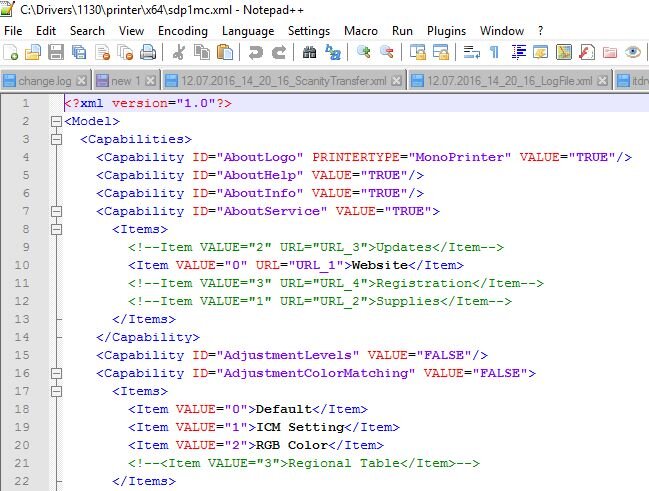
When you receive a support ticket with an XML payload, one of the first and fastest checks you can perform is to paste the content into one of these tools. It often reveals the root cause in seconds.
Use browser developer tools or validation services (e.g., W3C Markup Validation Service) to pinpoint broken nesting–inspect red highlights or errors referencing misplaced tags.
JSON, in contrast, tends to be more forgiving in some ways but has its own strict rules. For example, all keys must be double-quoted, and a trailing comma after the last element in an object will break most parsers. However, XML's nested tag structure provides more opportunities for simple typos, casing errors, and nesting mistakes, which is why robust validation is so critical in production environments.
What is the key difference between a 'well-formed' XML document and a 'valid' XML document?
A customer submits an XML payload that fails. Your parser immediately stops and reports an error on line 10: 'mismatched tag'. What is the most likely type of error?
Let's review the key differences and common issues.