Mastering UI/UX Expertise
Introduction to UI/UX Design
What Are UI and UX?
Think about the last app you used that just felt right. It was easy to navigate, looked great, and you accomplished what you wanted to do without any frustration. That feeling is the result of good design, specifically User Interface (UI) and User Experience (UX) design.
Though often used together, UI and UX are two distinct but deeply connected disciplines.
User Interface
noun
The visual elements of a digital product, such as screens, buttons, icons, and typography. It's how the product looks and presents itself.
UI is what you see and interact with directly. It's the graphical layout of an application. It consists of the buttons you click, the text you read, the images, sliders, text entry fields, and all the rest of the items the user interacts with. It’s about creating a visually appealing and consistent look.
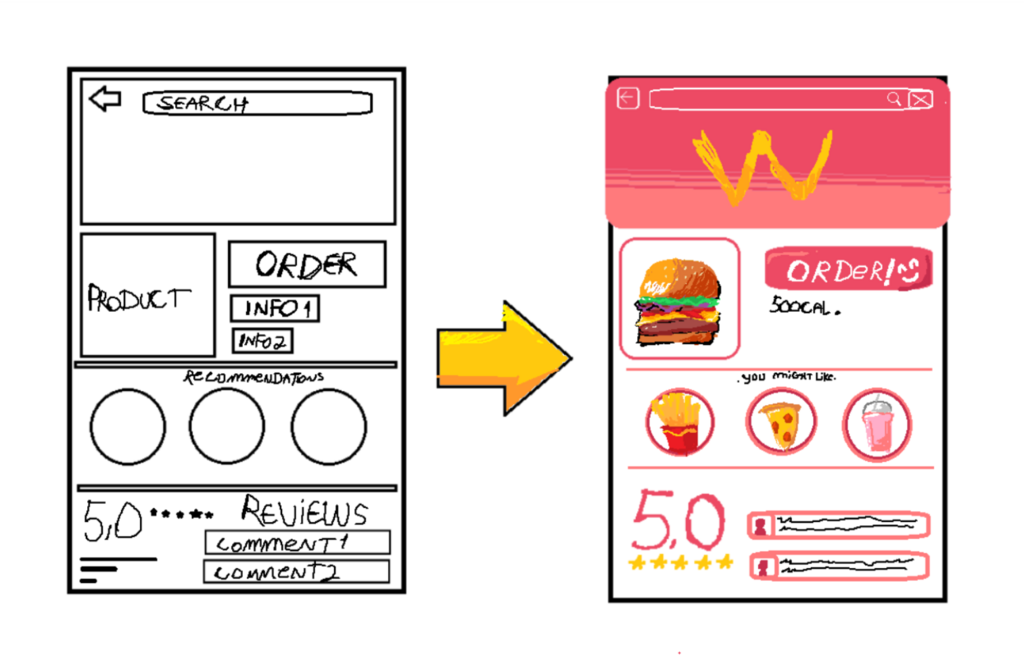
User Experience, on the other hand, is the bigger picture.
User Experience
noun
The overall feeling a person has when using a product, from the first moment of contact to the last. It encompasses everything that affects the user's perception and interaction.
UX is the internal experience a user has as they interact with every aspect of a company’s products and services. Is the app logical and easy to use? Does it solve their problem efficiently? Does it feel good to use? A good UX is one that is useful, usable, and desirable.
A great analogy is building a house. The UX is the architectural blueprint: the foundation, the layout of the rooms, and how the plumbing and electrical systems function to make the house livable. The UI is the interior design: the paint colors, furniture, light fixtures, and faucets. A house can look beautiful (good UI), but if the layout is confusing and the light switches are in strange places, it’s a bad experience (bad UX). They must work together.
The Evolution of Interaction
The way we interact with computers has changed dramatically over time, and UI/UX design has evolved with it. In the early days of computing, there was no graphical interface. Users had to type complex commands into a black screen with flashing text. This was the Command-Line Interface (CLI).

The 1980s brought the Graphical User Interface (GUI), popularized by Apple and Microsoft. This was revolutionary. Instead of typing commands, people could click on icons, open windows, and use a mouse. This made computers accessible to a much wider audience and was a massive leap forward in user experience.
Now, we are in the era of Natural User Interfaces (NUI), where interactions are even more intuitive. Think of touchscreens on your phone, voice commands to a smart speaker, or even gesture controls. The goal has always been to make technology feel less like a machine and more like a natural extension of ourselves.
Core Principles of Good Design
To create products that people love, designers follow a set of core principles. These are not strict rules but guiding philosophies that ensure the final product is effective and enjoyable.
The most fundamental principle of UX/UI design is keeping the user at the center of every decision.
This leads to three key concepts:
| Principle | What It Means |
|---|---|
| User-Centered Design | The entire design process revolves around the user. Designers research their target audience to understand their needs, behaviors, and goals, then build the product to meet those needs. |
| Usability | The product should be easy to learn, efficient to use, and pleasant. If a user can't figure out how to complete a task, the design has failed, no matter how beautiful it looks. |
| Accessibility | Design should be inclusive. This means creating products that can be used by people with diverse abilities, including those with visual, auditory, motor, or cognitive impairments. |
Accessibility is particularly important. It involves practices like ensuring good color contrast for people with low vision, providing text alternatives for images for screen readers, and making sure the entire site can be navigated with a keyboard. Good accessibility makes a product better for everyone.
Why It All Matters
So why do companies invest so much in UI/UX? The impact is huge. A well-designed product leads to higher user satisfaction. Happy users are more likely to keep using a product, recommend it to others, and become loyal customers.
On the flip side, poor design can be devastating. An app that is confusing, slow, or frustrating will be abandoned quickly. This translates directly to business outcomes. Good UI/UX can increase sales, boost user engagement, reduce customer support costs, and enhance brand reputation. It's not just about making things pretty; it's about making things work for people, which in turn makes the business work better.
Ultimately, great design is invisible. It guides you so smoothly that you don't even notice the effort that went into it. You just know that it works, and it feels good to use.
Ready to test your knowledge on these foundational concepts?
Which of the following best describes the relationship between User Interface (UI) and User Experience (UX)?
The evolution of computer interfaces went from command-line interfaces (CLI) to ______, which introduced icons and windows, and now to natural user interfaces (NUI), like touchscreens.
This introduction lays the groundwork for understanding the world of digital product design. By focusing on the user, designers create experiences that are not only functional but also meaningful and enjoyable.