Mastering UI Design with CSS
CSS Fundamentals
Styling Your Content
Think of HTML as the skeleton of a webpage. It provides the structure: headings, paragraphs, lists, and so on. But without any styling, it's just plain black and white text. It's functional, but not very interesting to look at.

This is where Cascading Style Sheets, or CSS, comes in. CSS is the language we use to style our HTML content. It's like the clothing, makeup, and personality you add to the skeleton. With CSS, you can control colors, fonts, spacing, layout, and much more.
HTML provides the meaning and structure, while CSS handles the visual presentation.
The Language of Style
To tell the browser how to style an element, you write a CSS rule. A rule is made up of a few key parts. It selects an HTML element and then declares how you want it to look.
selector {
  property: value;
}
Let's break that down:
- Selector: This is the HTML element you want to style. It could be a paragraph (
p), a heading (h1), or any other tag. - Property: This is the visual characteristic you want to change, like
colororfont-size. - Value: This is the specific style you want to apply, like
bluefor the color or16pxfor the font size.
A property and its value are called a declaration. You can have multiple declarations inside a single rule, each separated by a semicolon.
p {
  color: #333333;
  font-size: 18px;
}
The simplest type of selector is a type selector, which targets all elements of a specific type on the page. For example, using p as a selector will apply the styles to every single paragraph in your HTML document.
Connecting Your Files
You could write CSS directly inside your HTML file, but it's much cleaner to keep them separate. We do this using an external stylesheet. This is just a plain text file saved with a .css extension, like style.css.
Keeping your styles separate makes your project easier to manage. You can have one stylesheet that controls the look of an entire website, rather than adding styles to every single page.
To connect your CSS file to your HTML file, you add a <link> tag inside the <head> section of your HTML document. This tag tells the browser where to find the style rules.
<!DOCTYPE html>
<html>
<head>
  <title>My Styled Page</title>
  <link rel="stylesheet" href="style.css">
</head>
<body>
  <h1>This is a heading</h1>
  <p>This is a paragraph.</p>
</body>
</html>
The href attribute in the <link> tag points to the path of your CSS file. If style.css is in the same folder as your index.html, you just use its name.
Basic Text Styling
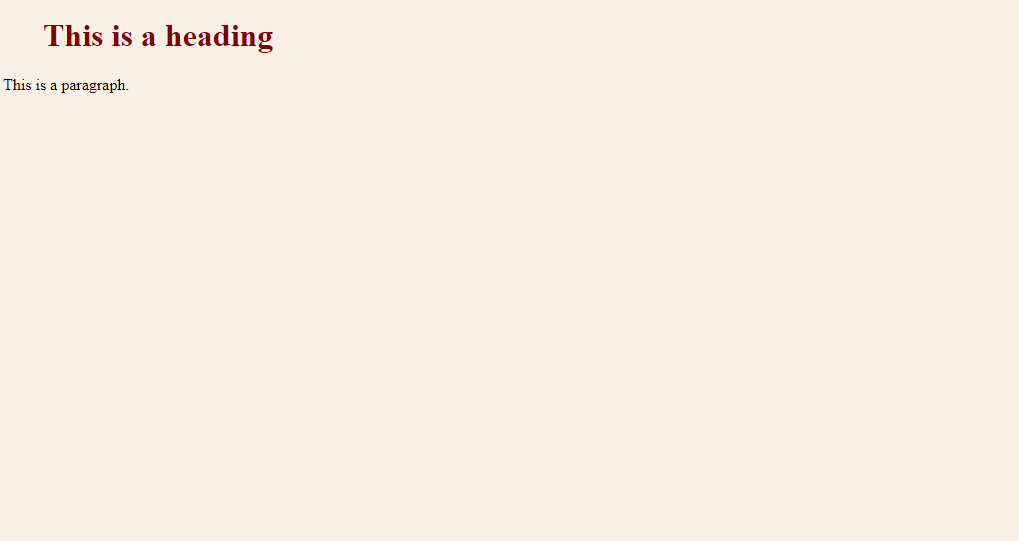
Let's apply some basic styles. We'll change the color, font size, and font family of our heading and paragraph. In our style.css file, we'll write the following rules:
/* This is a CSS comment */

h1 {
  color: #BE2E2E; /* A dark red color */
  font-size: 48px;
  font-family: Georgia, serif;
}

p {
  color: #BE2E2E;
  font-size: 20px;
  font-family: "Helvetica Neue", Helvetica, Arial, sans-serif;
}
Here’s what these properties do:
color: Sets the text color. You can use predefined color names likered, but for more specific shades, you use a hex code like#BE2E2E.font-size: Controls the size of the text. We're using pixels (px) here, a common unit for screen measurements.font-family: Sets the typeface. It's a good practice to provide a list of fonts. The browser will try the first font (Georgia), but if the user doesn't have it installed, it will try the next one, and so on. The last value (seriforsans-serif) is a generic family, which lets the browser pick a default font of that type as a final fallback.
Understanding the Cascade
The 'C' in CSS stands for 'Cascading'. This is the system the browser uses to decide which styles to apply when multiple rules target the same element. Think of it as a waterfall where styles flow down from a high level to more specific levels.
There are three main factors that determine which rule wins:
- Importance: Certain rules are considered more important than others (we'll cover this in later lessons).
- Specificity: A more specific selector will override a less specific one. For now, all our type selectors have the same specificity.
- Source Order: If two rules have the same importance and specificity, the one that appears later in the stylesheet wins. The last rule applied is the one you see.
Imagine you have two rules for a paragraph. One says the color is blue, and a later one says it's red. The paragraph will be red because that rule came last.
p {
  color: blue;
}

p {
  color: red; /* This rule wins */
}
This principle of the cascade is fundamental to how CSS works. Understanding it helps you predict how your styles will be rendered and debug issues when they don't look as expected.
What is the primary purpose of CSS (Cascading Style Sheets)?
In the CSS rule h1 { color: blue; }, the h1 part is known as the what?
You've taken your first steps into styling the web. With just a few simple rules, you can transform a plain document into something much more readable and visually appealing.