Mastering the Ping Command
Introduction to Ping
Checking for a Connection
Think of the ping command as a simple way to ask another computer on the network, "Are you there?" It's like shouting "Marco!" in a swimming pool and waiting to hear "Polo!" back. If you hear a reply, you know your friend is there and can hear you. If you hear silence, something might be wrong.
pingis a fundamental command-line tool used to test if a target computer or server is reachable across a network.
Network administrators and technicians use it constantly to diagnose connection problems. By sending a small packet of data to a specific address, ping can tell you whether the target machine is online and how long it takes for the signal to travel there and back.
How It Works: An Echo
The ping command uses a special set of rules called the Internet Control Message Protocol, or ICMP. Think of ICMP as the network's messenger service, used by devices to send operational information and error messages to each other.
When you use ping, your computer sends an "Echo Request" message to the target. If the target receives the message and is able to respond, it sends back an "Echo Reply." This simple back-and-forth confirms that a connection can be made.
This exchange tells you two main things: that the target is reachable and how quickly the communication happens. The time it takes for the packet to go out and come back is called the round-trip time, or RTT.
Using the Ping Command
To use ping, you open a command-line interface (like Terminal on macOS or Command Prompt on Windows) and type ping followed by a destination. This destination can be a domain name or an IP address.
ping google.com

# Or you can use the IP address directly
ping 8.8.8.8
When you run the command, you'll see output that looks something like this:
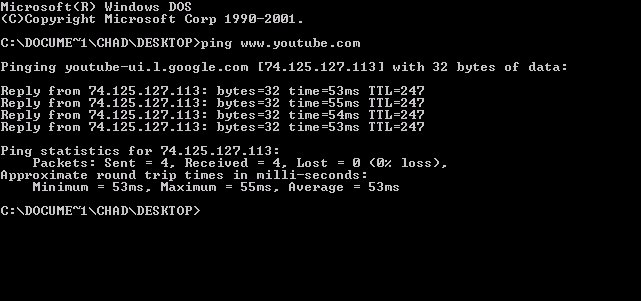
Let's break down what one of those reply lines means.
Reply from 216.58.194.78: bytes=32 time=23ms TTL=117
Each part gives you a piece of information about the connection.
| Component | What it Means |
|---|---|
Reply from... | Confirms the IP address that sent the reply. |
bytes=32 | The size of the data packet that was sent. |
time=23ms | The round-trip time in milliseconds. Lower is better. |
TTL=117 | "Time to Live." A counter that prevents packets from looping endlessly. |
The most important piece for basic troubleshooting is the time. This tells you the latency of your connection to the server. A low number (typically under 100ms) indicates a responsive connection. If the time is very high, or if you get a "Request timed out" message, it signals a potential network problem.
What is the primary purpose of the ping command?
The ping command uses which protocol to send its "Echo Request" messages?
That's the basic idea behind ping. It's a simple but powerful first step in figuring out what's going on with a network connection.