Mastering the Blender 3D Pipeline
Advanced Polygonal Workflows
The Art of Clean Topology
Moving beyond basic shapes requires thinking like a sculptor and an engineer. The vertices, edges, and faces of your mesh form a kind of digital fabric. How you arrange this fabric determines how it bends, stretches, and catches the light. This arrangement is called topology, and the directional flow of its edge loops is known as edge flow.
Think of edge flow like the grain in a piece of wood. A skilled woodworker carves along the grain for smooth, predictable results. Carving against it can cause splintering and weakness. Good topology works the same way, guiding deformations and smoothing operations cleanly.
Poor topology, with randomly placed triangles and complex poles (vertices with more or less than four connected edges), creates problems. It deforms unpredictably during animation, causes shading artifacts, and makes UV unwrapping a nightmare. Clean, quad-based topology is the professional standard because it behaves predictably, especially when using modifiers.
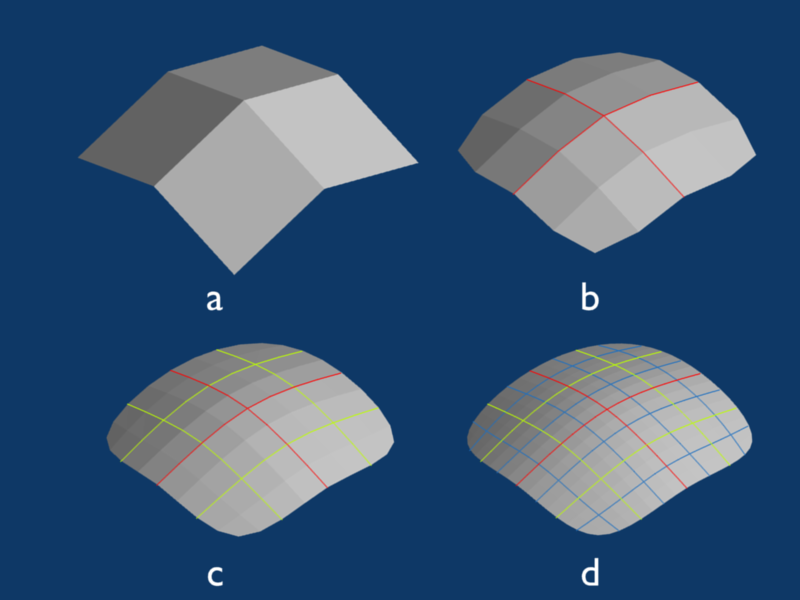
The primary driver for clean topology is the Subdivision Surface modifier. This tool algorithmically adds geometry to your base mesh, smoothing it out to create high-resolution, organic-looking surfaces. It's the standard for creating everything from characters to sleek industrial products. A clean, quad-based mesh subdivides into a smooth, predictable surface. A messy mesh becomes a lumpy, artifact-ridden disaster.
Non-Destructive Workflows
In professional pipelines, flexibility is key. A non-destructive workflow means you build models using a stack of modifiers that can be changed, reordered, or removed at any time. This allows for rapid iteration without having to manually rebuild your mesh after every client request. The cornerstone of this approach is the combination of the Boolean and Bevel modifiers.
The lets you use one object to cut a hole in, or merge with, another. It's perfect for creating complex hard-surface shapes. However, Booleans produce perfectly sharp, mathematically precise edges that look unnatural and won't catch light realistically in a render. To fix this, you add a to round off those sharp edges, creating small facets that mimic how real-world objects are manufactured.
This leads to a common modifier stack for hard-surface modeling:
- Boolean: To create the complex base shape.
- Bevel: To soften the hard edges created by the Boolean.
- Subdivision Surface: To smooth the entire object and create a high-poly final mesh.
The order of your modifier stack is critical. A Bevel modifier placed before a Boolean will have no effect on the edges the Boolean creates. Modifiers are processed from top to bottom.
Refining and Retopologizing
Sometimes a non-destructive workflow isn't enough, or you need to create a clean mesh based on a high-resolution sculpt. This is where retopology comes in. Retopology is the process of building a new, clean, animation-friendly mesh over the surface of another, more complex one.
The is a key tool for this. It takes the vertices of one object and 'projects' or 'wraps' them onto the surface of another. You can build a simple quad mesh and have it conform perfectly to the intricate details of a dense sculpt or a messy 3D scan. This gives you the best of both worlds: a detailed surface shape and clean, controllable edge flow.
For making precise, freehand cuts across your polygons, the Knife Tool (shortcut K) is indispensable. Unlike connecting existing vertices, the Knife Tool lets you draw new edge loops exactly where you need them. This is useful for adding detail, redirecting edge flow, or carving out specific patterns on a surface.
Mastering these advanced workflows is about choosing the right tool for the job. Whether you're building a complex machine with non-destructive modifiers or creating a game-ready character through careful retopology, understanding mesh architecture is what separates a hobbyist from a professional.
What is the primary benefit of maintaining clean, quad-based topology in a 3D model?
A non-destructive workflow in 3D modeling primarily relies on using a stack of modifiers that can be changed or removed at any time.