Mastering Text Editing
Introduction to Text Editing
What Is Text Editing?
At its core, text editing is simply the process of changing text. Whether you're fixing a typo in an email, writing a novel, or building a website, you are editing text. It's a fundamental skill in the digital world, the electronic equivalent of putting a pen to paper and then using an eraser.
Text editing allows us to create, modify, and format documents, code, and other text-based information.
From simple notes apps on your phone to complex word processors and specialized coding environments, text editing tools are everywhere. They are the foundation for communication, content creation, and software development. Understanding the basics helps you work more efficiently, no matter the task.
A Quick Trip Back in Time
Text editing wasn't always as simple as clicking a mouse and typing. Early computers used command-line interfaces, and their text editors were quite different from what we use today. These were often "line editors," which meant you could only work on one line of text at a time. You had to type specific commands to make changes, and you couldn't see the results immediately on a full screen.
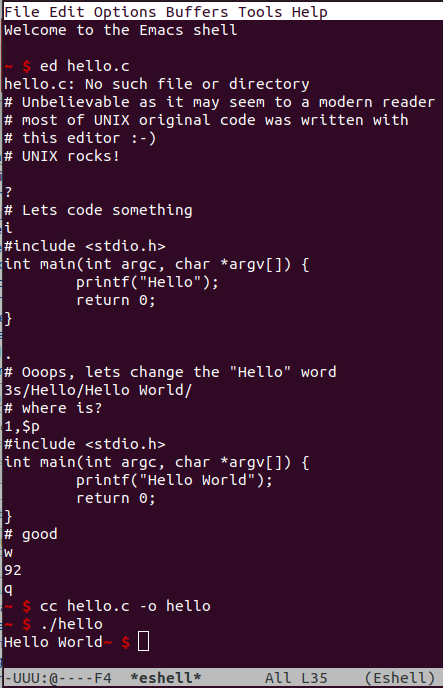
The big leap forward came with screen-oriented editors and word processors. These tools introduced the concept of WYSIWYG, which stands for "What You See Is What You Get." This means the text on the screen looks very similar to how it will appear when printed or published. This innovation made computers much more accessible and intuitive for everyday users.
The Four Basic Moves
Nearly everything you do in a text editor boils down to four fundamental operations. Mastering them is the first step to becoming proficient with any text-based tool.
| Operation | Description | Common Keys |
|---|---|---|
| Insert | Adding new characters, words, or sentences. | Typing on the keyboard |
| Delete | Removing characters. | Backspace or Delete |
| Copy | Duplicating selected text to the clipboard. | Ctrl+C or Cmd+C |
| Paste | Placing the text from the clipboard into the document. | Ctrl+V or Cmd+V |
Think of the clipboard as a temporary holding spot for text. When you copy something, you place a duplicate of it on the clipboard without changing the original. When you paste, you take what's on the clipboard and insert it where your cursor is.
A related operation is Cut (Ctrl+X or Cmd+X), which is like copying but it also deletes the original selected text. It's essentially a 'move' command.
Editing in Different Fields
While the basic operations are universal, the tools and goals of text editing can vary a lot depending on the context.
In word processing, the goal is often presentation. You care about fonts, margins, and page breaks. In programming, the editor is a tool for writing instructions for a computer, so precision is key. A single misplaced comma can prevent a program from working. For content creators, the focus is on crafting a clear and compelling message.
Despite these differences, the simple act of inserting, deleting, and moving text remains the same. Understanding these fundamentals gives you a solid base for any text-related task you'll encounter.
Ready to check your understanding? Let's see what you've learned.
What does the acronym WYSIWYG stand for in the context of text editors?
Early text editors that only allowed users to work on one line of text at a time were known as _____.
From simple notes to complex code, text editing is a skill you'll use every day. With these basics down, you're ready to build on your knowledge and explore more advanced tools and techniques.