Mastering Technical SEO
Crawling and Indexing
How Search Engines Find Your Site
Before your website can appear in search results, a search engine has to find it first. This discovery process is called crawling. Search engines use programs called crawlers, spiders, or bots to travel the web.
Think of the internet as a massive, constantly growing city. The crawlers are like automated explorers, navigating the city's streets (links) to discover new buildings (websites) and new rooms within those buildings (pages). When a crawler lands on a webpage, it reads the content and looks for links to other pages. It then follows these links to discover more pages, adding them to its list of places to explore. This process runs continuously to find new and updated content across the web.
To appear in search results, search engines need to be able to access your webpages and store them in a database (together called crawling and indexing).
After crawling comes indexing. If crawling is about discovering pages, indexing is about understanding and storing them. Once a crawler finds a page, the search engine tries to figure out what the page is about. It analyzes the text, images, and other content, then stores this information in a gigantic database called an index.
When you search for something, the search engine isn't scouring the entire live internet. It's rapidly searching its own organized index to find the most relevant results. If your page isn't in the index, it simply won't show up in any search results, no matter how relevant it is.
Giving Search Engines a Map
You can help search engines find your important pages more efficiently by providing them with a map. In the world of SEO, this map is called an XML sitemap. It's a file you create that lists all the essential URLs on your site.
A sitemap tells crawlers which pages you think are important and can also provide useful information, like when a page was last updated. This is especially helpful for large websites, new websites with few external links, or sites with content that isn't easily discovered by following links alone.
<?xml version="1.0" encoding="UTF-8"?>
<urlset xmlns="http://www.sitemaps.org/schemas/sitemap/0.9">
   <url>
      <loc>http://www.example.com/page1.html</loc>
      <lastmod>2024-05-01</lastmod>
   </url>
   <url>
      <loc>http://www.example.com/page2.html</loc>
      <lastmod>2024-05-15</lastmod>
   </url>
</urlset>
This code snippet shows a basic sitemap. The <loc> tag contains the page's URL, and the <lastmod> tag tells search engines when it was last modified. Once you create this file, you can submit it to search engines through tools like Google Search Console to ensure they know about all your pages.
Setting Boundaries with Robots.txt
Sometimes, there are parts of your website you don't want search engines to crawl or index. These might include admin login pages, internal search results, or duplicate content. To manage crawler access, you use a file called robots.txt.
This is a simple text file placed in your website's root directory. It contains instructions for crawlers, telling them which areas to avoid. While reputable crawlers like Googlebot will follow these rules, it's not a foolproof security measure. It's more like a polite request.
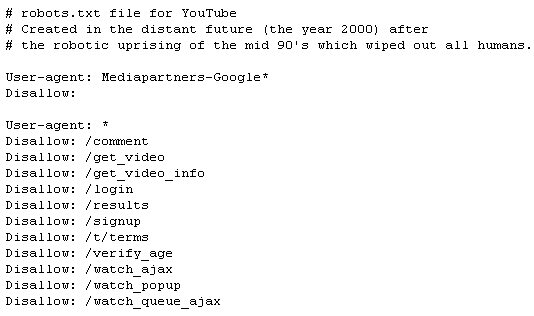
Here’s a basic robots.txt file:
# This tells all crawlers to follow the rules
User-agent: *

# Disallow access to the /admin/ directory
Disallow: /admin/

# You can also specify the location of your sitemap
Sitemap: http://www.example.com/sitemap.xml
In this example, User-agent: * applies the rules to all bots. Disallow: /admin/ tells them not to crawl any URLs within the /admin/ folder. It's also a best practice to include a link to your sitemap in your robots.txt file, making it even easier for search engines to find.
Finding and Fixing Problems
Even with a sitemap and a robots.txt file, crawlers can still run into problems. These are known as crawl errors. An error might occur if a crawler tries to access a page that no longer exists (a 404 error) or if a server issue prevents access (a 5xx error).
These errors can prevent your pages from being indexed, making them invisible in search. Luckily, tools like Google Search Console make it easy to find and diagnose these issues.
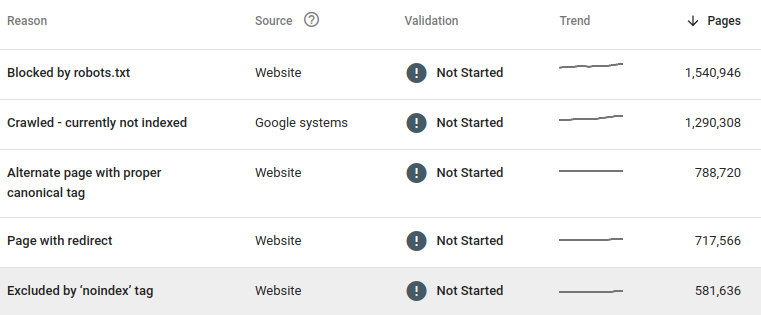
Inside Google Search Console, the "Pages" report (under the Indexing section) provides a detailed breakdown of your site's indexing status. It shows you which pages are indexed and, more importantly, which ones aren't and why. The report groups pages by issue, such as "Not found (404)" or "Blocked by robots.txt."
By regularly checking this report, you can identify crawl errors as they appear. Once you've fixed an issue, like restoring a broken link or removing a rule from robots.txt, you can ask Google to validate your fix directly within the tool. This prompts Google to recrawl the affected pages and, if the fix is successful, get them indexed.
What is the main purpose of a search engine crawler, also known as a spider or bot?
Why is it impossible for a webpage to appear in search results if it hasn't been indexed?
Properly managing how search engines crawl and index your site is the technical foundation of SEO. Without it, even the best content may never be seen.