Mastering Teamwork with Microsoft Planner
Introduction to Microsoft Planner
What is Microsoft Planner?
Microsoft Planner is a simple, visual way for teams to organize their work. Think of it as a shared digital to-do list. It's part of the Microsoft 365 suite, so it's designed to work smoothly with other tools you might already use, like Teams and Outlook.
The main goal of Planner is to take the chaos out of teamwork by making it clear who is doing what, and by when.
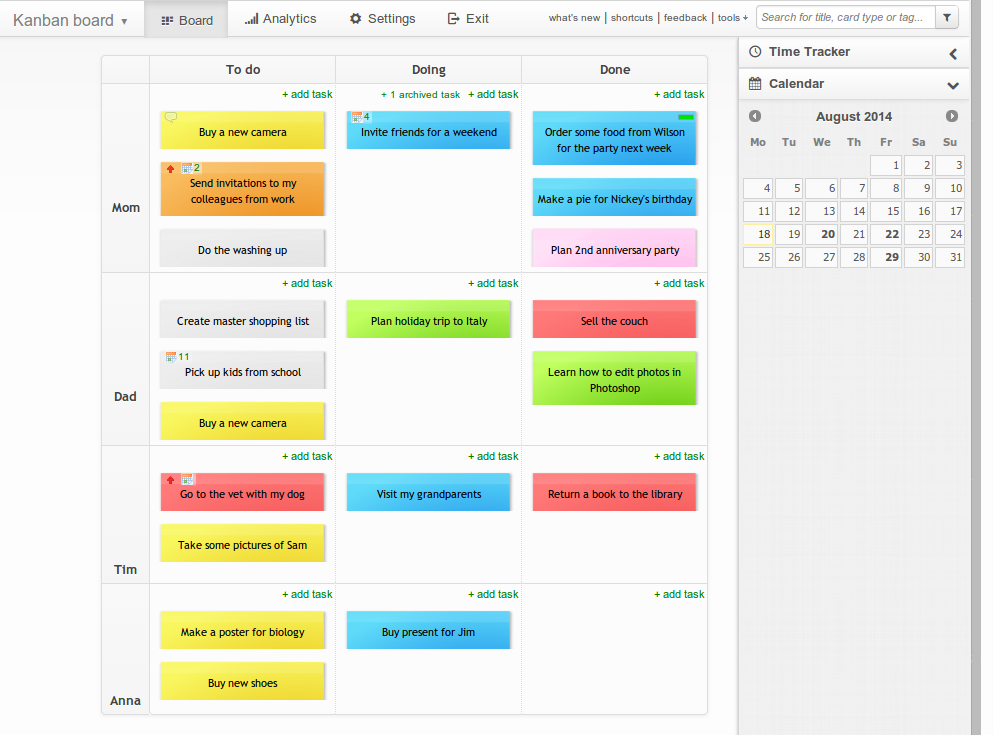
Instead of relying on long email chains or scattered notes, your team gets a central place to manage tasks. Planner uses a card-based system, much like a physical corkboard with sticky notes, which makes it easy to see the status of everything at a glance. Each project or initiative gets its own board, keeping all related tasks neatly organized.

The Building Blocks
Every project in Planner is organized using three core components: Plans, Buckets, and Tasks. Understanding how they fit together is key to using the tool effectively. Imagine a filing cabinet. The entire cabinet is your 'Plan'. Inside, you have several drawers, which are your 'Buckets'. And in each drawer, you have individual files, which are your 'Tasks'.
Let's break them down:
-
Plans: A Plan is the project itself. You'll create a new plan for each major initiative. For example, you might have a plan for a "Q3 Marketing Campaign" or "New Website Launch."
-
Buckets: Buckets are columns within your plan that you use to categorize tasks. You can name them whatever you like. A common approach is to use status-based buckets like "To Do," "In Progress," and "Completed." You could also organize them by workstream, such as "Design," "Development," and "Testing."
-
Tasks: A Task is a single work item represented by a card. You create tasks within buckets. Each task card can hold a surprising amount of information: who it's assigned to, a due date, a checklist of sub-items, attachments, and comments.
Integration with Microsoft 365
Planner's real power comes from its integration with the rest of the Microsoft 365 ecosystem. It isn’t a standalone island; it's a connected part of a larger toolkit. When you create a new Plan, it automatically creates a new Microsoft 365 Group.
Microsoft Teams is the central hub for communication and teamwork within Microsoft 365.
This means your plan comes with a shared Outlook inbox, a calendar, a SharePoint site, and a OneNote notebook. This tight integration simplifies collaboration. You can even add your Plan as a tab directly within a Microsoft Teams channel, allowing your team to manage tasks without ever leaving the conversation.
This keeps all your communication, files, and tasks in one convenient place, reducing the need to switch between different applications.
Now that you understand the basics, you're ready to start organizing your team's work.