Mastering SQL Server Integration Services
Introduction to SSIS
What is SSIS?
Think about organizing a massive, messy library. Books are arriving from different places—some are new, some are old, some are even in different languages. Your job is to take all these books, sort them, fix any torn pages, translate titles, and then place them on the correct shelves in a new, organized section. SQL Server Integration Services (SSIS) does a similar job, but for data.
SSIS is a component of Microsoft SQL Server that's designed to perform data integration tasks. Its main purpose is to build high-performance data integration and workflow solutions. In simpler terms, it’s a tool for moving data from one place to another, cleaning it up, and reshaping it along the way.
The Heart of ETL
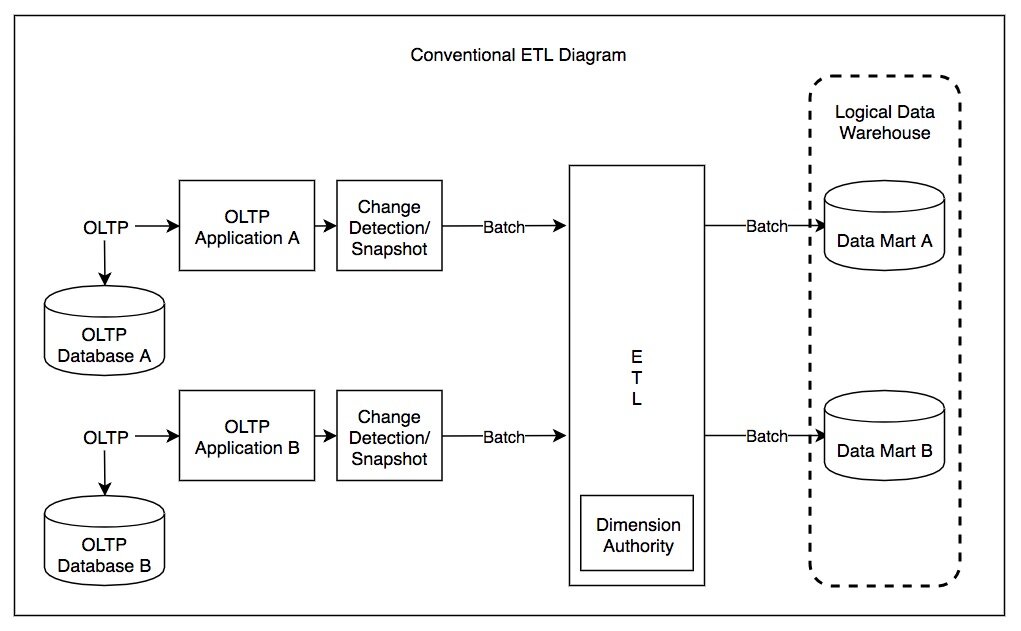
SSIS is fundamentally an ETL tool. ETL is a standard process in the world of data management.
ETL stands for Extract, Transform and Load which are the three fundamental steps in data processing.
Let's break down how SSIS handles each of these steps:
-
Extract: This is the 'get' phase. SSIS can connect to a wide variety of data sources to pull in raw data. This could be anything from a simple Excel spreadsheet or a text file to complex databases like Oracle, DB2, or another SQL Server instance.
-
Transform: This is where the real work happens. Raw data is often messy, inconsistent, or not in the right format. SSIS provides a rich set of tools to transform it. You might merge data from two different sources, sort records, convert data types (like changing text to a date), or perform calculations to create new data columns. For example, you could combine separate 'FirstName' and 'LastName' columns into a single 'FullName' column.
-
Load: Once the data is extracted and transformed into a clean, consistent format, it needs a new home. SSIS loads this processed data into a destination system. Most often, this is a data warehouse, where the data can be used for reporting and analysis, but it could also be another database or even a flat file.
This entire workflow, from extraction to loading, is contained within what's called an SSIS "package." You can think of a package as a single, executable work plan that SSIS follows.
Why It's Important
Businesses rely on data to make decisions, but that data is often scattered across many different systems. SSIS is the bridge that connects these disparate islands of information.
It's commonly used for two major tasks:
-
Data Warehousing: Companies collect data from their sales, marketing, and operations systems and use SSIS to load it into a central data warehouse. Analysts can then query this warehouse to find trends and insights without slowing down the daily operational systems.
-
Data Migration: When a company upgrades to a new system, like a new CRM or ERP, all the data from the old system must be moved over. SSIS is perfect for migrating this data, ensuring it's clean and correctly formatted for the new environment.
Beyond just moving data, SSIS can also automate complex business workflows. For example, you could design a package that not only loads daily sales data but also sends an email report to managers upon completion, or archives the source files to a different server. This makes it a powerful tool for automating routine but critical data-related jobs.
What does the acronym ETL stand for in the context of SSIS?
An SSIS workflow is designed to pull customer data from an Oracle database, combine separate 'City' and 'State' fields into a single 'Location' field, and then insert the cleaned data into a central data warehouse. The step of combining the fields occurs during which phase?
SSIS provides a graphical interface and a set of pre-built components that make building these complex data pipelines much easier than writing code from scratch.