Mastering React Component Architecture
Modern Component Architecture
Thinking in Components
At its heart, React is all about building user interfaces by breaking them down into smaller, independent, and reusable pieces called components. Imagine building with LEGOs; each brick is a component, and you combine them to create a complex structure. This approach makes your code cleaner, easier to understand, and much simpler to maintain and scale.
Components are the fundamental building blocks of any React application.
Functional vs. Class Components
In the early days of React, developers primarily used class components. These are ES6 classes that extend from React.Component and use lifecycle methods like componentDidMount to manage state and side effects. While powerful, they can be verbose and sometimes complex to reason about.
// A simple class component
class Welcome extends React.Component {
  render() {
    return <h1>Hello, {this.props.name}</h1>;
  }
}
Modern React development, however, heavily favors functional components. These are just plain JavaScript functions that accept props as an argument and return React elements. With the introduction of Hooks (like useState and useEffect), you can now manage state and lifecycle events directly within these simpler functions.
// The same component, as a function
function Welcome(props) {
  return <h1>Hello, {props.name}</h1>;
}
Functional components are generally more concise, easier to read, and simpler to test. For new projects, they are the recommended standard.
The Virtual DOM
One of React's most significant performance features is the Virtual DOM. The real Document Object Model (DOM) is the browser's representation of your HTML structure. Directly manipulating it is slow and can cause performance bottlenecks.
React creates a lightweight copy of the real DOM in memory, called the Virtual DOM. When a component's state changes, React first updates this virtual copy.
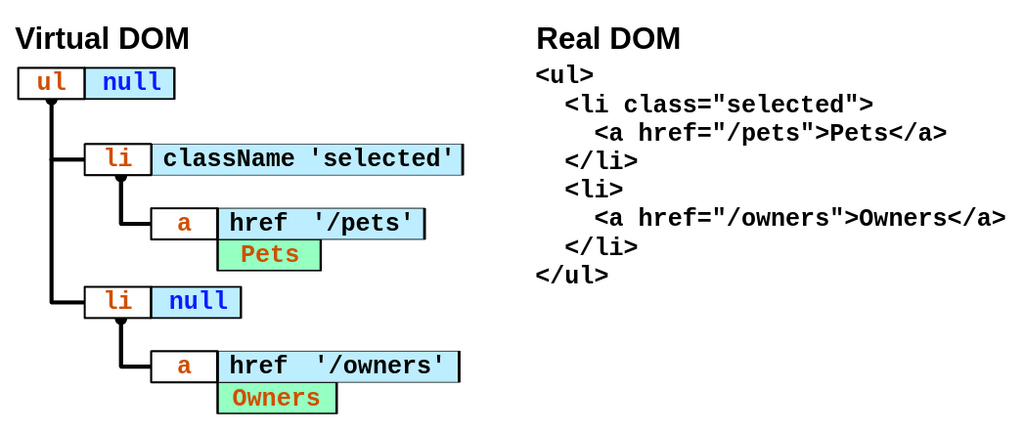
Next, React performs a process called reconciliation. It compares the new Virtual DOM with the previous one, figuring out the minimum number of changes needed to make the real DOM match. This is often called "diffing."
Finally, React takes these calculated changes and updates the real DOM in one single, efficient batch. This avoids unnecessary re-renders of the entire page and makes the application feel much faster and more responsive.
Component Composition
Good React applications are built by composing small, specialized components together, much like assembling a machine from smaller parts. A powerful tool for this is the children prop.
Any content you place between the opening and closing tags of a component is automatically passed as a special prop called children. This allows you to create generic 'wrapper' or 'container' components.
// A generic Card component
function Card(props) {
  return (
    <div className="card">
      {props.children}
    </div>
  );
}

// Using the Card component
function App() {
  return (
    <Card>
      <h1>Welcome!</h1>
      <p>This is content inside the card.</p>
    </Card>
  );
}
Here, the Card component doesn't need to know what it will display. It just provides a styled container, and the <h1> and <p> elements are passed in as props.children.
This pattern is key to building complex layouts. You might have a PageLayout component that defines the header and footer, and then you pass the specific page content as children.
Better JSX with Fragments and Conditionals
As you build more complex components, you'll encounter a couple of common JSX patterns.
Fragments
JSX expressions must have one parent element. Often, you might want to return multiple elements without adding an extra <div> to the DOM. This is where fragments come in. They let you group a list of children without adding extra nodes to the DOM.
You can use the full <React.Fragment> syntax or the shorter <> syntax.
function TermList() {
  return (
    <>
      <dt>Term 1</dt>
      <dd>Description 1</dd>
      <dt>Term 2</dt>
      <dd>Description 2</dd>
    </>
  );
}
Conditional Rendering
Often, you need to show or hide parts of your UI based on certain conditions. In React, you can use standard JavaScript syntax for this.
For simple cases, the logical && operator is a clean way to conditionally include an element:
function Mailbox({ unreadMessages }) {
  return (
    <div>
      <h1>Hello!</h1>
      {unreadMessages.length > 0 &&
        <h2>
          You have {unreadMessages.length} unread messages.
        </h2>
      }
    </div>
  );
}
For an if-else situation, the ternary operator is a common choice.
function LoginButton(props) {
  return isLoggedIn ? <LogoutButton /> : <LoginButton />;
}
By mastering these patterns, you can build dynamic and flexible user interfaces efficiently.
Ready to test your knowledge? Let's see what you've learned about modern React components.
What is the primary purpose of the Virtual DOM in React?
In modern React, what is the preferred way to create components and manage state?
Understanding these core principles of component architecture is the key to building scalable, maintainable, and efficient applications with React.