Mastering React and Advanced Frontend Development
Introduction to React
What Is React?
React is a JavaScript library used for building user interfaces. Developed by Facebook, its main job is to make creating interactive UIs painless. Instead of building a massive, single piece of code for a webpage, React encourages you to break it down into smaller, manageable pieces.
React is a JavaScript library for building user interfaces.
Think of it as building with LEGOs. You don't start with a giant block of plastic; you start with small, individual bricks that you snap together to create something complex. In React, these bricks are called components.
Components as Building Blocks
Everything in a React application is a component. A button, a search bar, a user profile picture, even the entire page itself can be a component. Each one is a self-contained piece of code that manages its own state and can be reused throughout your application. For example, you can create one Button component and use it everywhere you need a button, instead of writing the same code over and over.
This component-based approach makes your code more organized, easier to debug, and highly reusable.
Writing UI with JSX
When you look at React code, you might notice something that looks like HTML mixed right into the JavaScript. This is JSX, which stands for JavaScript XML. It's a syntax extension that lets us write HTML-like code in our JavaScript files.
const greeting = <h1>Hello, React!</h1>;
While it might look strange at first, it's incredibly powerful. Browsers don't understand JSX directly. Before your code runs, a tool called a transpiler (like Babel) converts your JSX into regular JavaScript that browsers can execute. For example, the code above becomes:
const greeting = React.createElement('h1', null, 'Hello, React!');
Using JSX makes the code for your components more readable and intuitive, as the structure of your UI is right there with its logic.
The Virtual DOM
One of React's most important features is its use of a Virtual DOM. Directly manipulating the actual Document Object Model (DOM) in a browser is slow and can hurt performance, especially in complex applications where many things are changing at once.
React solves this by creating a virtual, in-memory copy of the real DOM. This copy is just a lightweight JavaScript object.
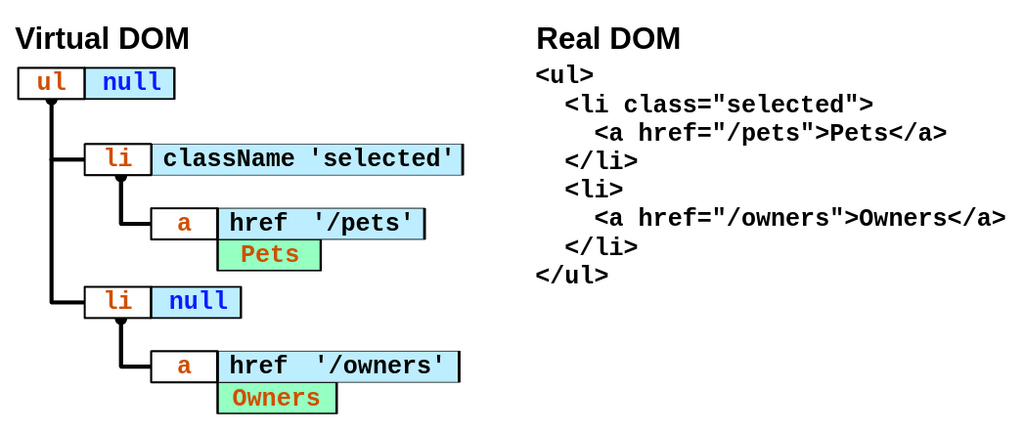
When the state of a component changes, React first updates the Virtual DOM. Then, it compares this new Virtual DOM with the previous version to figure out exactly what changed. This process is called "diffing."
Finally, React takes only these changes and updates the real DOM in one efficient batch. By minimizing direct interactions with the slow, real DOM, React makes applications feel much faster and more responsive.
Now that you understand the core concepts, let's test your knowledge.