Mastering Proxmox VE
Introduction to Virtualization
What is Virtualization?
At its core, virtualization is the process of creating a simulated, or virtual, version of something, such as a computer, a storage device, or a network. It allows one physical machine to run multiple independent operating systems and applications at the same time, each behaving as if it has its own dedicated hardware.
virtualization
noun
The creation of a virtual version of a computing resource, such as a server, desktop, storage device, operating system, or network.
Think of it like a large office building. Instead of one giant, open-plan office for one company, you can put up walls and partitions to create many smaller, separate offices. Each office is self-contained with its own door and resources, but they all share the same building foundation, plumbing, and electricity. Virtualization does something similar for a server, partitioning its resources so multiple tenants can use them without interfering with each other.
The Benefits
So why partition a perfectly good server? The advantages are significant.
Efficiency: Most servers only use a small fraction of their processing power. Virtualization lets you run multiple workloads on a single machine, drastically improving hardware utilization. This means fewer physical servers are needed, which saves money on hardware, electricity, and cooling.
Flexibility and Speed: Setting up a new virtual machine (VM) is much faster than deploying a new physical server. You can spin up new environments for development, testing, or production in minutes. Need to try out a new software configuration? Create a sandboxed VM for it. If it doesn't work out, you can simply delete it without affecting anything else.
Disaster Recovery: Virtual machines are essentially just large files. This makes them easy to back up, migrate, and restore. If a physical server fails, you can quickly move its VMs to another working server with minimal downtime.
Two Flavors of Virtual
Virtualization isn't a one-size-fits-all concept. There are two main approaches you'll encounter, especially when working with tools like Proxmox VE: full virtualization and containerization. They achieve similar goals but in fundamentally different ways.
Full virtualization creates virtual machines (VMs) that emulate an entire physical computer, including its own operating system. Containerization isolates applications at the operating system level, sharing the host's kernel.
Full Virtualization (KVM)
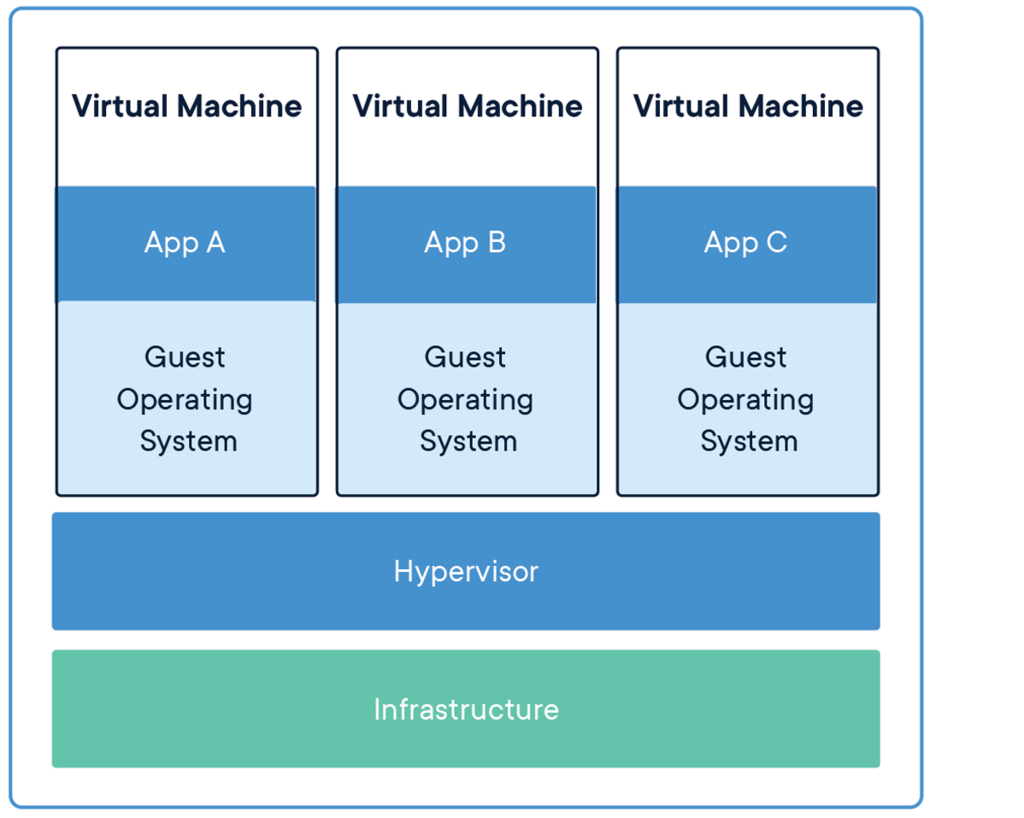
Full virtualization involves a piece of software called a hypervisor. The hypervisor sits between the physical hardware and the virtual machines, managing the distribution of resources like CPU, memory, and storage to each VM. Each virtual machine runs a complete, independent operating system—called a guest OS—on top of the virtualized hardware. KVM (Kernel-based Virtual Machine) is a full virtualization solution built directly into the Linux kernel.
Because each VM has its own full OS, this approach provides strong isolation. A problem in one VM is very unlikely to affect another. This makes it ideal for running different operating systems on the same server (e.g., one Linux VM and one Windows VM) or for applications that require a high degree of security and separation.
Containerization (LXC)
Containerization takes a more lightweight approach. Instead of creating an entire virtual computer, containers share the operating system kernel of the host machine. They package up an application and all its dependencies—libraries, configuration files, etc.—into a single, isolated unit.
LXC (Linux Containers) is a method of OS-level virtualization. Since containers don't need their own guest OS, they are much smaller and start up almost instantly. They use fewer resources because they aren't duplicating the entire operating system stack for each application.
LXC containers are generally more resource-efficient than VMs, as they share the host system’s kernel and use fewer resources.
This efficiency makes containers perfect for running many instances of a single application, such as in a microservices architecture. The trade-off is less isolation compared to a VM, and all containers on a host must be compatible with the host's kernel (e.g., you can't run a Windows container on a Linux host).
Here's a quick breakdown of the key differences:
| Feature | Full Virtualization (VM) | Containerization |
|---|---|---|
| Isolation | High (Full OS per VM) | Lower (Shared host kernel) |
| Resource Usage | High (OS overhead) | Low (Lightweight) |
| Startup Time | Slow (Minutes) | Fast (Seconds) |
| Size | Large (Gigabytes) | Small (Megabytes) |
| Flexibility | Run any OS | Run only compatible OSes |
Understanding both of these models is key because Proxmox VE is a platform that elegantly manages both. It uses KVM for robust, fully isolated virtual machines and LXC for fast, efficient containers, giving you the best of both worlds in a single tool.
Let's check your understanding of these core concepts.
What is the primary goal of virtualization?
Full virtualization, like KVM, allows you to run a Windows guest operating system on a Linux host server.
Now that you have a solid grasp of what virtualization is, we can move on to see how Proxmox VE puts these ideas into practice.