Mastering Primavera P6
Introduction to Primavera P6
What Is Primavera P6?
Primavera P6 is a powerful tool for managing large, complex projects. Think of it as a high-performance command center for everything from constructing a skyscraper to launching a satellite. It's widely used in industries like construction, energy, manufacturing, and aerospace, where projects involve thousands of moving parts and tight deadlines.
At its core, P6 helps project managers plan every step, schedule tasks, track progress, and control costs. It provides a structured way to organize massive amounts of information, ensuring that everyone on a project team knows what needs to be done, when it needs to happen, and how their work affects everyone else.
Finding Your Way Around
Opening Primavera P6 for the first time can feel a bit overwhelming, but the layout is logical. The main screen is typically divided into several key areas that help you navigate your projects.
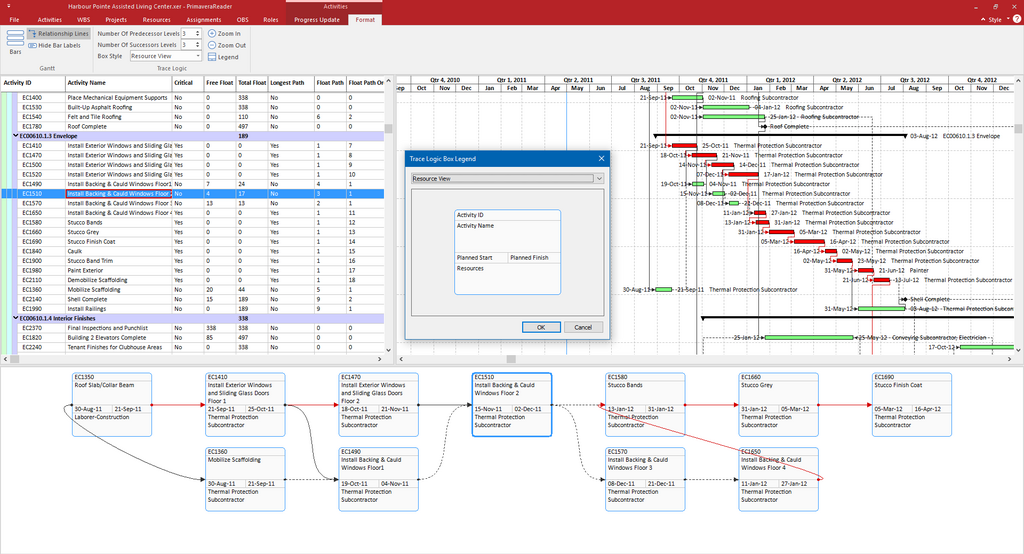
The main window is often dominated by the Activities view. This is where you'll spend most of your time. On the left, you'll see a table listing all the tasks, or activities, in the project. On the right is the Gantt Chart, a visual timeline that shows each task as a bar, making it easy to see the project schedule at a glance.
Projects themselves are organized within the Enterprise Project Structure (EPS). You can think of the EPS as a library's filing system. It's a hierarchy that organizes all of the company's projects, often grouped by department, location, or type. This structure ensures every project has a clear place.
Finally, along the top and side, you'll find various toolbars and navigation menus. These give you access to all of P6's features, from creating new activities to running reports.
Core Features
While P6 is packed with features, a few core functionalities make it an indispensable tool for project managers.
Work Breakdown Structure (WBS): Before listing individual tasks, P6 allows you to break down the entire project into smaller, more manageable phases or deliverables. This is called the Work Breakdown Structure, and it forms the backbone of your project plan.
Scheduling and Dependencies: Once the WBS is set, you can add individual activities. For each activity, you define its duration and link it to other tasks. For example, you can specify that pouring a building's foundation must be finished before the walls can be framed. P6 uses these relationships to build a logical project schedule.
Critical Path Method (CPM): This is one of P6's most powerful features. It automatically calculates the "critical path," which is the longest sequence of dependent tasks that directly impacts the project's completion date. Any delay to an activity on the critical path will delay the entire project. This tells managers exactly which tasks they need to watch most closely.
Baselines: Before a project starts, you can save the initial schedule as a "baseline." This creates a snapshot of the original plan. As the project progresses and changes inevitably occur, you can compare the current schedule to the baseline. This makes it easy to see if the project is ahead of, behind, or on schedule and by how much.
Why It Matters
In a small project, you might get by with a simple to-do list or spreadsheet. But for large-scale initiatives, that approach quickly falls apart. Primavera P6 is important because it brings order to chaos.
It provides a single source of truth for the entire project team, from executives to field workers. This shared visibility prevents misunderstandings and keeps everyone aligned. By identifying the critical path, P6 helps managers focus their attention on the tasks that matter most. It also allows for "what-if" scenario planning, helping teams anticipate the impact of potential delays before they happen.
Ultimately, using a tool like Primavera P6 increases the likelihood that a complex project will be completed on time and within budget, which is the goal of any project manager.
Ready to check your understanding of these core concepts?